Our Top Picks
The best retro gaming console with built-in games for most households is the 64GB model with 25 emulators, dual 2.4GHz wireless controllers, 4K HDMI output and save-and-load support. It pairs the widest emulator list in this group with two controllers in the box, so a second player can join immediately. A “built-in games” console is a plug-and-play box or stick that ships with an emulator front end and a pre-loaded game library on internal storage, so there is nothing to download before the first match. The other five picks below cover a stick with a different library, two near-identical 9-emulator boxes and a pocketable handheld.
Quick List
- Console Stick Pro (23 emulators) – best for players who want 3D-capable systems on a tiny HDMI stick
- Wireless 20,000+ Game Stick (64GB) – best for a large library with cordless controllers
- 64GB 25-Emulator Console – best overall for two-player living-room nostalgia
- R36MAX 2 Handheld – best for gaming away from the TV (runner-up, not a TV console)
- 9-Emulator 25,200-Game Console (stick style) – best for simple 8-bit and 16-bit sessions
- 9-Emulator 25,200+ Game Console (wireless controller kit) – best for a budget-minded second TV or guest room
Which One Is Right for You?
| If you… | Choose |
|---|---|
| want the broadest emulator list and local two-player play | 64GB 25-Emulator Console |
| want a stick that disappears behind the TV and supports 3D-era systems | Console Stick Pro (23 emulators) |
| care most about game count and wireless pads | Wireless 20,000+ Game Stick (64GB) |
| mostly play classic 8-bit and 16-bit titles | 9-Emulator 25,200-Game Console (stick style) |
| need a low-commitment console for a guest room | 9-Emulator 25,200+ Game Console (wireless controller kit) |
| travel, commute or play in bed instead of on a TV | R36MAX 2 Handheld |
If the console will live on a living-room TV and two people will play together, start with the 64GB 25-emulator model. If the TV is the only screen you care about and you do not need 3D-era systems, either 9-emulator box covers the classic catalog. Pick the handheld only if portability matters more than a big screen, because it is a different kind of device.
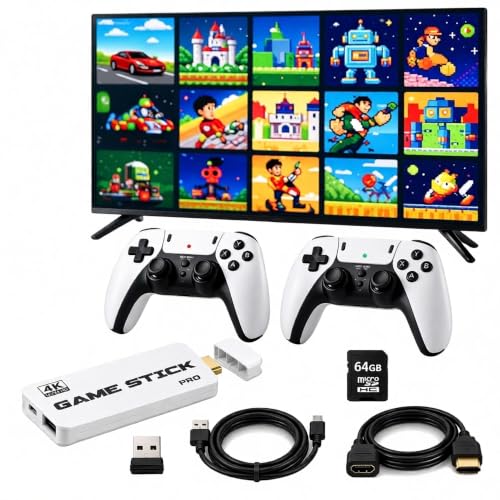
2026 Retro Gaming Console Stick Pro, New 3D Video Game Consoles with 4K HDMI, Built-in 23 Emulators, 20000+ Retro Games, Plug & Play TV Game Stick with Dual 2.4G Wireless Controllers
Chosen because it specifies New 3D Video Game Consoles with 4K HDMI and Built-in 23 Emulators.
View on Amazon
Wireless Retro Gaming Console Built-in 20,000+ Games & 23 Emulator (64GB) | New 4K HDMI Output Classic Retro Game Console Stick with Dual 2.4G Controllers, Plug & Play Nostalgic Console Gift
Chosen because it specifies 000+ Games & 23 Emulator (64GB) and Plug & Play Nostalgic Console Gift.
View on Amazon
Retro Gaming Console with 64GB High-end 3D Game Classic Games, 25 Emulators, Dual 2.4GHz Wireless Controllers, 4K HD Output, Save & Load Function, Plug & Play
Chosen because it specifies 25 Emulators and Dual 2.4GHz Wireless Controllers.
View on Amazon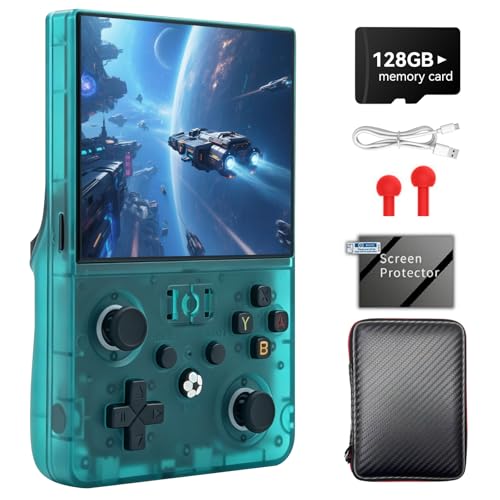
R36MAX 2 Retro Handheld Game Console, 4.5" IPS HD Display | Detachable Grip, 4000mAh Battery, Open Source Linux, Portable Emulator Console, Green 128G
Chosen because it specifies 4.5" IPS HD Display and Detachable Grip.
View on Amazon
Retro Game Console, Wireless Retro Game Console, Built-in 9 Emulators, 4K HDMI Output, Dual 2.4GHz, Built-in 25200 Games, Plug and Play Video Games, Black
Chosen because it specifies Wireless Retro Game Console and Built-in 9 Emulators.
View on Amazon
Retro Game Console, Retro Gaming Console with Built-in 9 Emulators, 25200+Games, 4K HDMI Output, Dual 2.4GHz Wireless Controller, Plug and Play Video Game Console (Deep Black)
Chosen because it specifies Retro Gaming Console with Built-in 9 Emulators and 25200+Games.
View on AmazonAll 6 Picks in Detail
1. Console Stick Pro – Best for 3D-Capable Emulation on a Stick
As an Amazon Associate we earn from qualifying purchases at no extra cost to you.
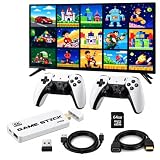
This stick-format console is named for 23 built-in emulators and a library of 20,000-plus retro titles, and the listing describes it as a plug-and-play TV game device with 4K HDMI output. It suits someone who wants a clean entertainment-center setup: the stick plugs into an HDMI port, a USB or wall adapter powers it, and the wireless controllers pair through a receiver. The “3D” language in the name points to support for the polygon-era systems that sit above the 8-bit and 16-bit classics, but low-cost hardware in this class handles that era unevenly, so expect some titles to run better than others. It is a sensible choice for a renter or student who moves often, because the whole console and its receiver fit in a coat pocket and set up in a minute on any HDMI television, including a hotel or dorm screen.
- Format: HDMI game stick with an emulator front end
- Emulators: 23 listed
- Library: 20,000+ games listed
- Output: 4K HDMI listed (retro games render at far lower native resolutions)
- Controllers: wireless pads are part of the stick bundle; confirm the count on the listing
- Storage: internal storage size is not stated in the title; confirm on the listing
Pros:
- Compact enough to travel in a bag
- Large emulator list for its size
Cons:
- Storage and chipset details are not stated in the listing name
- 3D-era performance is likely to vary by title
Compared with the 64GB 25-emulator console below, this stick trades two emulators and a stated storage figure for a smaller footprint.
2. Wireless 20,000+ Game Stick (64GB) – Best for a Big Library With Cordless Pads

This model puts the memory figure right in the name: 64GB of storage, 23 emulators and a library of more than 20,000 games, delivered through a 4K HDMI stick with dual 2.4GHz controllers. It is a good fit for a household that wants to browse a deep catalog on the couch without wiring anything across the room. Because both sticks list 23 emulators, the decision between this one and the Stick Pro comes down to the stated storage, the exact controller bundle and how each front end feels, which the listing pages show better than a summary can. A stated 64GB figure also tells you the library is not stored in a tiny chip, which helps if you plan to add a handful of your own files later.
- Format: wireless HDMI game stick
- Storage: 64GB listed
- Emulators: 23 listed
- Library: 20,000+ games listed
- Output: 4K HDMI listed
- Controllers: dual 2.4GHz wireless; confirm which button layout is included
Pros:
- 64GB capacity is stated plainly
- Two-player setup out of the box, according to the listing
Cons:
- Large libraries often contain duplicate regional versions that are tedious to scroll through
- Pad ergonomics for longer sessions are unknown from the listing alone
Its closest alternative is the Console Stick Pro, which lists the same emulator count but does not state a storage figure in the name.
3. 64GB 25-Emulator Console – Best Overall for Two-Player Living-Room Nostalgia

Our top pick advertises 25 emulators, 64GB of storage, dual 2.4GHz wireless controllers, 4K HD output and a “save and load” function. That last item matters more than it sounds: save states let you stop in the middle of a game and resume later, which makes older titles without battery saves far friendlier for adults with limited time. The emulator count is the highest in this group, which usually translates into support for more obscure systems. It suits families, roommates and anyone who wants a single box to cover arcade, console and computer classics.
- Emulators: 25 listed
- Storage: 64GB listed
- Controllers: two 2.4GHz wireless pads listed
- Output: 4K HD listed
- Extras: save and load listed; “high-end 3D games” mentioned in the name
- Form factor: confirm on the listing whether this is a stick or a small box
Pros:
- Highest emulator count in the group
- Two controllers and save states make it ready for multiplayer
Cons:
- The 3D wording is a marketing claim; real-world smoothness depends on the title
- Game-count claim is not stated in the listing name
Compared with the Wireless 20,000+ Game Stick, it adds two emulators and the save-and-load mention but does not headline a library size.
4. R36MAX 2 Handheld – Best for Gaming Away From the TV
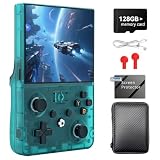
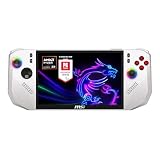
This one is not a TV console at all. It is a portable emulator handheld with a 4.5-inch IPS display, a detachable grip, a 4000mAh battery and an open-source Linux base, so it belongs here as a runner-up for readers who would rather play on a commute than on a television. Open-source Linux firmware tends to appeal to tinkerers, because the community can add themes, scrapers for box art and extra emulator cores. Buyers who prefer a no-setup experience should confirm what games, if any, come loaded on the card before choosing it over the TV models. It also helps to think about hands: a 4.5-inch device with a detachable grip is comfortable for adults, but players with very small or very large hands should look at the grip shape and button spacing before deciding.
- Format: handheld emulator console
- Screen: 4.5-inch IPS, HD per the listing
- Battery: 4000mAh listed
- System: open-source Linux listed
- Design: detachable grip listed
- Library and card size: confirm on the listing
Pros:
- Plays anywhere without a TV or outlet
- Open firmware allows customization
Cons:
- No built-in second-player controller bundle
- Not a plug-and-play TV box, so it is a different purchase from the other five
Next to the 64GB 25-emulator console, it gives up the big screen and local multiplayer in return for portability.
5. 9-Emulator 25,200-Game Console – Best for Simple 8-Bit and 16-Bit Sessions

This wireless plug-and-play console lists nine emulators, 4K HDMI output, dual 2.4GHz controllers and 25,200 built-in games. Nine emulators generally cover the heavy hitters of the 8-bit and 16-bit eras: the Nintendo and Sega families, plus a few arcade and handheld systems. For a player whose nostalgia ends before the polygon age, nine is plenty, and a shorter emulator menu is easier for children and grandparents to navigate. The large game count mostly reflects regional versions and hacks, so treat it as a ceiling rather than a measure of unique titles. Parents choosing a first console for a child often prefer this style of device, because a short emulator menu and a simple pad layout keep the learning curve gentle.
- Emulators: 9 listed
- Library: 25,200 games listed
- Output: 4K HDMI listed
- Controllers: dual 2.4GHz wireless listed
- Setup: plug-and-play listed
- Storage: confirm on the listing
Pros:
- Easy menu with fewer systems to wade through
- Two wireless controllers listed
Cons:
- No 3D-era emphasis in the name
- Game count likely includes many duplicates
Its twin is the next pick, which has nearly identical specs; the two differ mainly in the “+” on the game count and how the controller bundle is described.
6. 9-Emulator 25,200+ Game Console – Best for a Guest Room or Second TV

Another nine-emulator, 4K HDMI box with a 25,200-plus game library and a dual 2.4GHz wireless controller setup. The listing wording says “controller” singular in the truncated name, so confirm whether two pads ship in the bundle before assuming it is a two-player kit. This is the pick for a spare TV where nobody wants to manage a complicated menu. The appeal is mostly convenience: plug in power and HDMI, pair the receiver, and the front end launches a game list straight away. Because it asks so little of the user, it is also a reasonable gift for someone who has never touched an emulator and mainly wants to revisit games from their childhood.
- Emulators: 9 listed
- Library: 25,200+ games listed
- Output: 4K HDMI listed
- Controllers: dual 2.4GHz wireless listed; confirm the count
- Setup: plug-and-play listed
- Storage: confirm on the listing
Pros:
- Straightforward setup for casual users
- Broad classic catalog by the listed count
Cons:
- Controller bundle wording is ambiguous in the truncated name
- Limited emulator list compared with the 23 to 25 emulator models
Versus the previous pick, the difference is minor, so choose between them on the controller bundle shown on each listing page.
Specs Compared
| Pick | Format | Emulators | Library | Storage | Output | Controllers |
|---|---|---|---|---|---|---|
| Console Stick Pro | HDMI stick | 23 | 20,000+ | confirm on listing | 4K HDMI | wireless; confirm count |
| Wireless 20,000+ Game Stick | HDMI stick | 23 | 20,000+ | 64GB | 4K HDMI | dual 2.4GHz |
| 64GB 25-Emulator Console | confirm on listing | 25 | confirm on listing | 64GB | 4K HD | dual 2.4GHz |
| R36MAX 2 Handheld | Handheld, 4.5-inch IPS | confirm on listing | confirm on listing | confirm on listing | Built-in screen | Built-in, detachable grip |
| 9-Emulator 25,200-Game Console | Plug-and-play | 9 | 25,200 | confirm on listing | 4K HDMI | dual 2.4GHz |
| 9-Emulator 25,200+ Game Console | Plug-and-play | 9 | 25,200+ | confirm on listing | 4K HDMI | dual 2.4GHz; confirm count |
How We Chose These
We built this list by reading each listing’s title and specification fields and comparing the figures that matter for a built-in-games console: emulator count, stated storage, controller bundle, output format and form factor. We looked for products that describe a plug-and-play setup rather than a bare emulator board that needs software loaded. We then weighed those figures against general knowledge of how emulation hardware behaves, so claims such as “4K” or “3D” are explained rather than repeated. Where a listing name does not state a value, we say so rather than guessing, and one handheld is included as a clearly labeled runner-up because it is a different kind of device.
What to Look For
Emulator count versus the systems you actually play
An emulator is a program that imitates an older console’s hardware. The headline number, whether nine or twenty-five, tells you how many systems the front end can launch, but it says little about quality. Nine emulators typically cover the Nintendo 8-bit and 16-bit systems, Sega’s Genesis family and a handful of arcade and handheld platforms. Counts above twenty start adding the PlayStation 1 era, Nintendo 64, Dreamcast and PSP, which demand far more processing power. Rule of thumb: if your list of favorite systems stops at the 16-bit era, nine emulators is plenty; if you want polygon-era games, look for the higher counts and still expect uneven performance.
Storage and the “20,000 games” claim
Large library counts are easy to print and hard to verify. A single game cartridge image for an 8-bit system can be only tens of kilobytes, so thousands of titles fit on a modest card, but disc-era games take hundreds of megabytes each. A 64GB card cannot hold tens of thousands of disc-based titles, so the big numbers almost always come from small cartridge-era files and many regional duplicates. Treat the figure as an upper bound. Also be aware that bundled game collections on unbranded devices are often assembled from files whose licensing is unclear; if that matters to you, a console from a company that licenses its own catalog is the cleaner route, and you can ask the seller about the game source.
Controllers, latency and local multiplayer
A 2.4GHz wireless dongle usually has lower input delay than Bluetooth and does not require pairing menus, which is why almost every console in this group uses one. For classic fighting and platform games, the layout matters: a six-button face arrangement helps with Genesis-style fighting titles, while a simple four-button pad feels natural on a Super Nintendo layout. Check whether the listing says two controllers ship in the box, check the charging method (internal battery or AA cells), and count the USB ports if you want to add wired pads later. Because retro games were designed for sitting close to a TV, a controller cable or receiver extension may matter if your couch is far from the screen.
Output, display and what “4K” means here
Most retro titles render at resolutions below 480 lines. A “4K HDMI output” label therefore refers to the signal the box sends to your TV, not to the clarity of the old games, which are upscaled. Look for options such as integer scaling, scanline filters and aspect-ratio choices, because they decide how sharp pixel art looks on a modern panel. If you play on an older TV, check that your set accepts HDMI at all and what resolution it can display. Power is also worth a glance: sticks often draw power from a TV’s USB port, which can be underpowered; a wall adapter is the safer choice for stable play.
Setup, power and a day-one checklist
Plan the first evening before you plug anything in. Confirm the TV has a free HDMI port, and decide whether the receiver dongle will sit in a front-facing USB socket or at the end of a short extension cable, since a receiver tucked behind a metal stand can cut wireless range. Charge or load batteries in the controllers first, pair them one at a time, then open the settings menu and set the display scaling before you pick a game. Worked example: a stick with a 5V power need that you feed from a TV’s USB port may reset during heavy emulation if the port supplies too little current, so moving it to a wall adapter is the first fix to try when a game freezes. Finally, look at the menu for a save-state button; learning that shortcut on day one makes every later session easier.
Handheld or TV console
Choose a TV console if you want local multiplayer and a large screen. Choose a handheld if you will mostly play alone. A 4.5-inch IPS screen is comfortable for 8-bit and 16-bit games, and a 4000mAh battery should last a few hours of emulation, though real run time depends on the emulator, brightness and Wi-Fi use. Open-source Linux handhelds reward patient tinkering but are less plug-and-play, so ask yourself which side of that trade-off you prefer.
Questions
Are the games on these consoles legal?
That depends on how the library was assembled. Emulators themselves are generally lawful, but game files are copyrighted, and many bundled libraries on unbranded devices contain titles whose licensing is unclear. If this is a concern, buy from a seller that explains where its games come from, or choose a console that sells licensed collections.
Do these consoles really output 4K?
They send a 4K-capable HDMI signal, but the old games inside run at much lower native resolutions and are upscaled to fit the screen. The practical benefit is compatibility with a modern TV, not sharper graphics than the original release.
Can I add more games later?
Many of these devices read games from a card or internal storage, so adding files is often possible, but the process varies by firmware and is not described in the listing names. Check the product page and manual before assuming it supports adding your own backups.
Which one is better for two players?
Choose a model that explicitly lists dual wireless controllers, such as the 64GB 25-emulator console or the 64GB wireless stick. The two 9-emulator boxes also mention dual 2.4GHz setups, but confirm the number of pads on each listing before buying.
Do I need a Wi-Fi connection to play?
Built-in game libraries run locally, so Wi-Fi is normally not required to play. Some firmware offers optional online features, which the listings do not detail, so confirm any online or update function on the product page.
Is a handheld better than a TV stick?
Neither is better overall. A handheld is the right call if you travel or play alone, while a TV stick is better for couch play and multiplayer. The R36MAX 2 handheld in this list is included as a runner-up for that reason.
Update History
- October 20, 2026 – Initial publication; product set drawn from current catalog listings.
- Check the product page for current specifications and availability before buying.
Sources
- Retailer listing titles and specification fields for each console
- Product names, feature bullets and bundle descriptions as written by each seller