Our Top Picks
For a true beginner who wants a standalone headset, the Meta Quest 2 128GB bundle is the best pick in this list. It runs games and apps on its own, with no PC or phone required, and uses tracked controllers for natural movement. “Standalone” means the processor, screen, battery and tracking are all built into the headset, so you put it on and play. Be aware that only two of the six products here are genuinely standalone: the Quest 2 and an enterprise-oriented HTC headset. The other four are low-cost smartphone viewers, which need a phone and are best treated as casual runner-ups for movies and simple 360-degree video.
Quick List
- HTC Vive Focus Plus bundle – best for training, education and kiosk-style use (standalone, enterprise-oriented)
- Kids 3D VR Headset with Android Remote – best for children’s casual 3D video viewing (phone-based runner-up)
- DESTEK V5 VR Headset – best for phone-based movies with a controller (phone-based runner-up)
- Adjustable VR Goggles with Wide-Angle Lens – best for the lowest-commitment way to try VR video (phone-based runner-up)
- Universal 360-Panorama VR Glasses – best for sharing one viewer among several phones (phone-based runner-up)
- Meta Quest 2 128GB Set – best overall standalone headset for beginners
Which One Is Right for You?
| If you… | Choose |
|---|---|
| want a true standalone headset with games and apps | Meta Quest 2 128GB Set |
| need a self-contained headset for a business, classroom or demo | HTC Vive Focus Plus bundle |
| want to let a child watch 3D video on a phone | Kids 3D VR Headset with Android Remote |
| want a phone viewer with a bundled controller and a movie library | DESTEK V5 VR Headset |
| only want to peek into VR for a few minutes | Adjustable VR Goggles with Wide-Angle Lens |
| want one viewer that fits many phone sizes | Universal 360-Panorama VR Glasses |
If the goal is playing real VR games, the answer is the Quest 2. If the goal is a one-off viewer to see what virtual reality feels like with a phone you already own, any of the four phone-based products serves as an inexpensive trial, though none offers tracked controllers or room-scale movement. The HTC headset is standalone but built with organizations in mind, so it is rarely the right buy for a home user.
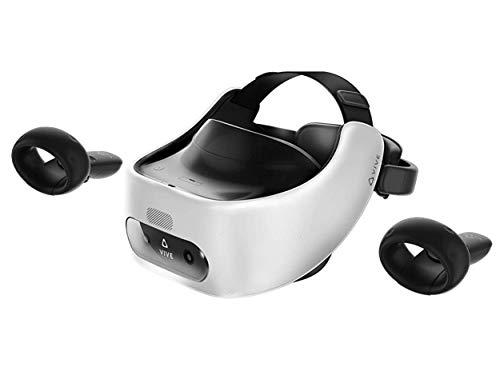
HTC Vive Pro Focus Plus 6DOF VR Headset in Almond White Bundle Including VR Headset, Controllers, face Cushion, QC 3.0 Charger and USB Type-C Cable
Chosen because it specifies Controllers and face Cushion.
View on Amazon
3D VR Headset for Kids + Android Remote - for iPhone & Android Phones | with 3D VR Videos & Apps Links | Virtual Reality Goggles Set for Beginners
Chosen because it specifies for iPhone & Android Phones and with 3D VR Videos & Apps Links.
View on Amazon
DESTEK V5 VR Headset with 50000+ VR Movies – Fits All Smartphone Sizes | Includes VR Controller & 50000+ VR Movies No Subscription,Touch Button Game, Anti-blue HD lenses, for iPhone/Android-Black.
Chosen because it specifies Fits All Smartphone Sizes and Includes VR Controller & 50000+ VR Movies No Subscription.
View on Amazon
Virtual Reality Goggles, 3D VR Glasses Adjustable VR Headset with Wide Angle Lens for Movies Games, Anti-Blue Eyes Protected- Universal Virtual Reality Goggles Set for Beginners
Picked as a relevant option in this category.
View on Amazon
VR Headset 3D VR Glasses Universal Virtual Reality Goggles Support 360°Panorama Large Screen An-ti Bluelight Adjustable Pupil Distance Eye Protection VR Goggles for Movies Games Gift for Kids Adults
Picked as a relevant option in this category.
View on Amazon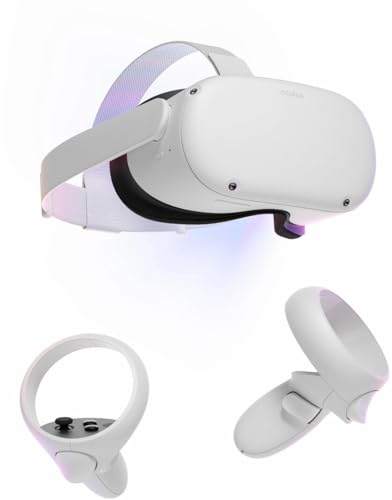
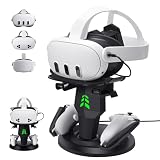
Oculus Newest Quest 2 Gmaing VR Headset 128GB Set - Advanced All-in-One Virtual Reality Headset Cover Set, White
Chosen because it specifies Advanced All-in-One Virtual Reality Headset Cover Set and White.
View on AmazonAll 6 Picks in Detail
1. HTC Vive Focus Plus Bundle – Best for Business and Training Use
As an Amazon Associate we earn from qualifying purchases at no extra cost to you.
This is a standalone 6DoF headset with controllers, a face cushion and a fast charger in the bundle. HTC’s product pages describe the Focus Plus as built for enterprise use, with dual 3.5-inch AMOLED screens at 1440 x 1600 pixels per eye, a Snapdragon 835 processor, 4GB of RAM and 32GB of storage, plus a microSD slot. It does not need a phone or computer to run its content, which makes it a genuine standalone option, but it is an older design aimed at managed deployments rather than home entertainment, so game choices for home users are narrow compared with the Quest ecosystem. Think of it as a tool for a school lab, a workshop or a showroom, where one person sets up content for many users and the headset stays in a managed fleet. A household buyer who simply wants to play will find more at home on the Quest 2.
- Type: standalone headset with 6DoF headset and controller tracking
- Display: dual AMOLED, 1440 x 1600 per eye, per HTC’s specifications
- Processor: Snapdragon 835 per HTC; 4GB RAM and 32GB storage
- Refresh rate and field of view: 75Hz and about 110 degrees per HTC
- Included: controllers, face cushion and charger per the listing
- Weight: about 695 g per HTC
Pros:
- Genuinely standalone with tracked controllers
- Sharper per-eye panel than any phone viewer here
Cons:
- Enterprise focus means limited consumer game selection
- Older chip and heavier body than newer consumer headsets
Compared with the Quest 2 at the end of this list, it offers a similar standalone idea but a thinner library for home players.
2. Kids 3D VR Headset with Android Remote – Best for Casual 3D Video (Phone-Based Runner-Up)

This is not a standalone headset. It is a plastic viewer into which an iPhone or Android phone slides, and the listing mentions an Android remote and links to 3D videos and apps. Because the phone supplies the screen, processor and sensors, image quality depends entirely on the phone you insert. It suits parents who want a low-cost way for a child to watch short 3D clips, with the usual caution that young children should use any head-mounted display for brief sessions and that manufacturers of VR devices publish minimum age guidance worth reading first. Because the viewer is light and the phone does the heavy lifting, it also works as a spare for travel, though any rough handling that dislodges the phone mid-session is a real risk for younger users.
- Type: smartphone viewer, not standalone
- Phone support: iPhone and Android per the listing
- Control: Android remote listed; iPhone control options may differ, so confirm
- Content: links to 3D videos and apps per the listing
- Tracking: relies on the phone’s built-in motion sensors
- Lens and strap details: confirm on the listing
Pros:
- Uses a phone you already own
- Light and easy to put on
Cons:
- No standalone play; no positional tracking
- Remote is described for Android; confirm iPhone compatibility
Next to the DESTEK V5, it is the simpler option with fewer stated extras for older viewers.
3. DESTEK V5 VR Headset – Best for Phone-Based Movies With a Controller (Phone-Based Runner-Up)

The DESTEK V5 is a phone-based headset, again not standalone. The listing says it fits all smartphone sizes, includes a VR controller, and comes with access to 50,000-plus VR movies without a subscription. The controller is a handheld remote with touch buttons rather than a tracked motion controller, so it helps you pick items from a menu but does not let you move your hands in the virtual space. It suits someone who mainly wants to watch movies on a big virtual screen during a commute or on a plane. Anyone considering it should remember that long films in a phone viewer can be tiring, so pick shorter content first, make sure the phone battery is charged and keep the phone cool, since a hot phone can throttle its screen and slow playback.
- Type: smartphone viewer, not standalone
- Phone fit: all smartphone sizes per the listing
- Controller: included VR controller with touch buttons per the listing
- Content: 50,000+ VR movies listed, no subscription stated
- Optics: lens size and field of view are not in the listing name; confirm
- Comfort: adjustable straps listed on the product page; confirm
Pros:
- Includes a controller for menu selection
- Large included movie library by the listing’s own claim
Cons:
- Phone screen resolution limits sharpness
- Controller is for menus, not motion tracking
Compared with the Kids viewer, it gives you a controller and a larger stated library, but it has the same phone dependence.
4. Adjustable VR Goggles With Wide-Angle Lens – Best for Trying VR Video Cheaply (Phone-Based Runner-Up)

These goggles are another phone-based viewer. The listing mentions a wide-angle lens, adjustable fit, universal phone compatibility and a blue-light-reducing lens claim. Treat the blue-light wording as marketing language and take breaks regardless. A pair like this is best for a single trial: put your phone in, open a 360-degree video and decide whether you enjoy the format before spending more. Games are possible only with phone apps that read the phone’s motion sensors, and the experience is a far cry from standalone VR. For a curious relative or a classroom giveaway, that low commitment is the point: nobody needs to learn a new platform, and the cost of a wrong guess stays small.
- Type: smartphone viewer, not standalone
- Compatibility: universal phone fit per the listing
- Lens: wide-angle lens listed; diameter and field of view not stated
- Adjustment: adjustable headset; whether pupil distance and focus are separate is unstated, confirm
- Controller: none listed
- Weight and strap material: confirm on the listing
Pros:
- Inexpensive entry to a phone-based experience
- Works for movies and panoramic video
Cons:
- No controller listed
- Resolution and tracking are limited by the phone
Versus the universal panorama glasses next, it emphasizes lens width over screen-size support.
5. Universal 360-Panorama VR Glasses – Best for Sharing One Viewer Across Phones (Phone-Based Runner-Up)

The last phone-based viewer supports 360-degree panorama content on a large virtual screen and lists anti-blue-light lenses and an adjustable pupil distance. It works as a household viewer that different family members can use with their own phones, as long as each phone fits the clamp. Like the other three, it does not run apps by itself, so the quality depends on the phone display, and the experience is comparable to watching a video in a dark room rather than stepping into a game. Households with mixed phone models may like this style of clamp, but should still try the fit with the largest phone and a slim case before relying on it for a gathering.
- Type: smartphone viewer, not standalone
- Content: 360-degree panorama support per the listing
- Adjustment: pupil distance adjustment listed
- Optics: anti-blue-light lenses claimed; treat as marketing language
- Controller: none listed
- Phone size range: confirm on the listing
Pros:
- Pupil adjustment helps different faces fit
- Works with many phones
Cons:
- No standalone operation
- No tracked controllers
It is closest to the Adjustable VR Goggles, with pupil adjustment as its main stated difference.
6. Meta Quest 2 128GB Set – Best Overall Standalone Headset for Beginners

The Quest 2 is a self-contained headset that runs its own apps, so beginners can start without a gaming PC. Public specification sources list a Snapdragon XR2 chip, 6GB of RAM and a display of 1832 x 1920 pixels per eye, with 128GB and 256GB storage options. This listing is a 128GB set sold with a cover accessory, in white. Meta stopped selling the Quest 2 in 2024, so availability and condition vary, and the Quest 2 still has a large library of games and fitness apps built up over its years on the market. For a first-time buyer the practical benefits are an easy account-based setup on the headset, a boundary system that marks a safe play area, and a huge pool of free and paid content to explore as interests develop.
- Type: standalone headset with tracked controllers
- Processor: Snapdragon XR2 per public specifications
- Memory: 6GB RAM per public specifications
- Display: about 1832 x 1920 per eye per public specifications
- Storage: 128GB per the listing
- Extras: cover accessory included; confirm exact contents and whether it is new or renewed
Pros:
- Large game and app library
- No PC or phone needed to start
Cons:
- Discontinued by the maker; confirm warranty and condition
- Resolution and comfort trail newer headsets
Next to the HTC headset, it has the broader consumer library and a lighter body, which is why it earns the top spot.
Specs Compared
| Pick | Standalone? | Tracking | Controllers | Display source | Storage |
|---|---|---|---|---|---|
| HTC Vive Focus Plus | Yes | 6DoF inside-out | Included, tracked | Dual AMOLED, 1440 x 1600 per eye | 32GB plus microSD per HTC |
| Kids 3D VR Headset | No | Phone sensors | Android remote | Your phone | Not applicable |
| DESTEK V5 | No | Phone sensors | Menu controller included | Your phone | Not applicable |
| Adjustable VR Goggles | No | Phone sensors | None listed | Your phone | Not applicable |
| Universal 360 VR Glasses | No | Phone sensors | None listed | Your phone | Not applicable |
| Meta Quest 2 128GB | Yes | 6DoF inside-out | Included, tracked | About 1832 x 1920 per eye | 128GB |
How We Chose These
This guide is based on reading the listing titles and specification fields for each product and cross-checking the two standalone headsets against the maker’s public specification pages and reference sources. We grouped products by how they work, because “VR headset” covers very different devices: standalone headsets contain their own computer, while phone viewers simply hold a phone. Where the listing named a spec, we reported it; where it did not, we wrote “confirm on listing.” The four phone-based viewers are included because they appear in the product set, and they are labeled clearly as runner-ups so a beginner does not mistake them for standalone headsets.
What to Look For
Standalone versus phone-based versus PC-tethered
A standalone headset has its own chip, battery and storage, and it tracks your head and hands using onboard cameras. A phone-based viewer relies on the phone for everything, so it can only handle video and light apps. A tethered headset connects to a PC for the graphics. Beginners who want games and fitness apps without a computer should aim for standalone. Rule of thumb: if the product page never mentions a processor, battery or storage figure for the headset itself, it is almost certainly a phone viewer.
Display and comfort numbers that matter
Pixels per eye is a better measure than total pixels, because each eye sees its own panel. The Quest 2’s roughly 1832 x 1920 per eye is a useful reference point for current standalone visuals, while the HTC headset’s 1440 x 1600 per eye is lower. Refresh rate matters for comfort: 72Hz to 90Hz or higher is typical on modern headsets, and the HTC runs at 75Hz. Weight and balance matter too, since a front-heavy headset tires the face quickly. Look for an adjustable strap, interpupillary distance adjustment and room for glasses.
Controllers and tracking
Six-degrees-of-freedom (6DoF) tracking means the headset follows both rotation and position, so you can lean, duck and step. Phone viewers offer only three degrees of freedom, meaning you can look around but not move through space. Tracked controllers are what make games like boxing, rhythm and sports feel natural. A simple menu remote, like the one bundled with some phone viewers, only lets you select items. If your plan involves games, treat tracked controllers as a requirement.
Space, safety and session length
Clear at least a two-meter square area, remove trip hazards and pets, and keep the first sessions short. Many makers publish minimum ages and recommend regular breaks; if you feel dizzy or uncomfortable, stop. Worked example: a first-timer might start with fifteen minutes in a seated experience, take a break, and then move on to standing games only once comfortable. Wipe the face cushion between users and follow the maker’s cleaning guidance.
Content libraries and what is really included
Standalone headsets draw from an app store, so the number of titles is only part of the story: look at the range of genres, whether fitness, social and creative apps appeal to you, and how many experiences are free to try. Phone viewers lean on video collections and phone apps instead. A claim such as “50,000 VR movies” usually describes a catalog of short clips and 360-degree videos rather than feature films, so read the fine print on what is included and for how long. Worked example: if you only plan to watch panoramic travel videos, a phone viewer may cover your needs; if you want to play rhythm or sports games, only a tracked standalone headset will do.
Accessories and extras worth planning for
A beginner headset becomes more comfortable with a few small additions. A padded or silicone face cover is easier to wipe clean between users, a head strap with a rear counterweight can shift pressure away from the face, and prescription-lens inserts help glasses wearers who find frames cramped inside the headset. Charging habits matter too: keep a short cable and a wall adapter near the play area so the battery is never an excuse to skip a session. For phone viewers, a microfiber cloth and a few spare nose pads are the only extras that really matter, since the lenses attract fingerprints quickly.
Buying condition and support
For discontinued hardware such as the Quest 2, check whether the unit is new, renewed or used, what warranty applies, and whether the seller supplies the correct charger. Software support lasts for a time after a model leaves the market, but features can change, so confirm current support on the maker’s site before buying. For the HTC unit, ask whether the bundle includes the enterprise license and what content the device can load.
Questions
Is a phone VR viewer the same as a standalone headset?
No. A phone viewer is a plastic frame with lenses that holds your phone, so the phone does all the work. A standalone headset has its own computer, battery and tracking and runs games without any other device.
Is the Meta Quest 2 still a good choice for a beginner?
It remains a strong choice if you can find it new or in good renewed condition, because of its large library, built-in tracking and tracked controllers that need no outside sensors. Check the warranty and the seller’s return terms since the maker stopped selling it.
Can children use these headsets?
Makers publish age recommendations, and many suggest a minimum age for tracked headsets. Phone viewers are lighter but still involve a screen close to the eyes, so keep sessions short and supervise young users.
Do phone viewers work with any phone?
Listings often claim universal fit, but phone size, camera bumps and cases can interfere. Check the stated size range and remove thick cases before you insert the phone.
Why is the HTC headset in a beginner list?
It is a true standalone headset with tracked controllers, so it matches the topic, but its enterprise focus means it is better for training and demos than for home gaming. Beginners looking for games should prefer the Quest 2, while organizations that need a managed standalone unit may find the HTC bundle more relevant.
What space do I need for standalone VR?
A clear play area of about two meters by two meters is a common starting recommendation, with more room for active games. Use the headset’s boundary setup to mark the safe area before playing.
Update History
- October 20, 2026 – Initial publication; product set drawn from current catalog listings.
- Check the product page for current specifications and availability before buying.
Sources
- HTC VIVE business and developer specification pages for the Focus Plus
- Public specification references for the Meta Quest 2 (processor, memory, display, storage options)
- Retailer listing titles and specification fields for all six products