Key takeaways
- Table of Contents 7 sections 8 min read 1 What to look for in a TV and gaming router 1.1 Prioritize latency and stability 1.2 Check coverage rather than just speed labels 2 Best affordable routers for streaming and gaming…
What's inside
The best 2026 router for TV and gaming under $150 is the TP-Link Archer AX55 for most homes: it combines Wi-Fi 6, a 2.4GHz band rated up to 574Mbps, a 5GHz band rated up to 2,402Mbps, gigabit Ethernet, and useful device-priority and parental-control tools. The ASUS RT-AX58U is an excellent alternative for advanced settings, while the TP-Link Deco X55 is the better choice for large homes when a two- or three-unit mesh kit fits within the budget. These routers can handle 4K streaming and online gaming well, but Ethernet remains the best way to minimize latency for a console or gaming PC.
What to look for in a TV and gaming router
A router for streaming and gaming does not need the highest theoretical speed. It needs consistent coverage, stable traffic handling, and enough capacity for several devices working at the same time. Wi-Fi 6 is the sensible minimum in 2026 for a new router under $150. It improves efficiency when phones, smart TVs, consoles, laptops, and smart-home devices share the network.
Prioritize latency and stability
Gaming latency is affected by your internet connection, the game server, signal strength, and network congestion. A router cannot fix a slow or poorly routed broadband connection, but features such as adaptive quality of service can prevent a large download or 4K stream from overwhelming an active game session. Look for a gigabit WAN port, multiple gigabit LAN ports, and a QoS system that lets you prioritize a console, PC, or television.
Check coverage rather than just speed labels
Manufacturers quote maximum wireless link rates under ideal conditions. Real performance falls through walls and at distance. A centrally positioned router with external antennas usually beats a faster router hidden inside a cabinet. For a home with several floors, thick masonry, or dead zones, a mesh system is generally more useful than buying a single router with an impressive speed number.
Best affordable routers for streaming and gaming
TP-Link Archer AX55: best overall
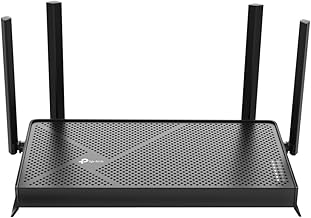
The Archer AX55 is the strongest all-round recommendation for a typical apartment or medium-size house. It is a dual-band Wi-Fi 6 router with a 5GHz maximum link rate of 2,402Mbps and a 2.4GHz maximum link rate of 574Mbps. Four gigabit LAN ports make it easy to wire a console, gaming PC, smart TV, and streaming box.
Its HomeShield tools provide device profiles, basic parental controls, client prioritization, and security features. Some advanced security and reporting functions may require a subscription, so check the current feature list before buying. The AX55 is usually priced around $80–$120, leaving room in a $150 budget for a longer Ethernet cable or a small unmanaged switch.
ASUS RT-AX58U: best for control and customization
The ASUS RT-AX58U, also known as the AX3000, remains a capable Wi-Fi 6 option for users who want detailed network controls. Its rated wireless speeds are 574Mbps on 2.4GHz and 2,402Mbps on 5GHz. ASUS includes AiProtection security powered by Trend Micro, guest networking, VPN features, and AiMesh support for adding compatible ASUS routers later.
Adaptive QoS can prioritize gaming traffic or individual devices, which is helpful when other household members are streaming or downloading. The interface offers more depth than many budget routers, although that can make setup feel less immediate. It commonly falls in the $90–$140 range depending on sales and revision.
TP-Link Archer AX73: best for a busy household when discounted
The Archer AX73 adds six external antennas and a faster AX5400 class design, with a rated 4,804Mbps on 5GHz and 574Mbps on 2.4GHz. Those figures do not mean an internet connection will reach 5Gbps, but the additional wireless capacity can help when many devices are active locally. It also includes gigabit Ethernet, OneMesh support, and the same general HomeShield ecosystem found on other TP-Link models.
This model is often around $120–$150 when discounted. It is a good fit for a family with several phones, multiple televisions, a console, and frequent simultaneous downloads. It is less compelling if your home is small or your broadband plan is well below 500Mbps, because the cheaper Archer AX55 will usually provide a similar everyday experience.
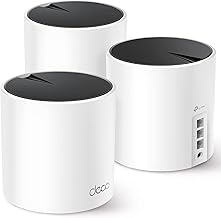
TP-Link Deco X55: best mesh choice under $150
The Deco X55 is a Wi-Fi 6 mesh system rather than a conventional single router. A two-unit kit can sometimes be found around $120–$150, while three-unit packages generally cost more. Each unit has three gigabit Ethernet ports, and the system supports wired backhaul, which is highly recommended when the units can be connected with Ethernet.
Mesh is useful when the television or console is far from the main internet connection. Place one Deco near the modem and the second in an open area near the weak zone, not inside the room where the signal is already poor. The system includes basic parental controls, device profiles, guest networking, and automatic band management. It is simpler than ASUS firmware, but easier to manage from a phone.
Key specifications and typical prices
| Model | Wi-Fi class | Rated wireless speed | Ethernet | Useful features | Typical price |
|---|---|---|---|---|---|
| TP-Link Archer AX55 | Wi-Fi 6 AX3000 | 574 + 2,402Mbps | 1Gbps WAN; 4 × 1Gbps LAN | QoS, HomeShield, parental profiles | Usually $80–$120 |
| ASUS RT-AX58U | Wi-Fi 6 AX3000 | 574 + 2,402Mbps | 1Gbps WAN; 4 × 1Gbps LAN | Adaptive QoS, AiMesh, AiProtection | Usually $90–$140 |
| TP-Link Archer AX73 | Wi-Fi 6 AX5400 | 574 + 4,804Mbps | 1Gbps WAN; 4 × 1Gbps LAN | More capacity, OneMesh, QoS | Usually $120–$150 |
| TP-Link Deco X55 two-pack | Wi-Fi 6 AX3000 | 574 + 2,402Mbps per unit | 3 × 1Gbps ports per unit | Mesh coverage, wired backhaul, profiles | Usually $120–$150 |
Best settings for gaming and 4K TV
Start by updating the router firmware, then use a distinct network name and a strong WPA2/WPA3 password. Connect a gaming console, desktop PC, or streaming device to the 5GHz band when it is within reliable range. Use 2.4GHz for distant smart-home products where range matters more than speed.
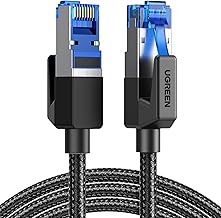
For the lowest and most consistent latency, connect the main gaming device with Cat 5e or Cat 6 Ethernet. A 15-meter cable can be preferable to a wireless repeater. If Ethernet is impossible, keep the router in the same room or one room away, avoid placing it behind the television, and select a clear 5GHz channel through the router’s automatic channel feature or a Wi-Fi analyzer.
Enable adaptive QoS only after identifying your real internet speed. Set the router’s bandwidth values to roughly 85%–95% of measured download and upload capacity. This gives the router room to manage queues. Prioritize the console or PC, but do not mark every device as high priority. On mesh systems, use Ethernet backhaul whenever possible; wireless backhaul consumes capacity that could otherwise serve the TV and game traffic.
Parental controls and household management
TP-Link HomeShield and ASUS AiProtection provide a practical starting point for families. Create profiles for children’s devices, schedule internet pauses, block broad content categories, and set bedtime limits. These controls operate at the network level, so they can cover consoles and smart TVs that do not support conventional parental-control apps.
Do not treat router filtering as a complete safety system. Services use encrypted connections, applications can change domains, and a determined user may work around basic scheduling. Combine router rules with console accounts, streaming-service profiles, device-level restrictions, and an explanation of the household rules. Guest networking is also important: put visitors and inexpensive smart-home devices on a separate network rather than sharing the main gaming password.
FAQ
Is Wi-Fi 6 fast enough for a 4K TV and online gaming?
Yes. A 4K stream commonly uses about 15–25Mbps, while online games usually need far less bandwidth but benefit from low delay and stable upload performance. A good Wi-Fi 6 router can support both at once, provided the broadband connection is reliable and the router has adequate coverage. Wired Ethernet is still preferable for competitive gaming.
Should I buy a mesh system or a single router?
Buy a single router such as the Archer AX55 or RT-AX58U for a smaller home with a central modem location. Choose a Deco X55 mesh kit when walls, floors, or distance create dead zones. Mesh improves coverage, but it does not automatically reduce latency; a wired connection to the satellite unit delivers the best result.
Bottom line
For most households, the TP-Link Archer AX55 is the best router for TV and gaming under $150 in 2026 because it balances coverage, Wi-Fi 6 capacity, gigabit ports, QoS, and parental controls at a reasonable market price. Choose the ASUS RT-AX58U if you want more detailed configuration and ASUS mesh expansion. Choose the Archer AX73 for a busier wireless home when its price is within budget, or the Deco X55 two-pack when eliminating dead zones matters more than having one powerful central router.