Our Top Picks
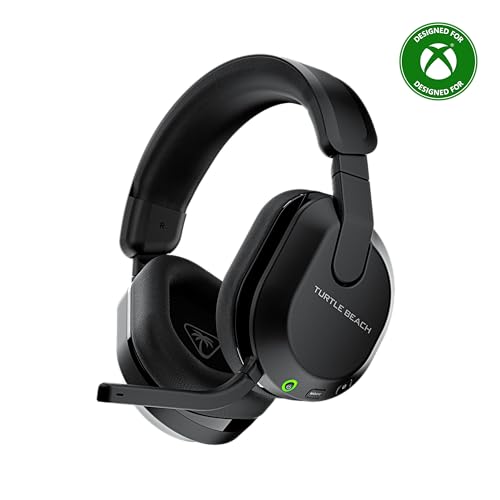 Turtle Beach Stealth 600 Wireless Gaming Headset forStandard8.58 x 7.81 x 3.74 inches0.7 poundsCheck on Amazon
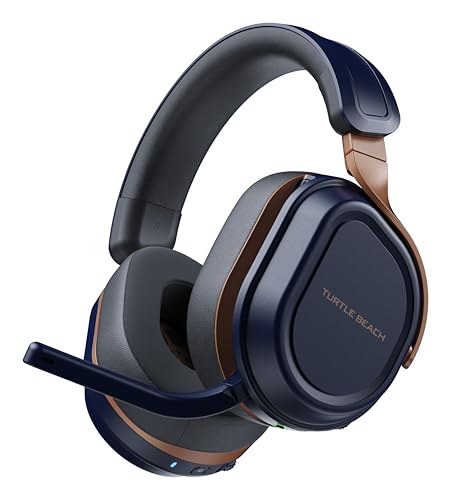 Turtle Beach Stealth 700 Wireless Gaming Headset forStandard7.87 x 6.81 x 3.7 inches0.9 poundsCheck on Amazon
 SteelSeries Arctis Nova 5X Wireless Multi-System Gaming HeadsetOne Size7.32 x 6.87 x 3.52 inches0.6 poundsCheck on Amazon
The best Xbox headset depends on how you connect it. For the simplest setup, the official Xbox Wireless Headset pairs directly with Series X and S, and Xbox-licensed models from Turtle Beach, SteelSeries, RIG and Corsair add longer battery life and stronger mics. A wired headset in the controller jack is the cheapest option.
Start Here: How Headsets Connect to Xbox Series X and S
Xbox consoles do not accept ordinary 2.4GHz USB dongles from PC or PlayStation headsets. That single fact explains most buying mistakes, so check the connection before anything else.
| Connection | How it works on Xbox | What to buy |
|---|---|---|
| Xbox Wireless (licensed) | Pairs directly with the console, or through an Xbox-licensed dongle | Headsets marked “for Xbox” or “HX” |
| 3.5mm wired | Plugs into the controller jack | Almost any wired headset |
| USB wired | Works only if the headset is Xbox-licensed | Check the product title |
| Bluetooth | Xbox consoles do not support Bluetooth audio directly | Needs a dongle or an Xbox-licensed headset |
Many wireless headsets list “Bluetooth” as a feature. On Xbox that Bluetooth connection is used for your phone, not for console audio, so do not assume a Bluetooth headset can connect to the console directly. When a listing says “for Xbox” and lists Xbox Series X|S, it normally includes the right wireless method.
Our Picks at a Glance
| Headset | Type | Standout | Best for |
|---|---|---|---|
| Xbox Wireless Headset | Wireless | Direct Xbox pairing, Dolby Atmos support | Simplest setup |
| Turtle Beach Stealth 600 | Wireless | 80 hour battery, 50mm drivers | Value wireless |
| Turtle Beach Stealth 700 | Wireless | 60mm dual drivers, 80 hour battery | Step-up Turtle Beach |
| SteelSeries Arctis Nova 5X | Wireless | 60 hour battery, 2.4GHz or Bluetooth | Multi-device |
| RIG 800 PRO HX | Wireless with base | Base station, 60 hour battery | Desk setup |
| Corsair HS80 MAX Wireless (Xbox) | Wireless | Broadcast-quality mic, Dolby Atmos | Voice chat |
| Razer BlackShark V2 X (Xbox) | Wired 3.5mm | 50mm drivers, light | Budget wired |
| HyperX CloudX | Wired | Official Xbox licensed, memory foam | Comfort on a budget |
1. Xbox Wireless Headset: Easiest Setup
Microsoft’s own headset is the most direct way to get wireless audio on an Xbox. The listing mentions spatial audio with Dolby Atmos and use on consoles, PCs and TVs, and the headset pairs through Xbox Wireless instead of a dongle. It is a good fit if you want the console to recognize it immediately.

XBOX Wireless Gaming Headset | Carbon Black | Over Ear Headphones, Spatial Audio with Dolby Atmos, Play on Consoles & PCs & TVs and more
Chosen because it specifies Carbon Black and Over Ear Headphones.
View on Amazon- Connection: Xbox Wireless, no dongle needed on Xbox
- Audio: spatial audio with Dolby Atmos
- Works on: consoles, PCs and TVs per the listing
- Battery and weight: not listed here, so check the maker
Best for: Xbox-first players who want the least setup. Skip if: you want the longest battery or a stronger mic.
Pros: direct pairing; Dolby Atmos support; clean design. Cons: fewer extras than some third-party models; battery details not listed here.
2. Turtle Beach Stealth 600: Best Turtle Beach Headset for Xbox Series X for Most People
The Stealth 600 is the mid-point of the Turtle Beach range. The listing mentions 50mm drivers, an 80 hour battery, Bluetooth, a flip-to-mute mic and compatibility with Xbox Series X|S, Xbox One, PlayStation and PC. That mix makes it an easy recommendation for households with more than one console.
Turtle Beach Stealth 600 Wireless Gaming Headset for Xbox, PS5, PC, Mobile | Xbox Series X|S, Xbox One, PlayStation, PS4, Multiplatform, Bluetooth, 50mm Drivers, 80-Hr Battery, Flip-to-Mute Mic, Black
Chosen because it specifies PS5 and Mobile.
View on Amazon- Drivers: 50mm
- Battery: 80 hours per the listing
- Mic: flip-to-mute
- Connection: wireless plus Bluetooth
Best for: value wireless on Xbox with the option to use it elsewhere. Skip if: you want premium materials.
Pros: long battery; simple controls; platform flexibility. Cons: plain design; some features vary by platform.
3. Turtle Beach Stealth 700: Step Up for Sound
The Stealth 700 steps up to 60mm dual drivers, with the same 80 hour battery, flip-to-mute mic and multiplatform support, according to the listing. Choose it over the 600 if you want bigger drivers and a more premium build.
Turtle Beach Stealth 700 Wireless Gaming Headset for Xbox, PS5, PC, Mobile | Xbox Series X|S, Xbox One, PlayStation, Multiplatform, Bluetooth, 60mm Dual Drivers, 80-Hr Battery, Flip-to-Mute Mic, Cobalt
Chosen because it specifies PS5 and Mobile.
View on Amazon- Drivers: 60mm dual
- Battery: 80 hours
- Platforms: Xbox, PlayStation, PC, mobile
Best for: players who want a larger-driver Turtle Beach. Skip if: the 600 already covers your needs.
Pros: bigger drivers; strong battery; multiplatform. Cons: higher cost; heavier build is likely, but weight is not listed here.
Turtle Beach Stealth 500, 600 and 700 Compared
Search results for the best Turtle Beach headset for Xbox Series X usually come down to these three. This table lists only what the store listings state.
| Spec | Stealth 500 | Stealth 600 | Stealth 700 |
|---|---|---|---|
| Drivers | 40mm | 50mm | 60mm dual |
| Battery | 40 hours | 80 hours | 80 hours |
| Bluetooth | Yes | Yes | Yes |
| Mic | Flip-to-mute | Flip-to-mute | Flip-to-mute |
| Cushions | Memory foam | Not listed | Not listed |
| Platform | Xbox | Xbox, PlayStation, PC, mobile | Xbox, PlayStation, PC, mobile |
The Stealth 500 is the cheapest of the three and is focused on Xbox. If you only play on Xbox and want to spend less, it is a reasonable pick. If you might switch to PlayStation or PC later, the 600 is a safer buy.
4. SteelSeries Arctis Nova 5X: Best for Multiple Devices
The Nova 5X is the Xbox version of the Nova 5. The listing shows neodymium magnetic drivers, a 60 hour battery, 2.4GHz or Bluetooth, a ClearCast Gen2.X mic and support for Xbox, PC, PlayStation, Switch and mobile. The companion app gives EQ presets for different games.
SteelSeries Arctis Nova 5X Wireless Multi-System Gaming Headset - Black | Neodymium Magnetic Drivers — 60 HR Battery — 2.4GHz or BT — ClearCast Gen2.X Mic — Xbox, PC, PS, Switch, Mobile
Chosen because it specifies Black and Switch.
View on Amazon- Battery: 60 hours per the listing
- Connection: 2.4GHz or Bluetooth
- Mic: ClearCast Gen2.X
- Platforms: Xbox, PC, PlayStation, Switch, mobile
Best for: players who want Xbox, PC and phone support in one headset. Skip if: you prefer a base station.
Pros: long battery; app EQ; multi-device. Cons: priced above entry models; the Xbox version is separate from the Nova 5.
5. RIG 800 PRO HX: Best With a Base Station
The RIG 800 PRO HX ships with a multi-function base station and is officially licensed for Xbox Series X|S, Xbox One and PC. The listing mentions Dolby Atmos 3D audio, a 60 hour battery and a flip-to-mute mic. The base lets you charge and swap batteries on some setups, which suits a desk-based console player.

RIG 800 PRO HX Wireless Gaming Headset & Multi-Function Base Station - Xbox | Officially Licensed for Xbox Series X|S, Xbox One, PC - Dolby Atmos 3D Audio - 60 Hour Battery - Flip-Mute Mic
Chosen because it specifies Xbox and Officially Licensed for Xbox Series X.
View on Amazon- Base station: included
- Audio: Dolby Atmos 3D
- Battery: 60 hours
- Platforms: Xbox Series X|S, Xbox One, PC
Best for: console desks where a base station stays plugged in. Skip if: you want a travel-friendly setup.
Pros: base station; Dolby Atmos; Xbox-licensed. Cons: larger desk footprint; no Bluetooth listed.
RIG 600 PRO HX for Xbox and phone
The RIG 600 PRO HX offers 2.4GHz or Bluetooth 5.3 and lists support for Xbox Series X|S, Xbox One, PlayStation, Switch, PC, Android and iPhone.
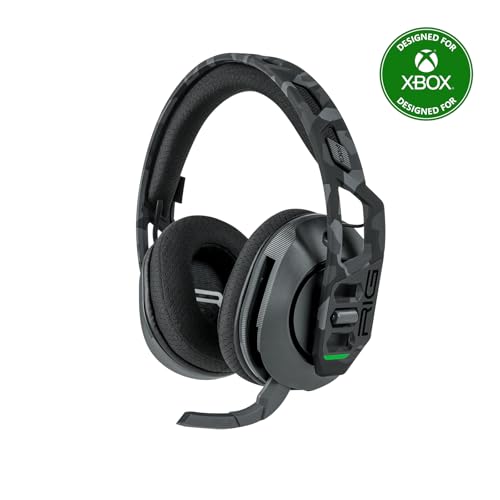
RIG 600 PRO HX Dual Wireless Universal Gaming Headset | Wireless 2.4GHz or Bluetooth 5.3 for Xbox Series X|S, Xbox One, PS4, PS5, Nintendo Switch, PC, Android, iPhone – Urban Camo
Chosen because it specifies Wireless 2.4GHz or Bluetooth 5.3 for Xbox Series X and Xbox One.
View on Amazon6. Corsair HS80 MAX Wireless (Xbox): Best for Voice Chat
Corsair’s Xbox version of the HS80 MAX lists Dolby Atmos, a broadcast quality microphone, iCUE compatibility and support for Xbox, PC, Mac and mobile with Bluetooth. Pick it if party chat is central to your sessions.

CORSAIR HS80 MAX Wireless Xbox Gaming Headset with Bluetooth – Steel Gray | Dolby Atmos, Broadcast Quality Microphone, iCUE Compatible, Xbox, PC, Mac, Mobile
Chosen because it specifies Steel Gray and Dolby Atmos.
View on Amazon- Mic: broadcast quality per the listing
- Audio: Dolby Atmos
- Software: iCUE on PC
- Platforms: Xbox, PC, Mac, mobile
Best for: players who talk a lot. Skip if: you want the lowest cost.
Pros: mic focus; Bluetooth; PC software. Cons: priced higher; battery not listed here.
7. Razer BlackShark V2 X for Xbox: Best Budget Wired
This version of the BlackShark V2 X is made for Xbox, with 50mm drivers, a cardioid mic, a 3.5mm jack, lightweight comfortable cups and support for Xbox Series X and S, PS5, PC and Switch. It is a simple, cost-conscious headset.

Razer BlackShark V2 X Xbox Gaming Headset, 3.5mm Audio Jack, Black | 50mm Drivers, Cardioid Mic, Lightweight, Comfortable Noise Isolating Earcups, for Xbox Series X, Series S, PS5, PC, Switch
Chosen because it specifies 3.5mm Audio Jack and Black.
View on AmazonBest for: a no-battery, low-cost headset. Skip if: you want wireless.
Pros: light; low cost; wired simplicity. Cons: no wireless; no app.
8. HyperX CloudX: Official Xbox Licensed Wired Option
The CloudX is listed as an official Xbox licensed headset for Xbox One and Series X|S with memory foam cushions, a detachable noise-cancelling mic and in-line audio controls. It is a straightforward wired choice that leans on comfort.
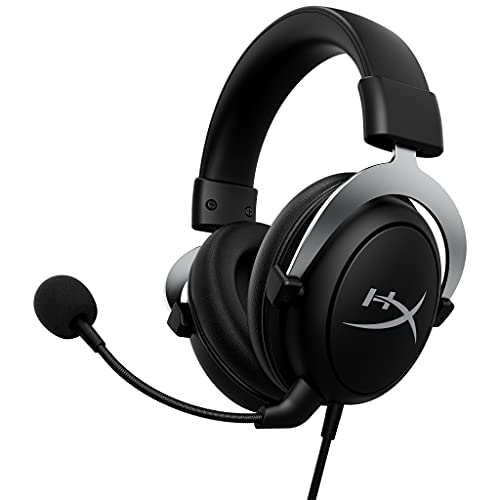
HyperX CloudX, Official Xbox Licensed Gaming Headset, Compatible with Xbox One and Series X|S, Memory Foam Ear Cushions, Detachable Noise-Cancelling Mic, in-line Audio Controls,Black/ Silver
Chosen because it specifies Official Xbox Licensed Gaming Headset and Compatible with Xbox One and Series X.
View on AmazonBest for: wired comfort and in-line volume controls. Skip if: you want wireless or modern surround features.
Pros: memory foam; in-line controls; licensed for Xbox. Cons: wired; older design.
Best Earbuds for Xbox
Earbuds are lighter and less hot than over-ear headsets, so they suit warm rooms and short sessions. Wired earbuds with a 3.5mm plug use the controller jack, just like wired headsets, so a mic and in-line controls matter.
SteelSeries Arctis GameBuds for Xbox
The listing shows an Xbox-specific wireless earbud model. It sits at a higher price than the others but offers a full wireless setup in a small package. Check the maker’s page for battery, mic and charging details, since they are not listed in the store title.
HyperX Cloud Earbuds II
A wired option with 14mm drivers, a built-in mic and a 3.5mm plug, for PC, mobile and Switch. It uses a 3.5mm plug, so it can connect to a controller with a headset jack; check the maker’s page for mic and in-line control support on your controller.

HyperX Cloud Earbuds II Wired Gaming Earbuds with Mic | 14mm Drivers | 14mm Drivers | Built-In Mic | 3.5mm Plug | PC, Mobile & Nintendo Switch
Chosen because it specifies 14mm Drivers and 14mm Drivers.
View on AmazonEarbud buying tip: earbuds with a wireless dongle must be Xbox-licensed. Bluetooth-only earbuds will not connect to the console directly.
Most Comfortable Xbox Headset
Comfort is personal, but a few features help for long sessions. Memory foam cushions, a padded or suspension band and a weight under 300g tend to feel lighter. Among the picks here, the HyperX CloudX and the Turtle Beach models list memory foam or soft cushions, and the Nova 5X and the Xbox Wireless Headset are the pick for people who want a modern shape. We cannot make medical comfort claims and we did not wear these headsets, so check return policies for the best fit.
| Comfort feature | Look for |
|---|---|
| Cushions | Memory foam, breathable fabric if you run warm |
| Headband | Padded or suspension strap |
| Weight | Under 300g if listed |
| Earcups | Deep enough for your ears |
| Glasses | Soft, wide cushions with light clamp |
Xbox Headset Setup Tips
- Update the console and the headset. Xbox firmware updates sometimes improve wireless stability.
- Set the audio format. In Xbox audio settings, choose the headset format that matches your headset (stereo, Dolby Atmos for Headphones, DTS Headphone:X or Windows Sonic). Some spatial formats need a license or app.
- Check chat mixer settings. Balance game and chat volume in the Xbox Accessories app and in Party Chat.
- Test the mic monitor. Turn on mic monitoring to hear yourself and adjust the distance.
- Use the right controller port. Wired headsets plug into the controller jack, not the console.
- Charge before the weekend. Wireless headsets with 60 to 80 hour batteries still need charging.
Wireless Protocol Compatibility, Explained Carefully
Headset marketing uses several terms that sound the same. Here is how they map to Xbox, in plain language.
- Xbox Wireless: the console’s own wireless standard. A headset with this connects directly or through a licensed dongle.
- 2.4GHz USB dongle for PC or PlayStation: works on those systems and usually does not work on Xbox unless the headset lists Xbox support.
- Bluetooth: supported on Xbox only through licensed adapters, so it is usually a bonus for phones and PCs.
- “Multi-platform” headsets: typically include several modes. Check that the Xbox mode is listed in the product title.
If a listing does not state Xbox support, check the maker’s page rather than guessing.
Best Xbox Headset by Budget Tier
Prices change often and differ by region, so this section groups the picks by tier instead of quoting numbers.
Entry tier: wired and simple
The Razer BlackShark V2 X for Xbox and the HyperX CloudX sit here. Both plug into the controller jack, need no charging and cover the basics of game audio and party chat. This tier makes sense for younger players, second rooms and anyone who wants a backup headset.
Mid tier: wireless value
The Turtle Beach Stealth 600 and the RIG 600 PRO HX are in this range. You get wireless freedom, 60 to 80 hour battery claims in the listings and platform flexibility. This is where most Series X and S owners will find the best balance.
Upper tier: features and polish
The Turtle Beach Stealth 700, SteelSeries Arctis Nova 5X, RIG 800 PRO HX and Corsair HS80 MAX Wireless add larger drivers, base stations, apps or stronger mics. They are worth it if you play most evenings and care about voice chat or build quality.
Which tier makes sense?
If you play a few hours a week, the entry tier is enough. If you play daily and talk to friends, the mid tier is the sweet spot. Spend more only for a feature you will actually use, such as the base station, the app EQ or the broadcast-style mic.
Xbox Series X vs Series S: Does It Change the Headset?
No. Both consoles use the same Xbox Wireless standard, the same controller headset jack and the same audio format options. A headset that is Xbox-licensed for Series X|S works on both. The only practical difference is the placement of the console: a Series S in a small space may favor a headset with a USB dongle that fits neatly, while a Series X in a media cabinet may need a longer cable or a base station placed within line of sight.
Microphone Guide for Xbox Party Chat
- Flip-to-mute: raising the boom mutes the mic. It is quick and gives you a clear visual cue.
- Detachable: useful if you often play solo, and easy to remove for travel.
- Cardioid pickup: reduces noise from behind the mic, such as fans.
- Sidetone or mic monitoring: lets you hear your own voice so you do not shout.
- In-line mute button: handy on wired headsets and earbuds.
Whatever the headset, keep the mic about two fingers from the corner of your mouth and check the level in party chat before a match.
Common Xbox Headset Mistakes
- Buying a PC or PlayStation dongle headset and expecting wireless on Xbox.
- Assuming Bluetooth means console support. It usually does not on Xbox.
- Ignoring the audio format setting. The console may output stereo until you select a spatial format.
- Paying extra for surround without checking whether you like it.
- Skipping the return window. A comfort problem often shows up only after several hours.
Troubleshooting a Headset That Will Not Connect
- No sound on a wireless headset: re-pair the headset by holding the pairing button, and confirm the console has the latest update.
- Mic does not work: check the Xbox privacy settings for chat permissions and make sure the boom mic is down or unmuted.
- Audio cuts out: move the dongle closer or away from other wireless devices and check the battery.
- Chat too quiet or too loud: adjust the chat mixer in the Xbox accessories settings or the headset app.
- Wired headset silent: push the plug fully into the controller jack and check the controller’s firmware.
Wired vs Wireless Headsets on Xbox
| Factor | Wired (controller jack) | Wireless (Xbox-licensed) |
|---|---|---|
| Setup | Plug in and play | Pair once, then automatic |
| Battery | None; the controller supplies power to the mic | 40 to 80 hours claimed in listings |
| Cost | Lower | Higher |
| Cable drag | Limited by controller cable reach | None |
| Audio features | Basic, depends on the console settings | Often adds app EQ or Dolby Atmos |
| Interference | None | Rare, but possible near other wireless devices |
The practical rule is simple. If you sit close to the console and hold a wired controller anyway, a wired headset is excellent value. If you play from a couch, use a wireless controller or want to walk away from the screen between matches, a wireless headset is worth the extra cost.
Using an Xbox Headset on PC and Phone Too
Many people buy one headset for the console and want to use it elsewhere. The multi-platform models on this list handle this in different ways.
- Turtle Beach Stealth 600 and 700: list Xbox, PlayStation, PC and mobile support, with Bluetooth for phones.
- SteelSeries Arctis Nova 5X: lists Xbox, PC, PlayStation, Switch and mobile, with 2.4GHz and Bluetooth modes.
- RIG 600 PRO HX: lists dual wireless for Xbox, PlayStation, Switch, PC, Android and iPhone.
- Corsair HS80 MAX Wireless (Xbox): lists Xbox, PC, Mac and mobile with Bluetooth.
- RIG 800 PRO HX: lists Xbox and PC, and is the most console-focused of the group.
When you plan to use the same headset on several devices, check which mode each device needs and whether you have to move a dongle between them. Headsets with both a dongle and Bluetooth are the easiest.
Headset or Earbuds for Xbox: Which Fits You?
Over-ear headsets win on microphone quality, battery life and sound isolation. Earbuds win on weight, heat and portability. Use this quick guide.
- Choose an over-ear headset if you play for long sessions, use party chat daily or want a boom mic with clear pickup.
- Choose earbuds if over-ear cups feel hot, if you wear glasses and the arms bother you, or if you want one set for the console and your commute.
- Choose wireless earbuds only if they are Xbox-licensed. Ordinary Bluetooth earbuds will not pair with the console for game audio.
- Choose wired earbuds for a low-cost backup and check for an in-line mic.
In both cases, test the mic in a party chat before a ranked or competitive session so teammates can tell you if the level is right.
How We Chose
This is a research-based roundup. We did not use these products ourselves. We compared maker specifications, store listings and published editorial coverage, and we favored Xbox-licensed models with a clear compatibility statement. Where a figure was not listed, the text says so.
Buying Guide: Thresholds That Matter
| Feature | Threshold |
|---|---|
| Xbox support | Product title lists Xbox Series X|S |
| Wireless battery | 40 hours or more |
| Mic | Flip-to-mute or detachable |
| Weight | Under 300g for long sessions |
| Spatial audio | Optional; check license needs |
| Budget wired | 3.5mm jack, in-line controls |
Frequently Asked Questions
What is the best Xbox headset?
The official Xbox Wireless Headset is the easiest, and the Turtle Beach Stealth 600 offers strong value. Pick by budget and comfort.
What is the best Turtle Beach headset for Xbox Series X?
For most players the Stealth 600 balances price, battery and platform support. The Stealth 700 adds larger drivers, and the Stealth 500 is the lowest-cost Xbox-focused option.
What are the best earbuds for Xbox?
The SteelSeries Arctis GameBuds for Xbox are an Xbox-specific wireless option. Wired earbuds like the HyperX Cloud Earbuds II work through the controller jack.
What is the most comfortable Xbox headset?
Models with memory foam and a padded band, such as the HyperX CloudX and Turtle Beach range, suit many people, but fit is personal.
Can I use a PlayStation headset on Xbox?
Wired ones work through the controller jack, but wireless dongle models usually do not connect to Xbox.
Do I need a wireless headset for Xbox?
No. A wired headset in the controller jack works, costs less and has no battery.
Does Xbox support Dolby Atmos headsets?
Yes, Dolby Atmos for Headphones is available through the console, although it may need a license or an app, so check the audio settings.
Which One Should You Buy?
- Easiest setup: Xbox Wireless Headset.
- Best value wireless: Turtle Beach Stealth 600.
- Bigger drivers: Turtle Beach Stealth 700.
- Multi-device with app EQ: SteelSeries Arctis Nova 5X.
- Desk setup with a base: RIG 800 PRO HX.
- Voice chat first: Corsair HS80 MAX Wireless for Xbox.
- Budget wired: Razer BlackShark V2 X for Xbox or HyperX CloudX.
Sources
- Xbox support: audio and headset setup pages
- Turtle Beach product pages: Stealth 500, 600 and 700
- SteelSeries product page: Arctis Nova 5X
- RIG product page: 800 PRO HX
- Corsair product page: HS80 MAX Wireless
Last updated: November 2026
FAQ
Which tier makes sense?
Xbox Series X vs Series S: Does It Change the Headset?
Headset or Earbuds for Xbox: Which Fits You?
What is the best Xbox headset?
What is the best Turtle Beach headset for Xbox Series X?
What are the best earbuds for Xbox?
What is the most comfortable Xbox headset?
Can I use a PlayStation headset on Xbox?
More from Amazon
Programs that pair well with the guide above. Offers and eligibility are set by Amazon and may change.
Free shipping on eligible items, Prime Video and more. Eligible new members can start with a free trial.
Start a Prime free trialAd-free music streaming. Eligible new subscribers can start with a free trial.
Try Music Unlimited freeA Prime membership for ages 18-24 with a trial period. Eligibility is set by Amazon.
See Prime for Young AdultsAudiobooks and podcasts to listen to on the go. Eligible new members can start with a free trial.
Try Audible freeAs an Amazon Associate we earn from qualifying purchases.