Key takeaways
- Pro: 32GB RAM at this price point removes a common bottleneck for multitasking and texture-heavy loads.
- Pro: The Ryzen 5 5600 provides enough single-thread headroom for CPU-bound esports scenarios.
- Con: The RTX 3050 6GB is entry-level and will fall well short of 240 fps in any AAA title, even at low settings.
Pairing a capable PC with a monitor that can actually deliver smooth, tear-free frames at 240Hz trips up a surprising number of buyers. Some overspend on a premium display only to discover their GPU cannot sustain high frame rates in their regular titles. Others grab a budget tower with an entry-level graphics card and wonder why the 240Hz refresh rate on their new monitor sits mostly unused. The core problem is alignment: the GPU, the panel, and the games you play all need to operate in the same performance envelope.
What separates a strong 240Hz setup from a mediocre one comes down to sustained frame output above 200 fps in your go-to titles, a panel response time low enough to avoid noticeable ghosting, adaptive sync to eliminate tearing without added input lag, and a price-to-performance ratio that leaves budget for the rest of the chain. This roundup compares eight products across prebuilt towers, a high-end gaming laptop, and monitors that all target the 240Hz standard, drawing on published specifications and aggregated owner feedback to clarify where each option fits.
Our top picks
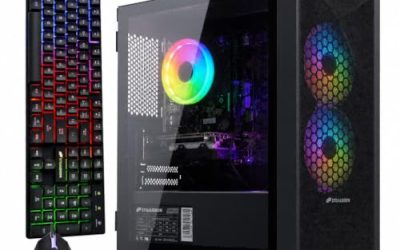
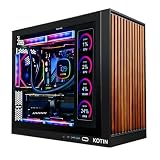
 SKYESEV Gaming Desktop Computer PC
- Processor specifications: Adopting AMD Ryzen 5 5600 processor,…
- Graphics Card: Features GeForce RTX 3050 graphics card…
- Memory configuration: Equipped with 32GB DDR4 RAM (16GB…
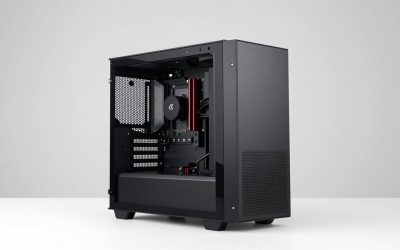
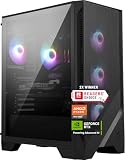
 CyberPowerPC Gaming PC
1TB PCIe 4.0 NVMe SSD supports fast load times
WiFi 6 and Bluetooth 5.3 are built in for wireless connectivity
Tempered glass side panel shows off the custom RGB lighting
2 USB-A 3.2 ports are limited next to the 6 USB-A 2.0 ports
RTX 5060 8GB sits in the mid-range tier for 1440p gaming
 ASUS ROG Strix G16
240Hz, 3ms ROG Nebula display suits fast-paced competitive gaming
32GB DDR5 memory and 1TB SSD support heavy multitasking and quick loads
Vapor chamber cooling with a tri-fan design targets sustained performance
At 5.84 pounds, this gaming laptop is heavier than thin-and-light models
Full-surround RGB lightbar adds styling some professional settings may not want
| Product | Key specs | |
|---|---|---|
| SKYESEV Gaming Desktop Computer PC | Processor specifications: Adopting AMD Ryzen 5 5600 processor,… Graphics Card: Features GeForce RTX 3050 graphics card… Memory configuration: Equipped with 32GB DDR4 RAM (16GB… | Check price |
| CyberPowerPC Gaming PC | Check price | |
| ASUS ROG Strix G16 | Check price | |
 Dell 27 240Hz Gaming Monitor Dell 27 240Hz Gaming Monitor | Smooth motion: 240Hz refresh rate and fast 0.5ms… Seamless gaming: FreeSync Premium and HDMI VRR eliminate… Fast IPS: Faster 0.5ms response with excellent color… | Check price |
| Dell 24 240Hz Gaming Monitor | Smooth motion: 240Hz refresh rate and fast 0.5ms… Seamless gaming: FreeSync Premium and HDMI VRR eliminate… Fast IPS: Faster 0.5ms response with excellent color… | Check price |
 SANSUI 32 Inch Curved 240Hz Gaming Monitor SANSUI 32 Inch Curved 240Hz Gaming Monitor | 32 Inch curved 1500R gaming monitor, 240Hz high… Performance: 240Hz refresh rate, Full HD 1920*1080P resolution,… Interfaces: HDMI up to 240Hz, DP 1.4 up… | Check price |
 Sceptre Curved 24.5-inch Prime Gaming Monitor up Sceptre Curved 24.5-inch Prime Gaming Monitor up | 240Hz Refresh Rate: Stay above the pack with… 1ms Response Time: Colors fade and illuminate instantly… 1500R Curvature: The 1500R degree curved design immerses… | Check price |
 ASUS ROG PG32UCDM 32 Inch 4K 240Hz ASUS ROG PG32UCDM 32 Inch 4K 240Hz | Immersive 4K QD-OLED Display: 32-inch 4K (3840 x… Advanced Heat Management System: Highly efficient custom heatsink,… Exceptional HDR Performance: VESA DisplayHDR 400 True Black… | Check price |
As an Amazon Associate we earn from qualifying purchases at no extra cost to you.
Quick Picks
| Product | Best for | Price |
|---|---|---|
| SKYESEV Gaming Desktop | Light esports on a tight budget | $959.99 |
| CyberPowerPC Gaming PC | Solid 240Hz FHD tower value | $1,286 |
| ASUS ROG Strix G16 | Portable 240Hz gaming with no separate monitor | $2,550.39 |
| Dell SE2726HG | Bigger screen on a modest budget | $149.99 |
| Dell SE2426HG | Absolute cheapest path to 240Hz | $99.99 |
| SANSUI 32″ Curved | Immersive size at a low cost | $179.99 |
| Sceptre C255B-FWT240 | Feature-packed value with built-in speakers | $119.97 |
| ASUS ROG PG32UCDM | Flagship 4K OLED clarity at 240Hz | $849 |
How We Picked
We filtered these products on four criteria: GPU headroom relative to the panel’s resolution and refresh rate, so the hardware can realistically feed the display; measured response time and ghosting behavior reported by owners; adaptive sync compatibility and input-lag characteristics; and final cost to assemble a working 240Hz pipeline. We excluded products that advertise 240Hz but pair with GPUs owners consistently report as unable to sustain high frame rates at the native resolution.
The 8 Best PC Gaming 240Hz in 2026
1. SKYESEV Gaming Desktop (AMD Ryzen 5 5600, RTX 3050 6GB, 32GB DDR4)
This prebuilt targets the most price-sensitive segment of 240Hz buyers, and the 32GB DDR4 allocation is unusually generous at under $960. In lighter competitive titles like Valorant or CS2 at FHD settings, owners report frame rates that comfortably exceed 200 fps, making the 240Hz target reachable.
- Pro: 32GB RAM at this price point removes a common bottleneck for multitasking and texture-heavy loads.
- Pro: The Ryzen 5 5600 provides enough single-thread headroom for CPU-bound esports scenarios.
- Con: The RTX 3050 6GB is entry-level and will fall well short of 240 fps in any AAA title, even at low settings.
Skip this if you regularly play graphically demanding releases or want a machine that still hits 240Hz in newer titles without major setting compromises.
2. CyberPowerPC Gaming PC (Intel Core i5-14400F, GeForce RTX 5060 8GB)
At $1,286, this tower represents the mid-range sweet spot for dedicated FHD 240Hz gaming. The RTX 5060 8GB is a clear generational step over entry-level cards, and the i5-14400F handles the CPU-bound demands of high-refresh esports without breaking a sweat. Owner feedback highlights stable frame delivery in competitive titles at high settings.
- Pro: The RTX 5060 8GB sustains 200+ fps at FHD in most esports and mid-tier AAA titles.
- Pro: The i5-14400F offers strong single-core performance for frame-rate-sensitive games.
- Con: RAM and storage configurations are not specified in the published listing, leaving buyers without full visibility before purchase.
Skip this if you need a guaranteed RAM or SSD configuration and cannot verify specs with the seller beforehand.
3. ASUS ROG Strix G16 (RTX 5070 Ti, Core Ultra 9 275HX, 32GB DDR5, 1TB SSD)
This laptop folds the entire 240Hz pipeline into a single device at $2,550.39. The integrated 16-inch ROG Nebula panel delivers 240Hz at 2.5K with 3ms response, and the RTX 5070 Ti provides enough GPU muscle to push high frame rates on its own screen. Wi-Fi 7 and a 1TB SSD round out a no-compromise portable package.
- Pro: No separate monitor purchase needed; the display is tuned specifically for the GPU inside.
- Pro: Top-tier processor and GPU combo makes this viable for 240Hz gaming anywhere, not just at a desk.
- Con: Premium pricing places it far above the cost of a tower-plus-monitor combination with similar desktop performance.
Skip this if you primarily game at a fixed desk setup and can assemble a cheaper tower and monitor pair.
4. Dell SE2726HG (27-inch FHD 240Hz IPS)
At $149.99, the SE2726HG offers a 27-inch IPS panel running 240Hz with AMD FreeSync Premium and a TÜV 3-Star certification for low flicker. Owners appreciate the clean color reproduction and comfortable viewing angles during extended sessions. It pairs naturally with mid-range towers like the CyberPowerPC above.
- Pro: A 27-inch 240Hz IPS panel for under $150 is exceptional value in this category.
- Pro: FreeSync Premium and the TÜV 3-Star rating address tearing and eye-strain concerns simultaneously.
- Con: FHD at 27 inches yields noticeably lower pixel density, making text and UI elements appear less sharp than on smaller panels.
Skip this if you sit close to your screen, use the monitor for productivity, or want crisp text rendering alongside 240Hz gaming.
5. Dell SE2426HG (23.8-inch FHD 240Hz IPS)
Under $100, the SE2426HG is the most affordable 240Hz display in this roundup. The 23.8-inch FHD layout maintains a reasonable pixel density for competitive play, and IPS panel quality is consistent with Dell’s broader gaming line. Owners report clean motion handling and minimal ghosting at native 240Hz.
- Pro: Sub-$100 pricing makes 240Hz accessible even on the tightest budgets.
- Pro: 23.8 inches at FHD avoids the pixel-density compromise seen on larger 1080p panels.
- Con: The stand offers tilt only, with no height adjustment or swivel.
Skip this if you require ergonomic adjustments or plan to sit at a distance where the smaller screen feels cramped.
6. SANSUI 32-inch Curved 240Hz Gaming Monitor
At $179.99, this curved 32-inch panel appeals to buyers who prioritize screen size and immersion over pixel clarity. The 240Hz refresh rate works as advertised in competitive scenarios, and the curve adds a sense of depth that flat panels at this price lack. Owner feedback is largely positive for casual and mid-tier gaming.
- Pro: A 32-inch curved 240Hz monitor under $180 is a rare combination in the budget tier.
- Pro: The curvature enhances peripheral immersion in racing and open-world titles.
- Con: FHD stretched across 32 inches produces visible pixel grain, especially for text and fine UI detail.
Skip this if image sharpness matters to you or you regularly alternate between gaming and productivity on the same display.
7. Sceptre C255B-FWT240 (24.5-inch Curved, up to 240Hz, 1080p, R1500)
Priced at $119.97, this Sceptre packs built-in speakers, Blue Light Shift, and an R1500 curvature into a compact 24.5-inch frame. Owners praise the value proposition, particularly for setups where desktop real estate is limited. The 1ms spec helps reduce trailing on fast-moving objects.
- Pro: Built-in speakers and Blue Light Shift reduce the need for external audio and accessories.
- Pro: R1500 curvature is gentle enough to avoid the geometric distortion that sharper curves introduce in competitive shooters.
- Con: The “up to 240Hz” label suggests the peak refresh rate may depend on overdrive settings, which can introduce inverse-ghosting or overshoot artifacts.
Skip this if you want guaranteed native 240Hz without experimenting with overdrive modes or menu settings.
8. ASUS ROG PG32UCDM (32-inch 4K 240Hz QD-OLED)
At $849, the PG32UCDM sits in a different category from every other monitor here. QD-OLED delivers per-pixel contrast and color saturation that IPS and VA panels simply cannot match, and running that at 4K and 240Hz makes it a no-compromise endgame display for competitive and single-player use alike.
- Pro: QD-OLED panel quality eliminates backlight bleed and delivers inky blacks alongside vivid color.
- Pro: 4K at 240Hz is among the most demanding combinations a monitor can offer, and owners report it executes cleanly with the right GPU.
- Con: Fully utilizing 4K 240Hz requires a top-tier GPU, pushing the total setup cost well beyond the monitor’s price alone.
Skip this if you do not already own or plan to buy a high-end graphics card; it will be bottlenecked on lesser GPUs.
Buying Guide
Matching GPU Power to Refresh Rate
240Hz means the monitor displays a new frame every 4.17 milliseconds. Your GPU must actually produce 240 distinct frames per second in your game to take full advantage. At FHD in lighter esports titles, even a mid-range GPU can clear this bar, but at 240Hz in a demanding AAA title, the frame rate is the limiting factor, not the panel. Check published GPU tier benchmarks against the resolution and settings you intend to use before selecting a monitor.
Panel Response Time and Ghosting
Response time determines how quickly a pixel transitions between colors. At 240Hz, slow transitions create visible trailing behind fast-moving targets. A panel spec of 1ms GtG or below is ideal, though real-world behavior depends on overdrive settings. OLED panels inherently respond faster than IPS or VA, which is why high-end models like the PG32UCDM maintain motion clarity even at 4K. Owners often report that aggressive overdrive introduces overshoot, so look for feedback on specific settings rather than relying solely on the advertised number.
Resolution and Screen Size Trade-offs
Pixel density drops sharply as screen size grows without a matching resolution increase. FHD on a 24-inch panel yields roughly 92 PPI, which most owners find acceptable for gaming. Stretching that same FHD signal across 32 inches drops density to about 69 PPI, making text and UI noticeably soft. If you want both a large screen and sharp imagery at 240Hz, plan to spend more at QHD or 4K, which also raises the GPU requirements significantly.
Our Verdict
The ASUS ROG PG32UCDM is the top pick for anyone with the GPU to support it, offering QD-OLED clarity at 4K 240Hz without meaningful competition in this price band. For a true budget path into 240Hz gaming, the Dell SE2426HG at $99.99 paired with the CyberPowerPC RTX 5060 tower creates a reliable FHD pipeline without overspending. The ASUS ROG Strix G16 wins outright for buyers who need portability, since its integrated 240Hz display and RTX 5070 Ti eliminate the entire tower-and-monitor equation in one purchase.
FAQ
Do I need a specific cable for 240Hz?
Yes. A standard HDMI 1.4 connection does not carry enough bandwidth for 240Hz at FHD. DisplayPort 1.4 is the safest and most widely supported path, and most monitors in this roundup include at least one DisplayPort input. Check your GPU’s output ports before purchasing a cable.
Is 240Hz worth it over 165Hz for casual gaming?
For casual single-player or narrative titles, the jump from 165Hz to 240Hz produces diminishing perceptible returns. Competitive shooters and fast-paced multiplayer games benefit most, where the reduced motion blur and lower input latency translate into a measurable advantage in tracking and reaction scenarios.
Can any monitor run at 240Hz with any GPU?
A 240Hz-capable monitor will physically accept the signal from any modern GPU, but the GPU must produce enough frames per second to fill those refreshes. If your card outputs 120fps, the remaining refresh cycles show a duplicate frame, which adaptive sync technologies like FreeSync Premium help mask but cannot eliminate entirely.
Do laptop displays with 240Hz perform as well as desktop monitors?
Integrated 240Hz laptop panels, like the 16-inch ROG Nebula on the Strix G16, typically match desktop monitors in refresh rate and response time specs. However, laptop thermal limits can cause the GPU to clock down during extended sessions, reducing sustained frame output compared to an equivalent desktop tower with better cooling headroom.