Key takeaways
- Your Primary Gaming Platform: Fight sticks require specific encoder hardware to talk to modern consoles. A stick designed specifically for PC and Nintendo Switch will not natively connect to a PlayStation 5 or Xbox Series X without costly third-party adapters. Decide where 80% of your play time will happen.
- Your Play Location (Lap vs. Desk): A lightweight, compact stick (under 4 lbs) is easy to store on a bookshelf, but it will slide continuously if played on your lap. Conversely, a heavy tournament-grade stick (7+ lbs) provides solid stability on your lap but takes up significant desk real estate (over 150 square inches).
- Your Customization Intent: Determine whether you want a sealed, plug-and-play unit or a openable chassis with quick-release hatches that allows you to swap out art, buttons, and joystick tension springs down the line.
Stepping into the world of arcade controllers can completely transform your experience with fighting games, but it is remarkably easy to make an expensive misstep. Many buyers fall into the trap of purchasing a stick based purely on retro aesthetics or nostalgia, only to discover that the unit slides around uncontrollably on their lap, lacks native platform compatibility, or uses mushy components that miss critical directional inputs. Others buy compact desktop sticks only to realize their wrists hang awkwardly off the front edge, causing severe fatigue after just thirty minutes of play.
When evaluating what to look for in an arcade fight stick in 2026, you must consider the controller as both a precision gaming peripheral and a physical piece of hardware sitting in your home setup. The ideal fight stick offers a balanced physical footprint, high-durability internal components, comfortable wrist support, and an interface that matches your platform requirements. Whether you are aiming for casual desktop play or high-stakes tournament matches, understanding the underlying mechanics and physical dimensions of these controllers will ensure you select a device that lasts for years.
Our top picks
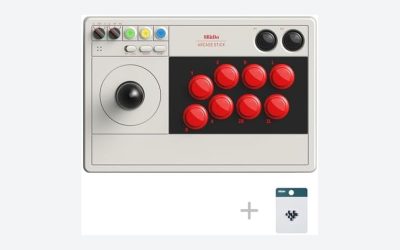
 8Bitdo Arcade Stick for Switch & Windows
- Compatible with Switch and Windows.
- Supports ultimate software - customize button mapping and…
- Dynamic button layout - button mapping changes with…
 MAYFLASH F300 Arcade Fight Stick Joystick for
- Compatible with Switch/Switch 2, PS4, PS3, Xbox Series…
- Compatible with Sanwa Denshi buttons and joystick that…
- Supports the XINPUT and DINPUT when being used…
 Nacon Daija Arcade Fight Stick Officially Licensed
- Nacon Daija arcade stick officially licensed for PlayStation…
- A leading brand among professional fighting game players…
- Buttons are fully configurable using the Nacon Daija…
| Product | Key specs | |
|---|---|---|
| 8Bitdo Arcade Stick for Switch & Windows | Compatible with Switch and Windows. Supports ultimate software - customize button mapping and… Dynamic button layout - button mapping changes with… | Check price |
| MAYFLASH F300 Arcade Fight Stick Joystick for | Compatible with Switch/Switch 2, PS4, PS3, Xbox Series… Compatible with Sanwa Denshi buttons and joystick that… Supports the XINPUT and DINPUT when being used… | Check price |
| Nacon Daija Arcade Fight Stick Officially Licensed | Nacon Daija arcade stick officially licensed for PlayStation… A leading brand among professional fighting game players… Buttons are fully configurable using the Nacon Daija… | Check price |
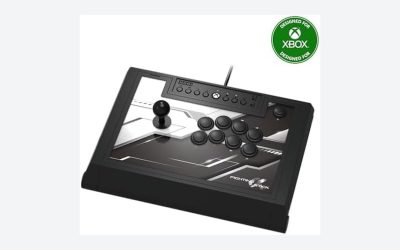
 8Bitdo Arcade Stick for Xbox Series X|S 8Bitdo Arcade Stick for Xbox Series X|S | First Xbox-licensed wireless arcade stick worldwide. Compatible with Xbox Series X|S, Xbox One, Windows… Wireless 2.4G or wired USB connectivity. | Check price |
As an Amazon Associate we earn from qualifying purchases at no extra cost to you.
Decide These 3 Things First
Before diving into specific component models and button layouts, establish these fundamental criteria to narrow down your choices immediately:
- Your Primary Gaming Platform: Fight sticks require specific encoder hardware to talk to modern consoles. A stick designed specifically for PC and Nintendo Switch will not natively connect to a PlayStation 5 or Xbox Series X without costly third-party adapters. Decide where 80% of your play time will happen.
- Your Play Location (Lap vs. Desk): A lightweight, compact stick (under 4 lbs) is easy to store on a bookshelf, but it will slide continuously if played on your lap. Conversely, a heavy tournament-grade stick (7+ lbs) provides solid stability on your lap but takes up significant desk real estate (over 150 square inches).
- Your Customization Intent: Determine whether you want a sealed, plug-and-play unit or a openable chassis with quick-release hatches that allows you to swap out art, buttons, and joystick tension springs down the line.
1. Physical Size, Weight, and Lap Stability
The overall footprint and total weight of a fight stick dictate its stability during intense physical inputs. Arcade sticks broadly fall into three footprint categories:
Compact Sticks: Typically measuring around 11 x 7.5 x 2.2 inches and weighing between 3.0 and 4.5 lbs (such as entry-level models like the MAYFLASH F300 at $59.95 or the 8Bitdo Arcade Stick for Switch & Windows at $79.99). These offer exceptional portability and easy storage in standard media console drawers, but their minimal weight means rapid joystick sweeps can cause the base to tilt off table surfaces unless firmly anchored.
Full-Sized / Tournament Sticks: Ranging from 15 x 10 x 4.5 inches to 18 x 12 x 5 inches, weighing between 6.5 and 8.5 lbs (such as the Nacon Daija Arcade Fight Stick at $249.99). These larger dimensions provide a wide surface area that bridges your legs comfortably when seated on a couch or gaming chair. The additional weight acts as a natural anchor, keeping the unit perfectly still during complex directional motions like 360-degree rotations.
Look for a bottom plate covered either by wide, high-density EVA foam padding (at least 1/8-inch thick) or non-slip rubber pads measuring at least 2 x 4 inches on all four corners to prevent desktop scuffing and leg slipping.
2. Chassis Materials and Structural Integrity
The construction materials of the enclosure determine both long-term structural integrity and tactile comfort during extended play sessions. Manufacturers primarily use three chassis configurations:
- Injection-Molded ABS Plastic: Found in most budget to mid-range sticks. High-impact ABS plastic is lightweight, resistant to cracking, and stays warm to the touch. Ensure the top panel features a matte or textured finish, as high-gloss plastic rapidly collects skin oils and fingerprints.
- Metal Base Plates with Acrylic Top Panels: Mid-tier and premium sticks feature heavy powder-coated steel or aluminum bottom plates (1.2mm to 1.5mm thick) paired with a clear acrylic top sheet (2.0mm to 3.0mm thick). The steel plate provides structural rigidity and lower center-of-gravity, while the acrylic panel lets you slide custom artwork printed on heavy cardstock directly beneath the buttons.
- All-Aluminum Unibody Enclosures: Premium custom enclosures utilize extruded or CNC-machined aluminum. While virtually indestructible and premium in feel, solid metal chassis can feel cold on bare wrists initially and carry a premium price tag.
3. Lever and Button Construction: Sanwa vs. Proprietary Parts
The heart of any arcade fight stick lies in its mechanical components: the joystick lever and the action buttons. The standard by which all fight sticks are judged is modern Japanese arcade hardware, primarily manufactured by Sanwa Denshi or Seimitsu.
The Joystick Lever: Standard arcade levers utilize microswitches rated for 1 million to 5 million actuations. Japanese microswitch levers (like the Sanwa JLF) feature a light spring tension (approx. 0.9 to 1.1 lbs of resistance) and a short travel distance (around 5mm throw to activate). Korean-style levers, by contrast, use synthetic rubber grommets instead of metal springs, providing higher resistance and a faster snap back to neutral position, which caters to specific game sub-genres.
Check the internal restrictive gate installed on the bottom of the lever assembly:
- Square Gate: The industry standard. Features sharp 90-degree corners that make finding down-diagonal inputs (crouch-blocking) effortless.
- Octagonal Gate: Features eight distinct notches, providing a smooth circular feel for players who prefer tactile feedback for all eight cardinal and diagonal directions.
Action Buttons: Japanese action buttons (typically 30mm diameter for main attack buttons, 24mm for start/option buttons) use low-operating-force microswitches requiring just 1.5 to 2.2 ounces (45 to 65 grams) of pressure to actuate. High-quality buttons feature quick-snap housing clips that mount into 1.5mm to 3.0mm thick panels and utilize standard 0.110-inch (2.8mm) quick-connect spade terminals for easy wire swapping.
4. Ergonomics, Wrist Clearance, and Cable Management
A poorly designed chassis can lead to wrist strain within minutes. Pay close attention to the space between the lower row of buttons and the bottom edge of the controller housing. You need at least 2.5 to 3.5 inches of flat or gently sloped palm resting space below the control surface.
High-end chassis incorporate a 10 to 15-degree sloped wrist bevel along the front edge. This subtle gradient prevents the sharp plastic or metal rim from pressing into your ulnar nerve while holding down directional inputs.
For cable management, look for these specific physical standards:
- Cable Length: A minimum of 9.8 feet (3.0 meters) to reach comfortably from your living room media console or TV stand to your seating area without taut wires hanging in mid-air.
- Connection Style: Detachable USB-C cables are preferred over fixed cables. If fixed, ensure the cable exit port features a heavy-duty strain relief boot extending at least 0.75 inches from the housing. Built-in cable storage bays with spring-loaded trap doors offer the cleanest storage for living room environments.
- Wireless Latency: If choosing a wireless unit (like the 8Bitdo Arcade Stick for Xbox at $95.99), ensure it supports a dedicated 2.4GHz wireless USB receiver in addition to Bluetooth. 2.4GHz wireless offers input latency under 8 milliseconds, whereas standard Bluetooth can introduce variable delay between 12 to 25 milliseconds, which disrupts tight combo timing.
5. Understanding Price Tiers and Features
Arcade fight sticks generally break down into three distinct quality and price brackets:
Budget Tier ($50 – $90): Includes options like the MAYFLASH F300 ($59.95) and standard 8Bitdo models ($79.99). These controllers feature proprietary microswitches and lightweight plastic housings. They serve as excellent entry points, though intense players may wear out stock button springs within 6 to 12 months. Many budget sticks in this tier rely on universal compatibility modes, requiring you to plug an official console controller into an passthrough USB port on the stick to negotiate console security handshakes.
Mid-Range Tier ($100 – $180): Features heavier chassis (5.0 to 6.5 lbs), authentic Sanwa or licensed Hori Hayabusa components out of the box, dedicated platform switching toggles, and integrated cable storage compartments. This is the sweet spot for balance between component longevity and cost.
Premium Tier ($200 – $350+): Represented by official licensed hardware such as the Nacon Daija ($249.99). This class features one-touch pop-up hood access (pneumatic or mechanical latching), fully modular wiring harnesses organized by color-coded guides, heavy steel base construction, integrated 3.5mm headset audio jacks, clear artwork acrylic overlays, and included conversion tools (such as dual-head screwdrivers and spare lever tops).
6. Warranty Coverage and Internal Serviceability
Because fighting games subject hardware to repeated, aggressive physical inputs, internal component replacement is an inevitability rather than an exception over a multi-year lifespan. Ensure the manufacturer supports easy opening without voiding your warranty coverages.
Standard manufacturer warranties cover defects for 1 year from purchase date. However, verify if opening the bottom casing breaks a tamper-evident seal. Tier-one manufacturers encourage user modification and construct their interiors with quick-disconnect 0.110-inch wiring spade connectors attached to every button, avoiding hard-soldered joints entirely. This means replacing a worn microswitch or swapping to a different button color requires zero soldering tools and under five minutes of effort.
7. Packaging, Assembly, and Desktop Integration
When unboxing your fight stick, inspect the assembly setup before making permanent wiring modifications. Most pre-assembled fight sticks arrive completely ready for plug-and-play operation, though premium sticks include both a traditional “ball-top” handle and a teardrop “bat-top” handle inside the packaging.
For home media room integration, consider the controller’s vertical profile. Total height from table surface to the tip of the joystick sphere usually spans 3.8 to 4.5 inches. Ensure your desk keyboard tray or media cabinet shelving offers at least 5.0 inches of vertical clearance if you plan to slide the controller away when not in use.
Spec Checklist
| Feature / Spec | Budget Tier ($50 – $90) | Mid-Range Tier ($100 – $180) | Premium Tier ($200 – $350+) |
|---|---|---|---|
| Average Weight | 3.0 – 4.5 lbs (1.3 – 2.0 kg) | 4.5 – 6.5 lbs (2.0 – 2.9 kg) | 6.5 – 9.0 lbs (2.9 – 4.1 kg) |
| Overall Dimensions | ~11″ x 7.5″ x 2.2″ | ~13.5″ x 9″ x 2.5″ | ~15.5″ x 11″ x 4.5″ |
| Stock Components | Proprietary OEM Clones | Hori Hayabusa or Sanwa Denshi | Sanwa Denshi / Seimitsu Professional |
| Connection Type | Fixed USB or Passthrough | Detachable 9.8ft USB-C / 2.4GHz | Braided Detachable USB-C with Lock |
| Chassis Access | Bottom Plate Screws (4-6) | Bottom Plate Screws w/ Modular Wiring | One-Touch Latch / Hinged Hood |
| Audio Passthrough | Rarely Included | 3.5mm Jack (Select Models) | 3.5mm Headset Jack with Mute Controls |
Red Flags
Avoid buying an arcade stick if you encounter any of these major hardware red flags:
- Directly Soldered Button Terminals: If wires are soldered straight to the button pins rather than using removable 0.110-inch spade connectors, replacing a dead button requires a soldering iron and desoldering pump.
- Unsecured Micro-USB Connections: Older budget controllers using standard Micro-USB input jacks suffer high failure rates due to physical wiggle fatigue. Only buy detachable cables utilizing locked USB-C or aviation-style screw-collar ports.
- Missing Control Panel Lock Switch: A quality stick must feature a hardware switch that disables the Start, Select, and Home buttons. Without this lock, an accidental press during a match can bring up a pause menu and result in an automatic forfeit.
- Chassis Weight Below 2.5 lbs: Ultra-light controllers shift across surfaces during normal gameplay unless permanently mounted or taped down.
- Non-Standard Button Hole Diameters: Stick to controllers using standardized 30mm action button and 24mm option button cutouts. Proprietary button sizes prevent you from upgrading to arcade-grade components later.
FAQ
Are expensive Japanese Sanwa parts really necessary for beginners?
While beginners can certainly learn basic motion inputs on proprietary budget components, standard Sanwa parts offer significantly higher manufacturing tolerances and predictable spring returns. OEM budget parts often display inconsistent actuation forces across the eight buttons and can fail after a few hundred hours of heavy play, whereas authentic Sanwa buttons are rated for up to 3 million presses.
What is the functional difference between a ball-top and a bat-top handle?
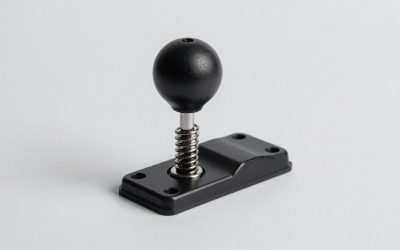
A ball-top features a 35mm spherical knob gripped primarily with the fingertips and palm facing upward, standard in Japanese arcades. A bat-top features an elongated teardrop profile (popular in classic American arcades) designed to be gripped with the full hand from the side. Both mount to standard M6 threaded lever shafts and can be unscrewed and swapped in under two minutes.
Can I use a wireless arcade stick for competitive fighting game play?
For casual matches and solo play, 2.4GHz wireless setups are extremely reliable. However, tournament play heavily favors wired USB-C connections. Wired connections guarantee zero wireless signal interference from crowded environments, eliminate battery charge anxiety, and avoid tedious wireless sync pairing procedures when switching between gaming setups.
How difficult is it to customize the graphic art on top of the stick?
It depends entirely on the top panel design. Sticks featuring a clear acrylic top sheet allow you to simply remove the top ring screws, lift the clear panel, drop in a pre-cut paper graphic print, and screw the cover back down. Sticks with direct-printed plastic tops require purchasing a separate aftermarket acrylic panel conversion kit to install custom artwork.