WiFi 7 has moved from bleeding-edge novelty to genuinely practical upgrade in 2026, and the router shelf now reflects that shift. With multi-gig internet plans becoming common and homes packed with 4K streamers, cloud-gaming consoles, and dozens of smart devices, the 320MHz channels, Multi-Link Operation, and 4K-QAM that define the standard finally have something to prove. The result is lower latency, fatter throughput, and a network that stays composed when everyone piles on at once.
The catch is that “WiFi 7” covers everything from an affordable dual-band unit to a tri-band mesh monster with 10G ports, so picking the right one depends on your internet speed, square footage, and device count rather than the marketing number on the box. Below we break down what actually matters when shopping, then walk through five of the strongest routers available right now.
Our top picks
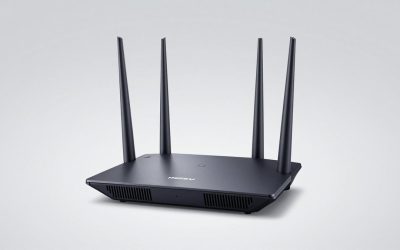
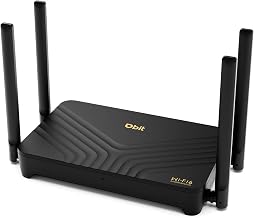
 TP-Link Tri-Band BE9700 WiFi 7 Router
- 𝐍𝐞𝐱𝐭-𝐆𝐞𝐧 𝐖𝐢-𝐅𝐢 𝟕 - Optimize performance on latest…
- 𝟕-𝐒𝐭𝐫𝐞𝐚𝐦, 𝐁𝐄𝟗𝟕𝟎𝟎 𝐓𝐫𝐢-𝐁𝐚𝐧𝐝 𝐖𝐢-𝐅𝐢 𝟕 𝐒𝐩𝐞𝐞𝐝𝐬 - Delivers…
- 𝐌𝐚𝐱𝐢𝐦𝐢𝐳𝐞𝐝 𝐂𝐨𝐯𝐞𝐫𝐚𝐠𝐞 - Up to 2,600 sq
 TP-Link Tri-Band BE9300 WiFi 7 Router
- BE9300 Tri-Band Wi-Fi 7 Speeds: Archer BE550 features…
- Unmatched Performance for Streaming and Gaming: Ensures seamless…
- Extend Your Coverage with EasyMesh: Add EasyMesh-compatible routers,…
 TP-Link Dual-Band BE3600 Wi-Fi 7 Router Archer
- 𝐅𝐮𝐭𝐮𝐫𝐞-𝐏𝐫𝐨𝐨𝐟 𝐘𝐨𝐮𝐫 𝐇𝐨𝐦𝐞 𝐖𝐢𝐭𝐡 𝐖𝐢-𝐅𝐢 𝟕: Powered by…
- 𝐁𝐄𝟑𝟔𝟎𝟎 𝐃𝐮𝐚𝐥-𝐁𝐚𝐧𝐝 𝐖𝐢-𝐅𝐢 𝟕 𝐑𝐨𝐮𝐭𝐞𝐫: Delivers up to…
- 𝐔𝐧𝐥𝐞𝐚𝐬𝐡 𝐌𝐮𝐥𝐭𝐢-𝐆𝐢𝐠 𝐒𝐩𝐞𝐞𝐝𝐬 𝐰𝐢𝐭𝐡 𝐃𝐮𝐚𝐥 𝟐.𝟓 𝐆𝐛𝐩𝐬 𝐏𝐨𝐫𝐭𝐬…
| Product | Key specs | |
|---|---|---|
| TP-Link Tri-Band BE9700 WiFi 7 Router | 𝐍𝐞𝐱𝐭-𝐆𝐞𝐧 𝐖𝐢-𝐅𝐢 𝟕 - Optimize performance on latest… 𝟕-𝐒𝐭𝐫𝐞𝐚𝐦, 𝐁𝐄𝟗𝟕𝟎𝟎 𝐓𝐫𝐢-𝐁𝐚𝐧𝐝 𝐖𝐢-𝐅𝐢 𝟕 𝐒𝐩𝐞𝐞𝐝𝐬 - Delivers… 𝐌𝐚𝐱𝐢𝐦𝐢𝐳𝐞𝐝 𝐂𝐨𝐯𝐞𝐫𝐚𝐠𝐞 - Up to 2,600 sq | Check price |
| TP-Link Tri-Band BE9300 WiFi 7 Router | BE9300 Tri-Band Wi-Fi 7 Speeds: Archer BE550 features… Unmatched Performance for Streaming and Gaming: Ensures seamless… Extend Your Coverage with EasyMesh: Add EasyMesh-compatible routers,… | Check price |
| TP-Link Dual-Band BE3600 Wi-Fi 7 Router Archer | 𝐅𝐮𝐭𝐮𝐫𝐞-𝐏𝐫𝐨𝐨𝐟 𝐘𝐨𝐮𝐫 𝐇𝐨𝐦𝐞 𝐖𝐢𝐭𝐡 𝐖𝐢-𝐅𝐢 𝟕: Powered by… 𝐁𝐄𝟑𝟔𝟎𝟎 𝐃𝐮𝐚𝐥-𝐁𝐚𝐧𝐝 𝐖𝐢-𝐅𝐢 𝟕 𝐑𝐨𝐮𝐭𝐞𝐫: Delivers up to… 𝐔𝐧𝐥𝐞𝐚𝐬𝐡 𝐌𝐮𝐥𝐭𝐢-𝐆𝐢𝐠 𝐒𝐩𝐞𝐞𝐝𝐬 𝐰𝐢𝐭𝐡 𝐃𝐮𝐚𝐥 𝟐.𝟓 𝐆𝐛𝐩𝐬 𝐏𝐨𝐫𝐭𝐬… | Check price |
 TP-Link Deco 7 Pro BE63 Tri-Band WiFi TP-Link Deco 7 Pro BE63 Tri-Band WiFi | 𝐅𝐞𝐚𝐭𝐮𝐫𝐞-𝐑𝐢𝐜𝐡 𝐖𝐢-𝐅𝐢 𝐁𝐮𝐢𝐥𝐭 𝐭𝐨 𝐋𝐚𝐬𝐭: Get expansive whole-home… 𝗩𝗮𝘀𝘁 𝗠𝗲𝘀𝗵 𝗖𝗼𝘃𝗲𝗿𝗮𝗴𝗲 & 𝗗𝗲𝘃𝗶𝗰𝗲 𝗖𝗮𝗽𝗮𝗰𝗶𝘁𝘆: The 2-pack… 𝐁𝐄𝟏𝟎𝟎𝟎𝟎 𝐓𝐫𝐢-𝐁𝐚𝐧𝐝 𝐖𝐢-𝐅𝐢 𝟕 𝐒𝐩𝐞𝐞𝐝𝐬: Delivers up to… | Check price |
 NETGEAR Nighthawk Dual-Band WiFi 7 Router NETGEAR Nighthawk Dual-Band WiFi 7 Router | Check price | |
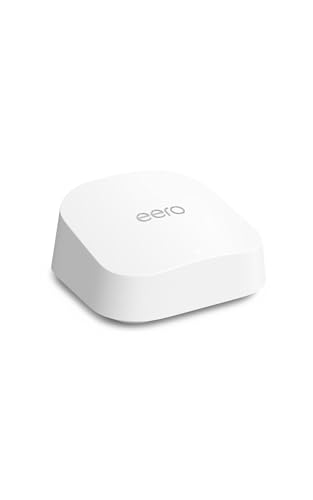 Amazon eero 7 dual-band mesh Wi-Fi 7 Amazon eero 7 dual-band mesh Wi-Fi 7 | eero 7 helps you future-proof your network and… eero 7 minimizes network disruptions to help ensure… Support for internet plans up to 2.5 Gbps… | Check price |
 NETGEAR Nighthawk Tri-Band WiFi 7 Router NETGEAR Nighthawk Tri-Band WiFi 7 Router | FASTER, FARTHER, MORE RELIABLE WIFI: A dedicated tri-band… Pairs with your existing modem or gateway via… Download the free Nighthawk app on iOS or… | Check price |
 Amazon eero Pro 7 tri-band mesh Wi-Fi Amazon eero Pro 7 tri-band mesh Wi-Fi | eero Pro 7 brings next-generation speed and reliability… eero Pro 7 helps eliminate dead spots, so… Support for internet plans up to 5 Gbps… | Check price |
As an Amazon Associate we earn from qualifying purchases at no extra cost to you.
⚡ Save on Your Next PC — Amazon Prime
Prime members get fast free shipping on the systems above, plus early access to Prime Day & Black Friday PC deals. New members get a 30-day free trial.
Watch: Best WIFI 7 Router 2026 — Video Review
How to Choose a WiFi 7 Router
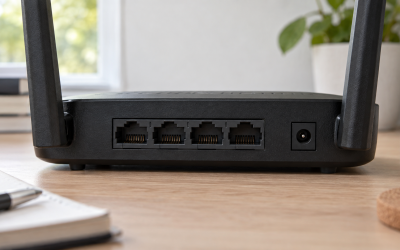
- Match the WAN port to your plan: A 2.5G port suits most fiber and cable plans, but if you pay for 5-gig or 10-gig service, look for a 10G port like the one on the Archer BE600 or Nighthawk RS700S so the router is not the bottleneck.
- Bands and streams: Tri-band models (like the BE9300 or Deco 7 Pro) reserve a full 6GHz lane for MLO and backhaul, while dual-band units such as the Archer BE230 keep costs down for smaller homes with fewer simultaneous demands.
- Coverage vs. a single point: A standalone router works up to roughly 2,000-3,500 sq. ft.; beyond that, a mesh kit like the Deco 7 Pro BE63 with wired backhaul delivers far more reliable whole-home performance.
- Wired backhaul and LAN speed: If you move large files or run a NAS, prioritize multiple 2.5G LAN ports so your wired devices aren’t stuck at gigabit while the wireless races ahead.
- Security and management: Built-in suites such as TP-Link HomeShield or NETGEAR Armor add ongoing protection, VPN support, and parental controls that are worth factoring into the long-term cost.
The Best WiFi 7 Routers Reviewed
TP-Link Archer BE600 (BE9700)
This tri-band flagship is the all-rounder to beat, pairing a 10G port and a 2.5G port with three additional 2.5G LAN jacks so both your internet and your wired rig get room to breathe. It covers up to 2,600 sq. ft. and handles around 120 devices, and the 320MHz channel width means the 6GHz band delivers the kind of raw throughput that makes WiFi 7 worth the upgrade. HomeShield security and VPN support round out a genuinely complete package.
TP-Link Archer BE550 (BE9300)
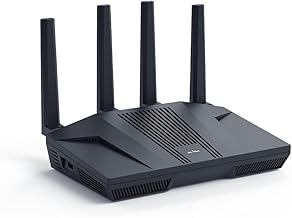
A step down in price but not in polish, the BE550 leans on six internal antennas and full 2.5G ports across the board for a clean, tidy footprint. Its 6-stream design and EasyMesh support make it a smart pick for a 2,000 sq. ft. home that might grow into a mesh later. It hits the sweet spot for buyers who want serious WiFi 7 performance without paying for 10G ports they won’t use.
TP-Link Deco 7 Pro BE63 (2-Pack)
When one router can’t reach every corner, this tri-band BE10000 mesh system fixes it. The two-pack blankets large multi-story homes with 6-stream, 10 Gbps-class speed, and four 2.5G ports per unit make wired backhaul painless. Smart internal antennas and HomeShield keep the whole network fast and protected, making it the go-to for sprawling floor plans and dense smart-home setups.
NETGEAR Nighthawk RS700S
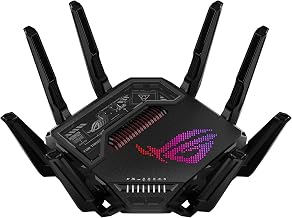
For enthusiasts chasing headroom, the RS700S is a tri-band BE19000 beast rated up to 19 Gbps with a 10 Gig internet port and coverage up to 3,500 sq. ft. It is overkill for a basic plan, but if you have multi-gig fiber and a house full of high-bandwidth users, few single units keep up as effortlessly. A year of Armor security sweetens an already premium proposition.
Amazon eero Pro 7
The eero Pro 7 is the pick for people who value simplicity as much as speed. This tri-band mesh unit supports internet plans up to 5 Gbps and covers around 2,000 sq. ft. per node, all managed through eero’s famously frictionless app. It expands effortlessly, plays nicely with smart-home ecosystems, and hides its complexity behind an interface anyone in the household can navigate.
Frequently Asked Questions
Do I need WiFi 7 if my internet is only 1 Gbps?
You won’t max out the headline speeds, but you’ll still benefit from lower latency, better handling of many simultaneous devices, and Multi-Link Operation that keeps connections stable. It’s also future-proofing for when you eventually upgrade your plan.
Will WiFi 7 work with my older phones and laptops?
Yes. WiFi 7 is fully backward compatible, so WiFi 6, 5, and older devices connect normally. They just won’t access WiFi 7-exclusive features like 320MHz channels, which are reserved for compatible hardware.
Should I buy a single router or a mesh system?
For homes up to about 2,000-3,500 sq. ft. on a single floor, a standalone router like the Archer BE600 is ideal. For larger or multi-story homes with dead zones, a mesh kit such as the Deco 7 Pro BE63 delivers more consistent coverage.
What is Multi-Link Operation (MLO)?
MLO lets a device use multiple bands simultaneously, combining them for higher throughput and switching between them to dodge congestion. It’s one of WiFi 7’s signature upgrades and improves both speed and reliability on compatible devices.
Final Thoughts
The right WiFi 7 router in 2026 is the one that matches your internet plan and living space rather than the one with the biggest number. The Archer BE600 is the standout all-rounder, the Deco 7 Pro BE63 owns large homes, and the eero Pro 7 wins on ease of use. Buy for the network you’ll have in two years, not just today, and you’ll get an upgrade that keeps paying off.