Storage prices have been a moving target for the last two years, and the sub-$100 tier is where the confusion is worst. You’ll see a 4TB QLC drive and a 500GB TLC drive sitting at the same price, one advertising 7,000 MB/s sequential reads it can only sustain for a few seconds, the other quietly delivering consistent performance under real load. For gaming specifically, the headline number on the box is one of the least useful things about a drive — DirectStorage, shader cache behavior, and sustained write performance during a 120GB install matter far more than a peak read figure you’ll never see.
This guide covers the drives genuinely worth buying under $100 in 2026, plus a couple of flagship options included for context — because knowing what $180 buys you makes it much clearer why the $80 drive is the smarter purchase for most gaming builds. We’ve prioritized DRAM presence, sustained write speed, thermal behavior in cramped M.2 slots, and warranty terms over marketing specs. Prices in this bracket move weekly, so treat capacity-per-dollar as the deciding factor rather than brand loyalty.
Our top picks
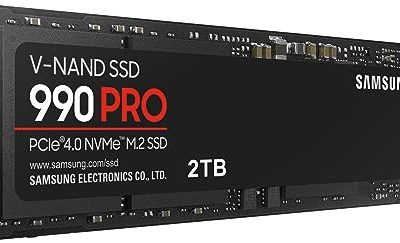
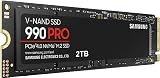
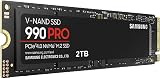
 Samsung SSD 990 PRO 2TB
Read and write speeds up to 7450/6900 MB/s suit demanding workloads
Over 55% random performance improvement is noted versus the 980 PRO
Up to 50% better performance per watt reduces power draw
PCIe 4.0 speeds depend on a compatible motherboard slot to reach full potential
2TB capacity may require a larger model for extensive game libraries
 Kingston NV3 1TB M.2 2280 NVMe SSD
- Latest SATA 3 Controller
- Interface: SATA III 6Gb/s
- Static and Dynamic Wear Leveling, Bad Block Management,…
 Samsung SSD 990 PRO 1TB
- Get random read/write speeds that are 40%/55% faster…
- Use less power and get more performance
- Samsung's own nickel-coated controller delivers effective thermal control
| Product | Key specs | |
|---|---|---|
| Samsung SSD 990 PRO 2TB | Check price | |
| Kingston NV3 1TB M.2 2280 NVMe SSD | Latest SATA 3 Controller Interface: SATA III 6Gb/s Static and Dynamic Wear Leveling, Bad Block Management,… | Check price |
| Samsung SSD 990 PRO 1TB | Get random read/write speeds that are 40%/55% faster… Use less power and get more performance Samsung's own nickel-coated controller delivers effective thermal control | Check price |
 Samsung SSD 9100 PRO 2TB Samsung SSD 9100 PRO 2TB | BREAKTHROUGH PCIe 5.0 PERFORMANCE: Supercharge your workflow and… EVERY TASK, TURBOCHARGED: Speed past productivity limits THINK FAST, CREATE FASTER: With random read/write speeds… | Check price |
 SANDISK 500GB Optimus 5100 NVMe SSD SANDISK 500GB Optimus 5100 NVMe SSD | SPEED UP PROJECTS CREATE AND STORE MORE IT GOES WHERE YOU GO | Check price |
| Samsung SSD 9100 PRO 1TB | BREAKTHROUGH PCIe 5.0 PERFORMANCE: Supercharge your workflow and… EVERY TASK, TURBOCHARGED: Speed past productivity limits THINK FAST, CREATE FASTER: With random read/write speeds… | Check price |
 WD_Black SN7100 1TB NVMe SSD WD_Black SN7100 1TB NVMe SSD | This product has been replaced by our latest… OCTANE GAMING BUILT | Check price |
 WD_Black SN7100 2TB NVMe SSD WD_Black SN7100 2TB NVMe SSD | This product has been replaced by our latest… OCTANE GAMING BUILT | Check price |
As an Amazon Associate we earn from qualifying purchases at no extra cost to you.
⚡ Save on Your Next PC — Amazon Prime
Prime members get fast free shipping on the systems above, plus early access to Prime Day & Black Friday PC deals. New members get a 30-day free trial.
Watch: Best SSD Under $100 — Video Review
How to Choose SSD Under $100
- Capacity first, speed second: Under $100, aim for 1TB minimum. Modern titles routinely exceed 100GB, and a half-full drive performs measurably better than one running at 90% capacity. A slower 1TB drive beats a faster 500GB drive for almost every gaming use case.
- PCIe 4.0 is the sweet spot: Gen 5 drives cost significantly more, run hotter, and deliver almost no real-world gaming benefit today. A solid PCIe 4.0 x4 drive saturates what current game engines and DirectStorage implementations actually request.
- Check for DRAM or HMB: Budget drives often drop the DRAM cache to hit a price point. Host Memory Buffer (HMB) is an acceptable compromise on a desktop with RAM to spare, but avoid DRAM-less drives entirely if you’re doing heavy write work alongside gaming.
- Sustained write matters more than peak: Every drive advertises a burst speed backed by an SLC cache. Once that cache fills — usually 100-200GB into a large transfer — speeds can drop hard. Look for reviews that test past the cache, not just CrystalDiskMark screenshots.
- Confirm the form factor and cooling: M.2 2280 fits virtually every modern motherboard and the PS5, but check clearance under your GPU. If your board lacks an M.2 heatsink, budget $10 for one; thermal throttling on a hot drive costs more performance than any spec-sheet difference.
The Best Picks Reviewed
Kingston NV3 1TB
The most sensible sub-$100 purchase on this list — 1TB of PCIe 4.0 storage at up to 6,000 MB/s, which is more than enough headroom for any current game engine. It’s a DRAM-less design leaning on HMB, so it won’t win sustained-write benchmarks, but for a game library drive that’s read-heavy by nature, the compromise is invisible in practice.
SanDisk Optimus 5100 500GB
A well-built PCIe 4.0 drive with up to 6,600 MB/s reads, and comfortably the cheapest entry point here. At 500GB it’s better suited as a dedicated boot or scratch drive than a primary game library — but if you’re adding storage to an existing build or reviving an older system, it’s excellent value.
Samsung 990 PRO 1TB
Usually sitting just above the $100 line, but it drops into range often enough to be worth watching. Full DRAM cache, 7,450 MB/s reads, and Samsung’s controller efficiency make it the best-behaved drive here under sustained load — if you can catch it on sale, nothing at this capacity performs better.
Samsung 990 PRO 2TB
The step-up option for anyone who’s tired of uninstalling games to make room. It’s meaningfully over budget, but the price-per-terabyte is better than the 1TB model and the performance is identical — worth stretching for if your build is a long-term one.
Samsung 9100 PRO 1TB
Included for context rather than as a budget recommendation: PCIe 5.0 with up to 14,700 MB/s reads, roughly double the sequential throughput of anything else here. Gaming frame times see essentially no benefit from this today, and it runs hot enough to demand active cooling — buy it for content creation workloads, not for your Steam library.
Frequently Asked Questions
Is a PCIe 5.0 SSD worth it for gaming in 2026?
Not yet for most people. Game load times are bottlenecked by decompression and engine overhead long before they’re limited by a Gen 4 drive’s bandwidth, and the price premium plus cooling requirements are hard to justify. A quality Gen 4 drive delivers effectively the same gaming experience for a fraction of the cost.
How much SSD capacity do I actually need for gaming?
1TB is the realistic minimum in 2026. Three or four AAA installs will consume most of it, and leaving 10-15% free space is important for controller wear-leveling and sustained performance. 2TB is the comfortable answer if your budget allows.
Does a DRAM-less SSD hurt gaming performance?
Rarely in any way you’d notice. Gaming workloads are dominated by random reads, which HMB-equipped drives handle well. The gap appears in large sustained writes — cloning drives, video work, mass file transfers — not in loading a save file.
Can I use these drives in a PS5?
Any M.2 2280 PCIe 4.0 drive in this list meets Sony’s requirements, provided you add a heatsink. Sony recommends at least 5,500 MB/s read speeds, which the Kingston NV3, SanDisk Optimus 5100, and both 990 PRO models all exceed.
Final Thoughts
For most gaming builds under $100, the Kingston NV3 1TB is the right call — it hits the capacity that actually matters without paying for speed you can’t use. If you only need a secondary or boot drive, the SanDisk Optimus 5100 500GB is the cheapest credible option here. And if you’re willing to watch for a sale, the Samsung 990 PRO 1TB dips into budget territory often enough to be worth setting an alert for — it’s the best-performing drive that can realistically land under $100.