Key takeaways
- For battery life: Snapdragon X laptops like the Surface Laptop and HP OmniBook lead the pack.
- For app compatibility: Intel guarantees the broadest support for every Windows program and game.
- For integrated graphics: AMD Ryzen’s Radeon graphics handle light gaming best without a dedicated GPU.
- For on-device AI: Snapdragon X’s high-TOPS NPU powers Copilot+ features most fully.
- For value multitasking: AMD Ryzen and Intel Core chips offer strong multi-core performance per dollar.
For years the laptop CPU debate was simply Intel versus AMD. Now Qualcomm’s Snapdragon X chips have crashed the party, bringing Arm-based efficiency, long battery life, and dedicated AI acceleration to Windows laptops. Choosing between these three platforms shapes everything from battery life and app compatibility to how well your machine handles the new wave of Copilot+ AI features.
This comparison breaks down what each platform does best, using real Copilot+ and productivity laptops so you can decide which architecture fits how you actually work and play.
Our top picks
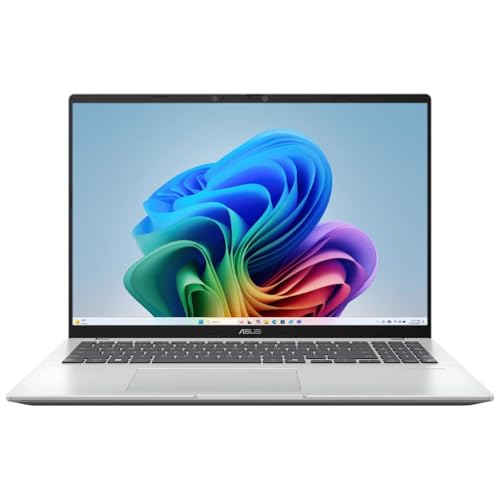 ASUS Vivobook 16" Copilot+ PC Laptop
- ASUS Vivobook 16 Laptop
- Snapdragon X - X126100 up to 3.0 GHz…
- 16GB LPDDR5X RAM
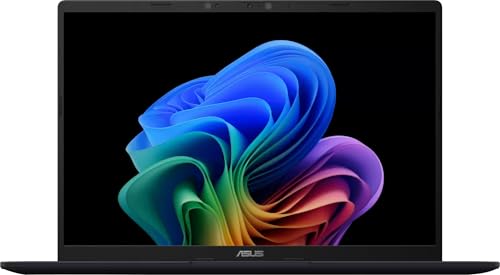 ASUS Vivobook 14
- 14-inch FHD+ screen with 1920 x 1200 (WUXGA)…
- Snapdragon X processor with Qualcomm Adreno GPU and…
- 512GB SSD provides fast boot times, quick file…
| Product | Key specs | |
|---|---|---|
| ASUS Vivobook 16" Copilot+ PC Laptop | ASUS Vivobook 16 Laptop Snapdragon X - X126100 up to 3.0 GHz… 16GB LPDDR5X RAM | Check price |
 HP OmniBook 5 14 inch Next Gen HP OmniBook 5 14 inch Next Gen | Check price | |
| ASUS Vivobook 14 | 14-inch FHD+ screen with 1920 x 1200 (WUXGA)… Snapdragon X processor with Qualcomm Adreno GPU and… 512GB SSD provides fast boot times, quick file… | Check price |
 GMKtec EVO-X2 AI Mini PC AMD Ryzen GMKtec EVO-X2 AI Mini PC AMD Ryzen | EVOLUTION AMD RYZEN AI MAX+ 395 MINI PC… AI NPU with XDNA 2 ARCHITECTURE - Powered… AMD RADEON 8090S iGPU GAMING PC - The… | Check price |
 GMKtec Mini PC Intel Core i7-1185G7 GMKtec Mini PC Intel Core i7-1185G7 | GMKtec M2 Pro S mini computer is equipped… 16GB DDR4 and 1TB NVME SSD: Desktop computer… 4K UHD & 3 Screens Support: Mini PC… | Check price |
 Intel® Core™ Ultra 7 Processor 270K Plus Intel® Core™ Ultra 7 Processor 270K Plus | Next‑Gen Platform Support: Compatible with Intel 800 Series… High‑Performance Core Configuration: Features up to 24 cores… Ultra‑Fast Boost Clocks: Reaches up to 5.5 GHz… | Check price |
As an Amazon Associate we earn from qualifying purchases at no extra cost to you.
🎮 Get More From Your Setup — Free
Prime Gaming gives you free PC games every month, in-game loot, and a free Twitch channel sub — plus fast free shipping on all the gear above. New members get a 30-day free trial.
Watch: Intel Vs Amd Vs Snapdragon: Full Comparison — Video Review
Quick Verdict
Snapdragon leads on battery life and AI performance for web and productivity work, Intel offers the broadest software compatibility and dependable all-round performance, and AMD traditionally delivers the strongest integrated graphics and multi-core value. For a modern thin-and-light where battery and AI matter most, Snapdragon is compelling; for guaranteed app compatibility, Intel remains the safe choice.
Snapdragon X Platform
Qualcomm’s Snapdragon X chips power a growing lineup of Copilot+ PCs, and their headline strengths are efficiency and on-device AI. The Microsoft Surface Laptop with the new Snapdragon X2 Elite, the ASUS Vivobook with an 8-core Snapdragon X, and the HP OmniBook 5 with a Snapdragon X Plus all pair long battery life with a powerful 45-TOPS-class NPU for AI tasks like live captions and image generation.
The trade-off is app compatibility. Because Snapdragon uses the Arm instruction set, most apps run natively or through emulation smoothly, but a few specialized x86 programs and some games may not run perfectly. For web, office, and AI-first workflows, though, these machines feel fast and last remarkably long on a charge.
Intel and AMD x86 Platforms
Intel and AMD share the x86 architecture that Windows software was built around, which means near-universal compatibility. Intel-powered machines like laptops running Core Ultra and Core i-series chips deliver reliable all-round performance and the widest support for professional and legacy apps. The Lenovo Snapdragon X model in this lineup even markets itself as beating an Intel Core i7, a sign of how competitive the landscape has become.
AMD’s Ryzen chips, meanwhile, are known for strong multi-core performance and class-leading integrated Radeon graphics, making them excellent value for light gaming and creative work without a discrete GPU. Both x86 platforms now offer AI-capable NPUs too, though generally with fewer TOPS than the Snapdragon X series in this class.
Head-to-Head: Which Should You Buy?
- For battery life: Snapdragon X laptops like the Surface Laptop and HP OmniBook lead the pack.
- For app compatibility: Intel guarantees the broadest support for every Windows program and game.
- For integrated graphics: AMD Ryzen’s Radeon graphics handle light gaming best without a dedicated GPU.
- For on-device AI: Snapdragon X’s high-TOPS NPU powers Copilot+ features most fully.
- For value multitasking: AMD Ryzen and Intel Core chips offer strong multi-core performance per dollar.
Frequently Asked Questions
Will all my Windows apps run on a Snapdragon laptop?
Most do, either natively or via emulation. A small number of niche x86 programs and certain games may not run perfectly, so check critical software before switching.
Which platform has the best battery life?
Snapdragon X laptops generally lead, with efficient Arm design delivering all-day and often multi-day runtime for light use.
Is AMD or Intel better for gaming laptops?
AMD’s integrated Radeon graphics are stronger for light gaming without a discrete GPU, but for serious gaming both pair with dedicated NVIDIA or AMD GPUs, where Intel and AMD CPUs both perform well.
Do I need a Copilot+ PC for AI features?
The most advanced on-device AI features require a high-TOPS NPU found in Copilot+ PCs, where Snapdragon X currently offers the most capability in this thin-and-light class.
Final Verdict
There is no single winner, only the right fit. Choose Snapdragon X, as in the Surface Laptop or HP OmniBook 5, if battery life and AI are your priorities. Choose Intel for the broadest, most dependable app compatibility. Choose AMD Ryzen for the best integrated graphics and multi-core value. Match the platform to your workflow and you can’t go wrong.