Key takeaways
- Excellent 1080p/1200p performance at high settings in modern titles.
- DLSS 4 and frame generation boost frame rates in supported games.
- High-refresh displays (144–180Hz) come standard across the tier.
- Strong value versus pricier 5070/5080 laptops.
The RTX 5060 laptop GPU has quietly become the sweet spot of the current gaming laptop lineup. Built on NVIDIA’s Blackwell architecture with DLSS 4 and Multi Frame Generation, it delivers high-refresh 1080p and 1200p gaming without the premium price of the 5070 and 5080 machines. If you want a laptop that runs modern titles at high settings and lasts a few years, this is the tier to shop.
But “RTX 5060 laptop” spans a wide range of chassis, CPUs, cooling designs, and displays—and those choices matter as much as the GPU itself. We compared the leading configurations to help you find the one that fits your games and budget.
Our top picks
 Acer Nitro V 16S AI Gaming Laptop
16-inch WUXGA display covers 100% sRGB for accurate colors
180Hz refresh rate supports smoother fast-paced gameplay
32GB DDR5 memory and 1TB Gen4 SSD suit multitasking and quick loads
Only one of two M.2 slots is available for storage expansion
AI-focused features may go unused in non-creative workflows
 ASUS ROG Strix G16
- Unleash power with Windows 11 Home, an Intel…
- Multitask seamlessly with 16GB of DDR5-5600MHz memory and…
- Immerse yourself in stunning visuals with the smooth…
 Lenovo LOQ 15.6" IPS FHD 144Hz AMD
- Performance That Dominates: Equipped with an AMD Ryzen…
- Stunning Visuals: The 15.6" Full HD IPS LCD…
- Smart Connectivity: Wi-Fi 6 and Bluetooth 5.3 deliver…
| Product | Key specs | |
|---|---|---|
| Acer Nitro V 16S AI Gaming Laptop | Check price | |
| ASUS ROG Strix G16 | Unleash power with Windows 11 Home, an Intel… Multitask seamlessly with 16GB of DDR5-5600MHz memory and… Immerse yourself in stunning visuals with the smooth… | Check price |
| Lenovo LOQ 15.6" IPS FHD 144Hz AMD | Performance That Dominates: Equipped with an AMD Ryzen… Stunning Visuals: The 15.6" Full HD IPS LCD… Smart Connectivity: Wi-Fi 6 and Bluetooth 5.3 deliver… | Check price |
 msi Katana 15 HX Gaming Laptop msi Katana 15 HX Gaming Laptop | Intel Core i7-14650HX and NVIDIA GeForce RTX 5060… 15.6" QHD 165Hz, 100% P3 visuals: Game on… Cooler Boost 5 shared-pipe thermals: Dual fans, multi-heat-pipe… | Check price |
 GIGABYTE Gaming A16 Gaming Laptop GIGABYTE Gaming A16 Gaming Laptop | GIGABYTE GiMATE as Your Smart AI Mate Intel Core i7-13620H Processor NVIDIA GeForce RTX 5060 Laptop GPU | Check price |
 ASUS V16 Gaming Laptop ASUS V16 Gaming Laptop | Check price | |
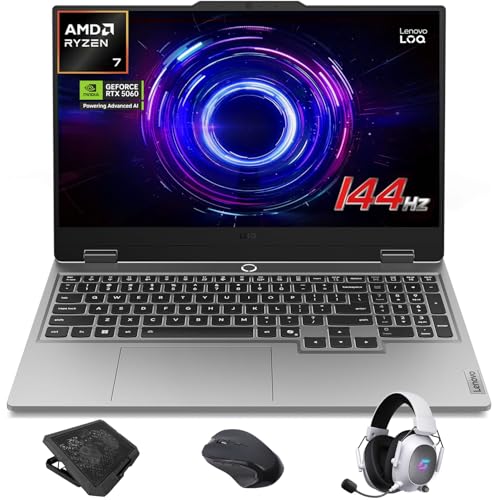 Lenovo LOQ RTX 5060 Gaming Laptop Lenovo LOQ RTX 5060 Gaming Laptop | AI-Enhanced Lenovo LOQ Laptop: The Lenovo LOQ 15.6"… Lenovo AI Engine+ for Ultimate Gaming: Lenovo AI… Immersive Gaming Experience: The 15.6" Full HD IPS… | Check price |
As an Amazon Associate we earn from qualifying purchases at no extra cost to you.
🎮 Get More From Your Setup — Free
Prime Gaming gives you free PC games every month, in-game loot, and a free Twitch channel sub — plus fast free shipping on all the gear above. New members get a 30-day free trial.
Watch: Nvidia Geforce Rtx 5060 Laptop — Video Review
Design & Build
These laptops range from tightly built 15-inch machines to roomier 16-inch chassis with better cooling headroom. The Acer Nitro V 16S AI pairs a 16-inch WUXGA 180Hz panel with a modern Ryzen 7 260 in a relatively slim body, while the ASUS ROG Strix G16 brings ROG’s more aggressive thermal design and a premium 165Hz 16:10 display. Budget-minded builds like the Lenovo LOQ 15.6-inch keep costs down with a 144Hz FHD panel and Luna Grey styling. Cooling capacity is the thing to watch: larger 16-inch shells generally sustain higher clocks under long sessions than compact 15-inch designs.
Performance
Across the board, the RTX 5060 handles modern AAA games at high settings and high frame rates at 1080p/1200p, with DLSS 4 and frame generation stretching that further in supported titles. The bigger performance variable is RAM and CPU pairing: the Acer Nitro V 16S with 32GB of DDR5 and a 1TB Gen 4 SSD is the most future-proof of the group, comfortably handling game streaming, multitasking, and creative work. The MSI Katana 15 HX leans on a strong Intel Core i7-14650HX and a sharp QHD 165Hz screen for crisper visuals, while the GIGABYTE Gaming A16 offers a balanced i7 config at a friendly price. For pure gaming, any 16GB configuration is plenty; step up to 32GB if you stream or edit.
Pros & Cons
- Excellent 1080p/1200p performance at high settings in modern titles.
- DLSS 4 and frame generation boost frame rates in supported games.
- High-refresh displays (144–180Hz) come standard across the tier.
- Strong value versus pricier 5070/5080 laptops.
- Compact 15-inch models can throttle under sustained load.
- Battery life is modest under gaming—keep the charger handy.
- 8GB VRAM may pressure the most demanding titles at max texture settings.
Alternatives to Consider
If you want more thermal headroom and a premium chassis, the ASUS ROG Strix G16 is worth the step up. Shoppers watching their budget should look hard at the Lenovo LOQ, which delivers the same GPU class for less. And if display sharpness matters most, the MSI Katana 15 HX’s QHD 165Hz panel gives you a crisper image than the FHD/WUXGA competition.
Frequently Asked Questions
Is the RTX 5060 laptop good for 1080p gaming?
Very much so. It runs current AAA games at high settings and high frame rates at 1080p and 1200p, and DLSS 4 pushes performance even higher in supported titles.
How much RAM should I get?
16GB is plenty for gaming alone. If you stream, record, or do creative work alongside gaming, a 32GB configuration like the Acer Nitro V 16S gives you meaningful headroom.
Do I need a 16-inch model over a 15-inch?
Not necessarily, but larger chassis usually cool better and sustain higher clocks in long sessions. If you game for hours at a time, the extra thermal room is worth it.
What’s DLSS 4 and does it matter?
DLSS 4 is NVIDIA’s AI upscaling and frame-generation tech. In supported games it substantially boosts frame rates with minimal visual loss, making it a real advantage of this GPU generation.
Verdict
For most buyers, the Acer Nitro V 16S AI is the smart pick—32GB of RAM, a 1TB SSD, and a 180Hz 16-inch display make it the most balanced and future-proof RTX 5060 laptop here. Step up to the ASUS ROG Strix G16 for premium cooling and build, or save with the Lenovo LOQ if you want this GPU class at the lowest entry price. All three deliver excellent high-refresh gaming for years to come.