Key takeaways
- Check the card’s length and slot width against your case, modern cards are often 2.5 slots and quite long.
- Confirm your power supply has enough wattage and the correct connectors for the card you choose.
- Ensure your case has adequate airflow, a starved GPU throttles and loses performance.
- Verify the display outputs (HDMI 2.1, DisplayPort 2.1) match what your monitor needs for its resolution and refresh rate.
The graphics card is the single biggest factor in how your games look and how many frames per second you get, which makes it the most important, and often most expensive, decision in any gaming build. But the market is crowded with confusing names, competing brands, and specs that do not always mean what they seem. Buy too little GPU and you compromise on settings and smoothness, buy too much for your monitor and you waste money on power you will never see on screen.
This 2026 guide cuts through the noise. You will learn how to match a graphics card to your target resolution and refresh rate, what specs like VRAM and memory bandwidth really do, how modern upscaling changes the value equation, and how to make sure the card physically fits and powers correctly in your system. The aim is a GPU that hits your performance goals without overspending.
Our top picks
 ASUS Dual NVIDIA GeForce RTX 5060 8GB
- Product Group: Personal Computer
- Binding: Personal Computers


 ASUS SFF-Ready Prime NVIDIA GeForce RTX 5070
- Product Group: Personal Computer
- Binding: Personal Computers

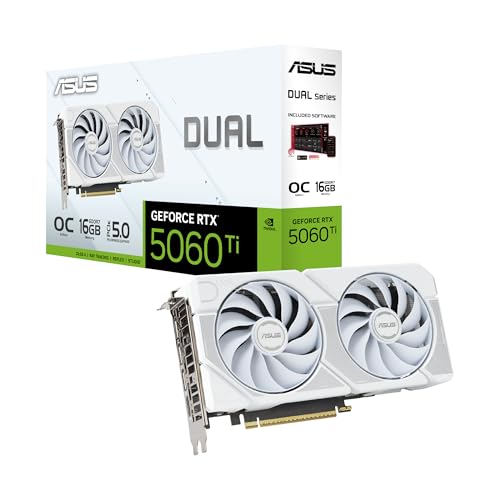

As an Amazon Associate we earn from qualifying purchases at no extra cost to you. Ratings are shown as listed on Amazon.
The graphics cards above are our recommended picks across resolutions and budgets, from efficient 1080p and 1440p options to high-end cards built for 4K, so you can target the tier that matches your monitor.
⚡ Save on Your Next PC — Amazon Prime
Prime members get fast free shipping on the systems above, plus early access to Prime Day & Black Friday PC deals. New members get a 30-day free trial.
Watch: How to Choose a Graphics Card (2026 Guide) — Video Review
Start With Your Resolution and Refresh Rate
The right GPU is defined by the monitor it feeds. For 1080p high-refresh gaming, a card like the ASUS RTX 5060 or RX 9060 XT delivers strong frame rates without overspending. For 1440p, the sweet spot of modern gaming, mid-range cards such as the RTX 5060 Ti, RTX 5070, or RX 9070 XT balance performance and price nicely. For 4K and very high refresh rates, you step up to powerful cards like the RTX 5070 Ti or RTX 5080. Decide your resolution and target frame rate first, then buy the tier that reaches it, everything else follows from that.
VRAM: How Much Video Memory You Need
VRAM (video memory) holds textures, frame buffers, and assets, and running out causes stutter and forced texture downgrades. For 1080p, 8GB is workable but increasingly tight in the newest titles. For 1440p, aim for 12GB or more for comfortable headroom, which is why cards like the 16GB RX 9060 XT and RX 9070 XT are appealing. For 4K, more VRAM matters even more as texture and buffer demands climb. Do not fixate on VRAM alone, but treat it as a floor, a card with too little memory for your resolution will age poorly no matter how fast its core is.
Understand Upscaling and Frame Generation
Modern GPUs lean heavily on AI upscaling (NVIDIA DLSS, AMD FSR) and frame generation to boost performance. These technologies render at a lower internal resolution and reconstruct a sharp image, or insert generated frames, to raise your effective frame rate. NVIDIA’s latest DLSS 4 features are a major reason RTX 50-series cards punch above their raw specs, while AMD’s FSR keeps improving on Radeon cards like the RX 9070 XT. Factor upscaling into your buying decision, a card that supports the newest features can deliver a much better experience than raw numbers suggest, especially at higher resolutions.
Physical Fit, Power, and Connectors
- Check the card’s length and slot width against your case, modern cards are often 2.5 slots and quite long.
- Confirm your power supply has enough wattage and the correct connectors for the card you choose.
- Ensure your case has adequate airflow, a starved GPU throttles and loses performance.
- Verify the display outputs (HDMI 2.1, DisplayPort 2.1) match what your monitor needs for its resolution and refresh rate.
Balancing GPU With the Rest of Your Build
A powerful graphics card needs a system that can keep up. Pair it with a CPU strong enough to avoid bottlenecks at your resolution, enough RAM for modern games, and a power supply with headroom. Spending your entire budget on the GPU while starving the rest of the build leads to inconsistent frame rates and stutter. Conversely, if your monitor is only 1080p, an ultra-high-end card like the RTX 5080 is largely wasted, that money is better spread across a balanced system or saved. Think of the GPU as the centerpiece of a coordinated whole, not an isolated purchase.
Tips
- Buy for the monitor you actually own, not a hypothetical future 4K display you may never get.
- Prioritize enough VRAM for your resolution, it is one of the biggest factors in how well a card ages.
- Factor in DLSS and FSR support, modern upscaling can meaningfully extend a card’s useful life.
- Measure your case clearance and check PSU connectors before ordering to avoid a frustrating return.
Frequently Asked Questions
What graphics card do I need for 1440p gaming?
A mid-range card such as the RTX 5060 Ti, RTX 5070, or RX 9070 XT hits the 1440p sweet spot, delivering high frame rates at good settings. Aim for at least 12GB of VRAM for comfortable headroom in modern titles.
How much VRAM is enough in 2026?
Treat 8GB as the minimum for 1080p, 12GB or more as ideal for 1440p, and even more for 4K. Running short on VRAM causes stutter and forces texture downgrades, so err on the side of more for longevity.
Is NVIDIA or AMD better for gaming?
Both are excellent. NVIDIA’s RTX cards lead in ray tracing and DLSS upscaling, while AMD’s Radeon cards like the RX 9070 XT often offer more VRAM and strong value. Choose based on the features, price, and performance tier that fit your needs.
Do I need a top-end card like the RTX 5080?
Only if you game at 4K or very high refresh rates and want maximum settings. For 1080p or 1440p, a mid-range card delivers a superb experience for far less, so match the card to your monitor rather than buying the most expensive option.
Conclusion
Choosing a graphics card is really about matching it to your monitor and your budget. Start with your resolution and refresh rate, make sure the card has enough VRAM to age well, factor in modern upscaling features, and confirm it fits and powers correctly in your system. Keep the rest of your build balanced so nothing bottlenecks the GPU. Follow that approach and you will land on a card that delivers exactly the performance you need, without paying for frames you will never see.