Key takeaways
- Radiator length: a 360mm AIO like the ARCTIC or CORSAIR models cools better than a 240mm because it has more surface area.
- Heat pipe count: more heat pipes on an air cooler, such as the six on the Peerless Assassin, move more heat.
- Fan speed (RPM): higher RPM cools more but adds noise; PWM fans adjust automatically to balance the two.
- Fan direction: make sure intake and exhaust fans are oriented so air flows through the case, not in circles.
What's inside
Heat is the quiet enemy of gaming performance. When your CPU or GPU gets too hot, it throttles, deliberately slowing down to protect itself, which shows up as stuttering frame rates and fan noise right when the action peaks. Good cooling keeps clocks high, components healthy, and your system quiet, making it one of the most impactful upgrades you can make.
This guide explains how PC cooling works, the difference between air and liquid coolers, how case airflow ties it all together, and how to keep temperatures low over the long haul. Whether you are building fresh or fixing a hot-running system, you will learn what actually moves heat out of your case.
As an Amazon Associate we earn from qualifying purchases at no extra cost to you.






⚡ Save on Your Next PC — Amazon Prime
Prime members get fast free shipping on the systems above, plus early access to Prime Day & Black Friday PC deals. New members get a 30-day free trial.
Watch: How to Cool Your Gaming PC (2026 Guide) — Video Review
Air Coolers vs Liquid Coolers
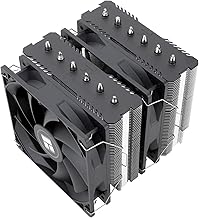
An air cooler uses heat pipes and a fan-cooled heatsink to pull heat off the CPU, and a good one goes a long way. Tower coolers like the Thermalright Peerless Assassin 120 SE and Cooler Master Hyper 212 PRO ARGB rival many liquid coolers for a fraction of the price. All-in-one (AIO) liquid coolers like the ARCTIC Liquid Freezer III Pro 360 or CORSAIR Nautilus 360 RS move heat to a radiator with fans, offering strong cooling and a cleaner look around the socket, especially for high-wattage CPUs.
Understanding Case Airflow
Even the best cooler struggles inside a stuffy case. Airflow is about creating a clear path: intake fans at the front and bottom pull cool air in, exhaust fans at the rear and top push hot air out. Aim for a slight positive pressure (a bit more intake than exhaust) to reduce dust buildup. A cooler dumps heat into the case, so the case must then move that heat outside, the two work as a system.
Radiator Size and Fan Configuration
- Radiator length: a 360mm AIO like the ARCTIC or CORSAIR models cools better than a 240mm because it has more surface area.
- Heat pipe count: more heat pipes on an air cooler, such as the six on the Peerless Assassin, move more heat.
- Fan speed (RPM): higher RPM cools more but adds noise; PWM fans adjust automatically to balance the two.
- Fan direction: make sure intake and exhaust fans are oriented so air flows through the case, not in circles.
Thermal Paste and Contact
The best cooler in the world underperforms if it does not make solid contact with the CPU. Apply a pea-sized dot of quality thermal paste, seat the cooler evenly, and tighten the mounting bracket in a crossing pattern so pressure is uniform. Thermal paste dries out over years, so reapplying it on an older system that has started running hot is a cheap way to reclaim lost cooling performance.
Keeping It Cool Over Time
Cooling degrades as dust accumulates on fans, filters, and radiator fins, choking airflow. Clean dust filters every month or two with compressed air, keep the PC off carpet where it inhales fibers, and set a sensible fan curve so fans ramp up under load rather than running loud constantly. A well-maintained cooler like the Thermalright Assassin X120 keeps temperatures stable for years with minimal effort.
Tips
- A quality air cooler is enough for most CPUs, save an AIO for high-wattage or overclocked chips.
- Set up front and bottom intake with rear and top exhaust for a clean airflow path.
- Clean dust filters regularly, clogged filters are the most common cause of rising temperatures.
- Use PWM fans with a custom fan curve to stay quiet at idle and cool under load.
Frequently Asked Questions
Is liquid cooling better than air cooling?
Not always. High-end air coolers match many AIOs on performance for less money and with no pump to fail. Liquid cooling shines for very hot CPUs and gives a cleaner look, but a good air cooler is enough for most builds.
How many case fans do I need?
Two or three well-placed fans handle most builds: one or two intake at the front and one exhaust at the rear. Add top exhaust if your case supports it and your components run warm.
How often should I reapply thermal paste?
Every three to five years is typical, or sooner if you notice temperatures creeping up on an older system. Fresh paste can meaningfully lower CPU temperatures on a machine that has started throttling.
Does dust really affect cooling that much?
Yes. Dust clogs fans, filters, and radiator fins, restricting airflow and driving temperatures up. Regular cleaning with compressed air is the single easiest way to keep a system running cool.
Conclusion
Effective PC cooling is a system, not a single part: a capable cooler, a clear case airflow path, solid thermal contact, and regular dust maintenance all work together. Choose a strong air cooler for most builds or a larger AIO for hot chips, set your fans up to move air through the case, and keep it clean. Do that and your PC stays fast, quiet, and stable for years.