Key takeaways
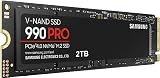
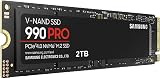
- Interface bandwidth: SATA III tops out around 550-560MB/s, while even entry-level PCIe 4.0 NVMe drives push 5,000MB/s and Gen5 models exceed 12,000MB/s.
- Latency and queue depth: NVMe uses the NVM Express protocol with deep parallel queues; SATA relies on the older AHCI stack, which adds overhead on random reads — exactly the workload open-world streaming generates.
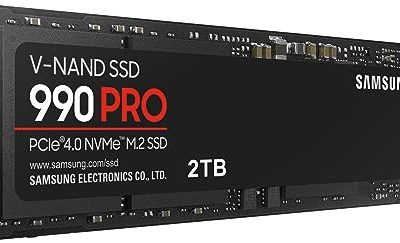
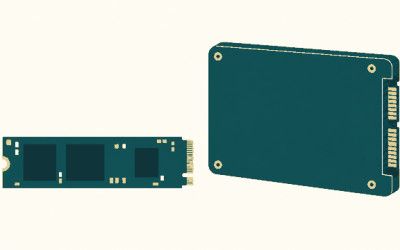
- Form factor: NVMe drives are gumstick-sized M.2 2280 modules that slot into the motherboard; SATA SSDs are 2.5″/7mm units needing a data cable, a power cable, and a bay or bracket.
- Cost per terabyte: SATA remains the cheaper route to bulk storage, and the gap widens as you climb toward 4TB.
- Thermals and power: Fast NVMe drives throttle without a heatsink and draw more power under load; SATA SSDs run cool and sip power, which matters in older laptops.
- Real-world load times: In DirectStorage titles, NVMe can halve level loads. In older games that are CPU- or shader-bound, the difference is often two or three seconds.
Storage has quietly become the most impactful upgrade in a gaming PC. GPUs and CPUs get the headlines, but a 2026 game library is measured in hundreds of gigabytes, patch sizes routinely run past 30GB, and streaming-heavy engines pull texture data off the drive continuously rather than loading it once at a menu screen. The two choices in front of you are NVMe, which talks directly to the CPU over PCIe lanes, and SATA, the mature 6Gb/s interface that has powered 2.5″ drives for over a decade.
The temptation is to declare NVMe the winner and move on, but that ignores how most people actually build. M.2 slots are finite, high-capacity NVMe drives still carry a premium, and plenty of gaming laptops and mid-tower builds have empty 2.5″ bays doing nothing. The right answer is usually about which drive holds which files — not which technology is theoretically faster.
Our top picks
 fanxiang S101 1TB SSD SATA SSD 1TB
- The fanxiang 1TB SSD 2.5 Inch SATA SSD…
- Compared to HDDs, the 1TB SATA SSD boots…
- The 2.5 SATA SSD 1TB incorporates 3D NAND…
 TEAMGROUP T-Force Vulcan Z 1TB SLC Cache
- [Gaming & PC Upgrade] Boost your PC with…
- [High-Speed SLC Cache] Features a built-in SLC Cache…
- [Universal Compatibility] Standard 2.5-inch 7mm slim design fits…
 Crucial BX500 1TB 3D NAND SATA 2.5-Inch
- Boot up faster
- 300% faster than a typical hard drive
- Improves battery life because it’s 45x more energy…
| Product | Key specs | |
|---|---|---|
| fanxiang S101 1TB SSD SATA SSD 1TB | The fanxiang 1TB SSD 2.5 Inch SATA SSD… Compared to HDDs, the 1TB SATA SSD boots… The 2.5 SATA SSD 1TB incorporates 3D NAND… | Check price |
| TEAMGROUP T-Force Vulcan Z 1TB SLC Cache | [Gaming & PC Upgrade] Boost your PC with… [High-Speed SLC Cache] Features a built-in SLC Cache… [Universal Compatibility] Standard 2.5-inch 7mm slim design fits… | Check price |
| Crucial BX500 1TB 3D NAND SATA 2.5-Inch | Boot up faster 300% faster than a typical hard drive Improves battery life because it’s 45x more energy… | Check price |
 KingSpec 1TB 2.5 SSD SATA III Internal KingSpec 1TB 2.5 SSD SATA III Internal | [ Fast and Extraordinary ]: KingSpec 2.5 SATAIII… [ High-Performance ]: KingSpec 2.5 SATA SSD has… [ More Reliable &More Stable ]:The 2.5" SATA… | Check price |
 Western Digital 1TB WD Blue SA510 SATA Western Digital 1TB WD Blue SA510 SATA | Storage Capacity: 1 TB Wireless LAN: No Drive Interface: SATA | Check price |
 Samsung SSD 870 EVO SATA III 2.5” Samsung SSD 870 EVO SATA III 2.5” | The latest 870 EVO has indisputable performance, reliability… Enjoy professional level SSD performance which maximizes the… Meet the demands of every task | Check price |
 PNY CS900 1TB 2.5" SATA III Internal PNY CS900 1TB 2.5" SATA III Internal | Upgrade your laptop or desktop computer and feel… Exceptional performance offering up to 535MB/s seq Superior performance as compared to traditional hard drives… | Check price |
 Fikwot FX815 1TB SSD Fikwot FX815 1TB SSD | 【Excellent Performance】Upgrade your laptop or desktop computer and… 【Multi-Scenario Use】The 7mm slim design of the Fikwot… 【3D NAND Flash】The Fikwot FX815 adopting 3D NAND… | Check price |
As an Amazon Associate we earn from qualifying purchases at no extra cost to you.
⚡ Save on Your Next PC — Amazon Prime
Prime members get fast free shipping on the systems above, plus early access to Prime Day & Black Friday PC deals. New members get a 30-day free trial.
Watch: NVMe vs SATA SSD: 2026 Speed Comparison — Video Review
Quick Verdict
Choose NVMe for your boot drive and the handful of titles you play most: it delivers the lowest latency, the fastest asset streaming, and full DirectStorage support. Choose SATA when you need affordable bulk capacity, are upgrading an older desktop or laptop that lacks a spare M.2 slot, or simply want to stop uninstalling games to make room. Most enthusiasts end up running both, and that combination is genuinely the best value per dollar in 2026.
Key Differences
- Interface bandwidth: SATA III tops out around 550-560MB/s, while even entry-level PCIe 4.0 NVMe drives push 5,000MB/s and Gen5 models exceed 12,000MB/s.
- Latency and queue depth: NVMe uses the NVM Express protocol with deep parallel queues; SATA relies on the older AHCI stack, which adds overhead on random reads — exactly the workload open-world streaming generates.
- Form factor: NVMe drives are gumstick-sized M.2 2280 modules that slot into the motherboard; SATA SSDs are 2.5″/7mm units needing a data cable, a power cable, and a bay or bracket.
- Cost per terabyte: SATA remains the cheaper route to bulk storage, and the gap widens as you climb toward 4TB.
- Thermals and power: Fast NVMe drives throttle without a heatsink and draw more power under load; SATA SSDs run cool and sip power, which matters in older laptops.
- Real-world load times: In DirectStorage titles, NVMe can halve level loads. In older games that are CPU- or shader-bound, the difference is often two or three seconds.
NVMe SSDs: The Speed Standard for Modern Gaming
An NVMe drive is the correct home for Windows, your launcher, and the games you actually have installed right now. Because it connects over four PCIe lanes straight to the CPU, it sidesteps the SATA controller entirely and handles thousands of small simultaneous reads without breaking stride. That is the exact pattern modern engines use when they stream terrain, textures, and shader caches on the fly, and it is why fast-travel in a large open world feels instant on NVMe and merely quick on SATA.
The practical caveat is diminishing returns. Going from a hard drive to any SSD is transformative; going from a good PCIe 4.0 drive to a Gen5 flagship is measurable in benchmarks but rarely noticeable while gaming. Unless you are also editing large video files or running local AI workloads, a solid Gen4 drive with a DRAM cache is the sweet spot, and the money saved is better spent on capacity.
SATA SSDs: The Smart Way to Grow Your Library
SATA earns its place through compatibility and cost. Any desktop built in the last fifteen years and most laptops with a 2.5″ bay will accept one, no BIOS gymnastics required. The Samsung 870 EVO remains the benchmark for endurance and firmware maturity, with the WD Blue SA510 close behind at up to 560MB/s. The Crucial BX500 is the reliable mainstream pick at 540MB/s, while the TEAMGROUP T-Force Vulcan Z pairs SLC caching with 3D NAND TLC for consistent 550/500MB/s figures. For pure capacity per dollar, the fanxiang S101 and the KingSpec 1TB SATA III both deliver the sequential speeds that matter for a secondary library drive.
The honest limitation is that every one of these drives saturates the same 6Gb/s ceiling, so shopping on advertised sequential speed is largely pointless — a 20MB/s spec difference is invisible in practice. What separates them is controller quality, cache behaviour under sustained writes, and warranty. For storing installed games you rotate through, any of them will load a level in a fraction of the time a mechanical drive needs.
Which Should You Buy?
- For a new gaming build: pick a 2TB NVMe boot drive, then add a 1TB SATA SSD like the Crucial BX500 or Vulcan Z for overflow.
- For an older desktop without M.2: pick SATA — the WD Blue SA510 or Samsung 870 EVO will transform boot and load times for far less than a motherboard swap.
- For a laptop upgrade: pick SATA if you have a 2.5″ bay; the low power draw and cool operation protect battery life.
- For competitive shooters and live-service titles: pick NVMe so you load into lobbies before your teammates.
- For the tightest budget per gigabyte: pick SATA — the fanxiang S101 or KingSpec 1TB gets you a full terabyte of flash for the least outlay.
Frequently Asked Questions
Will NVMe increase my frame rate?
Not directly. Frame rate is governed by your GPU and CPU. What NVMe improves is loading, fast travel, and texture pop-in in streaming-heavy open-world games, plus a noticeably snappier desktop.
Can I run NVMe and SATA drives together?
Yes, and it is the recommended setup. Just check your motherboard manual — on some boards, populating certain M.2 slots disables one or two SATA ports.
Is a SATA SSD still fast enough for 2026 games?
For the vast majority of titles, yes. Most games list a generic SSD requirement rather than an NVMe one, and a quality SATA drive stays comfortably within playable load times.
Do I need a heatsink?
SATA SSDs never need one. Gen4 and Gen5 NVMe drives do benefit from the motherboard’s M.2 heatsink to avoid thermal throttling during long installs or transfers.
Final Verdict
NVMe is the better technology and the right choice for your primary drive, but SATA is far from obsolete — it is the most cost-effective way to expand a gaming library and the only practical option for millions of existing systems. Run a fast NVMe boot drive alongside a dependable 1TB SATA SSD and you get flagship responsiveness where it counts, without paying flagship prices for storage you rarely touch.