Key takeaways
- Table of Contents 8 sections 7 min read 1 Best webcams under $100 at a glance 2 Best overall: Logitech C920s Pro HD 2.1 Why it remains a safe choice 2.2 Best use case 3 Best image detail and microphone…
What's inside
The best webcams under 100 in 2026 are the Logitech C920s for dependable 1080p video, the Anker PowerConf C200 for sharper detail and a wider view, and the Elgato Facecam Neo for creators who want simple streaming controls. Expect to spend roughly $40–$100. For most buyers, prioritize 1080p at 30 frames per second, reliable autofocus, a usable microphone, automatic exposure, and a mounting system that fits your monitor or tripod.
Best webcams under $100 at a glance
| Webcam | Typical price | Maximum video | Field of view | Focus | Microphone setup | Best for |
|---|---|---|---|---|---|---|
| Logitech C920s Pro HD | $60–$90 | 1920 × 1080 at 30 fps | 78 degrees | Autofocus | Dual stereo microphones | Meetings and general streaming |
| Anker PowerConf C200 | $45–$70 | 2560 × 1440 at 30 fps | Up to 95 degrees | Fixed focus | Four microphones | Wide desk shots and calls |
| Elgato Facecam Neo | $60–$80 | 1920 × 1080 at 30 fps | 77 degrees | Fixed focus | Built-in stereo microphones | Streaming and creator setups |
| Logitech C922 Pro Stream | $70–$100 | 1920 × 1080 at 30 fps | 78 degrees | Autofocus | Dual stereo microphones | Streaming with background removal |
| Logitech Brio 100 | $35–$55 | 1920 × 1080 at 30 fps | 58 degrees | Fixed focus | Mono microphone | Basic meetings on a budget |
Specifications can vary slightly by software mode, operating system, and regional model packaging. None of these webcams delivers true 4K video under normal sub-$100 pricing, and 60fps recording is uncommon in this category.
Best overall: Logitech C920s Pro HD
Why it remains a safe choice
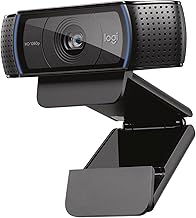
The Logitech C920s Pro HD is the easiest recommendation for a mixed-use setup. Its 1080p resolution is sufficient for Zoom, Microsoft Teams, Google Meet, Twitch, and YouTube, while autofocus keeps your face readable when you lean toward the camera or hold a product up to the lens. The 78-degree field of view frames one person naturally without showing too much of the room.
Its automatic low-light correction helps in an ordinary bedroom or office, although it cannot overcome a dark room. The dual microphones produce clear speech at close range and use noise reduction, but a dedicated USB microphone or headset will sound fuller and reject keyboard noise more effectively. A privacy shutter is included with the C920s, which is useful for a camera that remains attached to a monitor.
Best use case
Choose the C920s when you want consistent results without spending time adjusting camera software. It is especially practical for work meetings, online classes, casual streaming, and anyone who moves between laptops or desktops.
Best image detail and microphone pickup: Anker PowerConf C200
Sharper video with a wider perspective
The Anker PowerConf C200 stands out because it can capture 2K video at 30fps, giving text, facial details, and product demonstrations more definition than a typical 1080p webcam. Its selectable field of view reaches 95 degrees, so it works well when two people share a frame or when a streamer wants to show more of a desk. You can select a narrower view when the wide perspective makes your room look distorted.
Four built-in microphones use directional processing to focus on speech and reduce some background sound. They are convenient for meetings, though they still do not match a separate microphone for streaming. The camera uses fixed focus, so position it about 2–6 feet from your face and avoid placing important objects very close to the lens.
Low-light behavior
The C200 performs best with a lamp or window in front of you. Its higher resolution cannot replace lighting, and dim rooms can produce visible noise and softer detail. A small LED light aimed at a wall or placed behind your monitor usually improves the image more than upgrading from one affordable webcam to another.
Best for streaming: Elgato Facecam Neo
Creator-friendly controls
The Elgato Facecam Neo is designed around straightforward streaming and video-call workflows. It records at 1080p and 30fps, has a 77-degree field of view, and includes a physical privacy shutter. Fixed focus is not a disadvantage for a normal streaming position: place the camera at eye level, keep your face roughly an arm’s length away, and it will maintain a stable image without autofocus hunting.
Elgato’s Camera Hub software provides controls for exposure, white balance, field of view, and other image settings. That makes it more appealing than a basic plug-and-play webcam for users who want a repeatable look in OBS or other broadcast software. Its built-in stereo microphones are suitable for calls and quick streams, but serious creators should use a USB or XLR microphone.
The Facecam Neo is a strong choice when you value a clean, stable picture and software control over maximum resolution. It does not offer the 60fps motion that some gaming streamers prefer, but 1080p30 remains widely supported and uses less bandwidth.
Other worthwhile choices
Logitech C922 Pro Stream
The C922 Pro Stream is a refined alternative to the C920s. It supports 1080p at 30fps and 720p at up to 60fps, which can make fast hand movements look smoother at the lower resolution. It also supports software-based background removal and includes a tripod-ready mount. The feature is useful for streamers without a green screen, but background removal can create halos around hair and hands, particularly in poor lighting.
Its autofocus and dual microphones make it versatile, while its low-light correction is respectable for the price. Buy it when the price is close to the C920s and you specifically want 720p60 or streaming-oriented software features.
Logitech Brio 100
The Brio 100 is the economical option for meetings. It produces 1080p video, has a fixed-focus lens, includes automatic light correction, and uses a built-in mono microphone. Its 58-degree field of view is relatively narrow, which is helpful if you want to keep a cluttered room or shared workspace out of frame.
It is less suitable for product demonstrations, multi-person calls, or moving around during a stream because fixed focus and the narrow view limit flexibility. Still, for a laptop or desktop used mostly for work calls, it offers the essential features at a lower market price.
What to look for before buying
Image quality and low light
1080p is the practical minimum for a sharp-looking face on a modern monitor. Resolution alone is not the deciding factor: lens quality, exposure processing, and room lighting matter just as much. Put light in front of you, not directly behind you. A window behind your head commonly turns your face into a silhouette.
Autofocus versus fixed focus
Autofocus is valuable for demonstrations, presenters, and anyone who shifts position. Fixed focus can look steadier for a streamer who remains in one chair and eliminates focus hunting. Check the recommended working distance before choosing a fixed-focus model.
Microphones and streaming features
Built-in microphones are acceptable for meetings when the camera is close to your face. For gaming streams, background noise from a keyboard, controller, PC fan, or room echo makes a headset or dedicated microphone a worthwhile upgrade. Look for a privacy shutter, a tripod thread, USB compatibility, and software that allows exposure and white-balance adjustments.
FAQ
Are webcams under $100 good enough for streaming?
Yes, particularly for face-cam streaming at 1080p30. A Logitech C920s, Logitech C922, or Elgato Facecam Neo can produce a clear broadcast image when positioned at eye level with light on your face. Spend the remaining budget on lighting and audio before chasing a more expensive camera.
Is 2K better than 1080p for video meetings?
Not always. The Anker PowerConf C200 can provide extra detail at 2K, but meeting services may compress or scale the feed, and higher resolution uses more bandwidth. For most calls, a well-lit 1080p image looks better than a poorly lit 2K image.
Bottom line
Buy the Logitech C920s Pro HD for the best all-round balance of autofocus, dependable 1080p video, privacy protection, and microphone quality. Choose the Anker PowerConf C200 for 2K detail, a wide field of view, and multiple microphones. Pick the Elgato Facecam Neo if streaming software controls matter most, or the Logitech Brio 100 if you simply need an affordable meeting camera. Whichever model you choose, front-facing light and a separate microphone will make a larger practical difference than small specification upgrades.