Our Top Picks
Nobody plans to buy a webcam mount. You buy a camera, clip it to the top of your monitor, and discover that the resulting shot looks down your nose, catches the ceiling light, and shakes every time you type.
This guide covers the mounting hardware itself: the thread standard you need to know, the geometry of a flattering angle, and which style of stand suits which desk. Check the current listing for pricing, since it changes often.

30 Inch Webcam Stand Camera Mount, Upgraded Thick Base Flexible Gooseneck Camera Stand Desk Webcam Mount Clamp for Logitech Webcams C930e C930 C920 C922x C922 Brio 4K C925e C615, Gopro Hero 8 7 6 5 4
Chosen because it lists an explicit depth/thickness.
View on Amazon
InnoGear Webcam Stand Arm for Desk Camera Mount Holder for Logitech Webcam | for C922 C930e C920S C920 C615 C960 C920x BRIO 4K NexiGo N60, Heavy Base, Gooseneck, Max Height 20.9", Eye-level Framing
One of the home product options compared in this guide.
View on Amazon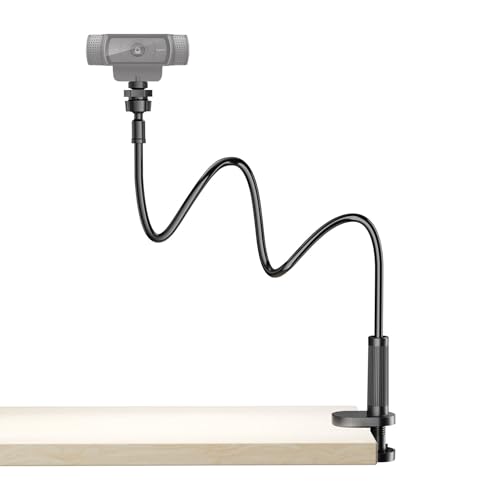
Flexible Webcam Stand Mount for Desk, Gooseneck Webcam Tripod with Clamp, Desktop Phone Holder & Table Top Tripod Compatible with Action Camera Gopro C922 C930e C920S C920 C615 C960 C920x Brio
One of the home product options compared in this guide.
View on Amazon
Ponlrie Webcam Stand for Desk, 28" Telescopic Tripod with Phone Holder, Desktop Webcam Mount Compatible with Logitech Webcam C922 C930e C920S C920 C615 C960 C920x BRIO 4K NexiGo N60, 1/4'' Thread
One of the home product options compared in this guide.
View on AmazonQuick Verdict
Almost every webcam and almost every stand share the same 1/4″-20 tripod thread, so compatibility is rarely the issue — reach, stability and clamp type are. Pick a gooseneck for flexibility on a cheap desk, an articulated boom arm for stability and repeatability, a floor tripod when the desk is out of the question, and a mini tripod when portability matters.
| Mount | Type | Reach | Best for |
|---|---|---|---|
| UURIG TP05 Mini Tripod | Desktop mini tripod | Short | Travel and laptop bags |
| Urciwos Webcam Stand | Gooseneck, clamp | 12.6 in | Cheapest usable upgrade |
| Flexible Gooseneck with Clamp | Gooseneck, clamp | Medium | Phone and webcam sharing one mount |
| NEEWER TP34 Phone Tripod | Flexible mini tripod | Short | Phone-as-webcam setups |
| 30 in Gooseneck Stand | Gooseneck, weighted base | 30 in | Desks with no clampable edge |
| InnoGear Boom Arm | Articulated arm, clamp | Medium | Webcam plus mic on one desk |
| InnoGear Webcam Stand Arm | Articulated arm, clamp | Medium | Repeatable, stable framing |
| SMALLRIG 22″ Magic Arm | Magic arm, C-clamp | 22 in | Overhead and heavier cameras |
| 80 in Floor Tripod | Floor tripod | 80 in | Standing shots, no desk space |
| NEEWER UA057 Magic Arm | Magic arm, desk C-clamp | 22 in | The most rigid option here |
How to Choose
The 1/4″-20 thread is the standard and nearly everything uses it
The threaded socket on the bottom of a webcam is almost always 1/4″-20 — a quarter-inch diameter, twenty threads per inch — which is the same standard used by camera tripods worldwide. It is also why a webcam will happily screw onto a photography tripod you already own.
Two things to watch. First, some clip-style webcams have the thread hidden inside the folding foot, so you need to unfold the clip fully before the socket is accessible. Adapters between the two cost very little, but check before you order.
Eye-line geometry is the whole point
The reason to mount a camera deliberately rather than clipping it to a monitor is angle. A camera positioned slightly above eye level, looking very slightly down, is the most universally flattering position: it shortens the appearance of the neck and produces a natural gaze when you look at the screen. A camera below eye level looking up is the least flattering angle in existence, which is why laptop webcams have a reputation they will never shake.
The second consideration is gaze alignment. The further the camera is from the part of the screen where the other person’s face appears, the more it looks like you are staring off to the side. Mounting a camera on a second monitor you never look at is a common and easily avoided mistake. Get the camera close to the top-centre of your primary display, at or just above eye height.
Gooseneck versus articulated arm
Goosenecks are flexible metal tubes: cheap, infinitely adjustable, and good at getting a camera into awkward positions. Their weakness is stability. A gooseneck stores energy, so a knock to the desk sets it wobbling for a second or two, and a longer gooseneck holding a heavier camera will slowly droop. They are also hard to return to exactly the same position after you move them.
Articulated arms use rigid segments with tightening joints. They cost slightly more, they hold position indefinitely, and they return to the same framing every time because the joints lock. If your framing matters and you set it once, an arm is the better instrument.
Clamp compatibility is where purchases go wrong
Most desk mounts use a C-clamp that grips the edge of the desk. Check three things before buying. The clamp’s jaw depth must exceed your desktop thickness — thick butcher-block and some standing desks defeat cheap clamps. The desk must have a clampable overhanging edge, which rules out desks with a full apron or a wall-mounted rear edge if you wanted to mount at the back. And the clamp must not sit where your chair arms or keyboard tray will collide with it.
If any of those fail, a weighted-base stand solves the problem outright.
Reach determines the shots you can get
Short mounts hold the camera near the desk edge. Long mounts let you place the camera over the desk, off to one side, or above a work surface for overhead shots. A 22-inch magic arm can reach out over a keyboard for top-down demonstrations.
Longer reach also means more leverage, so the further out the camera sits, the more the mount’s rigidity matters.
Cable management is not an afterthought
A USB cable hanging off a boom arm will slowly pull the camera out of alignment, and it will transmit every desk knock up into the frame. Most decent arms include cable clips; use them, and leave a small service loop of slack at the camera end so the weight of the cable hangs from the arm rather than from the camera’s mounting joint. This single habit prevents most of the mysterious slow drift people blame on cheap mounts.
Weight, reach, and mount type: the numbers that decide a good fit
Most mount problems come from the camera being heavier than the arm can hold, or the arm being too short for the shot. Use these thresholds before comparing models.
- Weight: a typical clip webcam is light, but a mirrorless camera or a webcam with a ring light attached can be several times heavier. Choose a mount whose listed capacity is at least 1.5 times your camera weight, and do not extend an arm to full reach with a load near its limit.
- Reach: 10 to 12 inches is enough to bring a camera just in front of a monitor. 20 to 25 inches is what you need to place a camera over a keyboard for top-down shots.
- Thread: 1/4-inch is standard on webcams. Magic arms often add 3/8-inch threads for heavier gear, and microphone arms use 5/8-inch.
- Clamp jaw: measure your desk thickness and compare it with the clamp opening. Many clamps handle desktops up to about 2 inches.
- Height: for a floor tripod, the camera should reach your eye level when you sit, which means about 40 to 50 inches from the floor for most people.
Which mount for which job
| Job | Best type | Cost tier | Watch out for |
|---|---|---|---|
| Calls and meetings | Short gooseneck or monitor-adjacent arm | Budget | Droop with heavier cameras |
| Streaming with a webcam | Articulated arm | Budget to mid-range | Clamp depth on thick desks |
| Overhead or desk demos | Magic arm or overhead mount | Mid-range | Leverage at full extension |
| Mirrorless camera as webcam | Heavy-duty magic arm or modular system | Mid-range to premium | Weight limit and thread size |
| Travel | Mini tripod | Budget | Height from a desk |
| Presenting standing up | Floor tripod | Budget to mid-range | Floor space and cable length |
Mistakes to avoid
- Buying on reach alone: a long arm that flexes under the camera makes shaky video.
- Ignoring the cable: USB cables pull cameras out of alignment, so clip them to the arm and leave slack at the camera end.
- Mounting off-center: aiming from a side monitor makes you look away from the screen.
- Skipping a safety check: tighten every joint, and test the arm with the camera attached before leaving it overhead.
- Choosing a stand without checking the webcam: some Brio-style webcams use a magnetic or proprietary base, so check compatibility.
The Picks in Detail
NEEWER 22″ Magic Arm with Desk C-Clamp (UA057)
The most rigid option here. Magic arms are built for camera work, which means they hold heavier loads at full extension without creeping, and the desk C-clamp gives a solid anchor. Twenty-two inches of reach is enough to position a camera overhead for a top-down shot of your hands, your desk or a keyboard. If you shoot anything other than a static head-and-shoulders frame, this is the versatile choice.
SMALLRIG 22″ Magic Arm Clamp
The same concept, slightly cheaper, from a brand that primarily serves camera rigs. Same 22-inch reach, same overhead capability. Between this and the NEEWER, buy on price and on which clamp geometry suits your desk edge.
InnoGear Webcam Stand Arm
Purpose-built for webcams, with tightening joints that hold position. This is the sweet spot for someone who wants a stable, repeatable head-and-shoulders framing and nothing more exotic. Set it once, forget it, and it will be in the same place next month.
InnoGear Boom Arm for Webcam and Microphone
Listed as compatible with both webcams and microphones including the Blue Yeti, which matters because a mic is far heavier than a webcam and an arm rated for one will comfortably hold the other.
30-inch Gooseneck Stand with Weighted Base
The answer when clamping is not possible. A thick weighted base sits on the desk surface and a 30-inch gooseneck gets the camera wherever you need it. It uses more desk area than a clamp mount and it is less rigid than an arm, but it works on desks where nothing else will, including glass tops and desks with a full apron.
80-inch Floor Tripod
Explicitly listed for Logitech’s C920x, C922x, C930e, MX Brio and Brio 501, which is simply confirmation that it uses the standard 1/4″-20 thread. Eighty inches of height means you can shoot standing, at a distance, or down at a table from above. Essential if you present on your feet; unnecessary if you never leave your chair.
Urciwos 12.6-inch Webcam Stand
The budget entry. It is not rigid and it is not long, but it is a genuine improvement over a monitor clip for the price of a sandwich.
UURIG TP05 Mini Tripod
It will not raise a camera to eye height from a desk, so pair it with a monitor riser or a stack of books, but it packs flat and it is the right thing to throw in a laptop bag for travel.
NEEWER TP34 Flexible Phone Tripod
A small flexible tripod that handles phones as well as cameras. Worth noting if you are using a phone as your webcam, since phone mounting is the single biggest practical headache of that approach and a purpose-built flexible tripod solves it cleanly.
Related guides: 1080p vs 4k webcam which is worth it, best webcam for low light rooms, best webcam microphone quality compared, best webcam under 50 on a budget, best webcam with autofocus under 100
Elgato Solid Arm: a modular option for heavier cameras
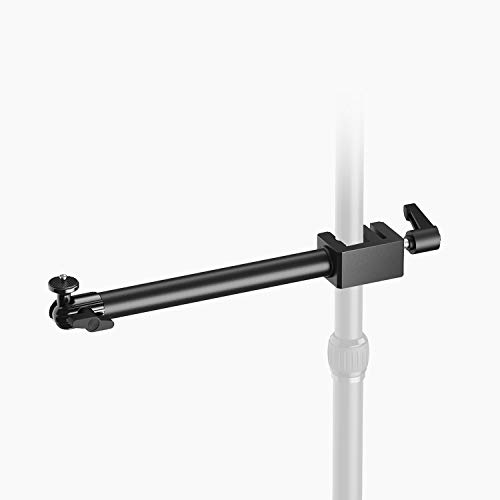
Elgato Solid Arm, Holding Arm with Padded Clamp | Clamps horizontally onto Master Mount, Ball head with 1/4-inch screw, Steel and hard composite build
One of the home product options compared in this guide.
View on AmazonThe Elgato Solid Arm is a holding arm with a padded clamp that attaches horizontally to a Master Mount, according to the listing, and ends in a ball head with a 1/4-inch screw. It belongs to a modular system, so it is not a stand-alone desk mount; you need the system’s other pieces to build a working setup. That matters for budget: you pay for flexibility.
The benefit is expandability. You can attach lights, microphones, and cameras to one frame, and rearrange them as your setup grows. The padded clamp avoids marking the desk edge and the ball head makes angle changes quick. It suits streamers who already own other items from the same brand or plan to add several accessories.
Drawbacks: it costs more than the single-purpose arms above, and the arm’s weight rating is not stated in the title. If you only need to hold a lightweight webcam, an articulated arm is simpler. Choose this when your setup is growing and you want everything to share one framework. Skip it if you want the cheapest solution or have no plan to add accessories.
K&F Concept 9.8-Inch Magic Arm Clamp Kit: a compact arm for tight desks

K&F CONCEPT 9.8" Magic Arm Clamp Kit with 1/4" & 3/8" Thread Screw | 360° Ball Heads Camera Mount for Monitor, Flash, LED Light, Microphone, Camera Cage, Action Camera, MS32
One of the home product options compared in this guide.
View on AmazonThe K&F Concept magic arm is a 9.8-inch clamp kit that includes 1/4-inch and 3/8-inch thread screws, per the listing. Compared with the 22-inch arms in the main list, it is much shorter, which gives it a big advantage in rigidity: less length means less leverage and less wobble under the same camera.
It is a good pick when your camera only needs to sit just above or beside the monitor, you have a small desk, or you want to hold a heavier camera such as a mirrorless body used as a webcam. The dual thread options make it adaptable to cameras, lights, and microphones.
The limit is reach. At under ten inches, you cannot position it over a keyboard for overhead shots, so pick one of the 22-inch arms for that. The maximum load is not stated in the product title, so check the listing before mounting an expensive camera. For a standard webcam, it is more than enough.
Boseen Suspension Scissor Arm: a spring-balanced stand for a clean desk

Boseen Webcam Stand Desk Mount - Suspension Boom Scissor Arm Webcam Holder with Desk Clamp Mount for Logitech Webcam C920 C922 C922x C920S C930e C930 C615 Brio 4K and Other Devices with 1/4" Thread
One of the home product options compared in this guide.
View on AmazonThe Boseen webcam stand is a suspension boom scissor arm with a desk clamp mount, listed as compatible with Logitech webcams such as the C920. The scissor design moves the camera in an arc and holds position through its tension, so you can swing the camera out of the way when you are not on a call and bring it back to the same place.
That swing-away behavior is the main reason to choose it over a gooseneck. You get a stable camera at roughly the same cost tier as the budget arms, and the arm folds toward the desk edge to save space. It works well in small apartments and shared desks.
The drawbacks are that scissor arms can squeak or loosen with time, the springs may need occasional adjusting, and the maximum weight is not stated in the product title. Use it with lightweight webcams only. If you use a heavier camera or a ring light, a magic arm is safer.
AceTaken Magnetic Stand for Logitech Brio: when a standard thread is missing

Brio Webcam Stand Holder, Magnetic Webcam Desktop Tripod Mount Compatible with Logitech Brio 101 100/Brio 301 300/Brio 501 500/Brio 4K 2022 2017 version/C270/C310 webcams
One of the home product options compared in this guide.
View on AmazonSome newer webcams do not have a standard tripod thread, so the usual mounting advice does not apply. The AceTaken stand is listed as a magnetic desktop tripod mount for the Logitech Brio line (including Brio 100 and 300 models). The magnet attaches to the webcam’s base, so you can pop the camera on and off.
The upside is simplicity: no tools, no thread, and quick relocation between a desk and a laptop. It is aimed at buyers whose camera would otherwise sit on a monitor top only. The downside is that it works only with the listed camera models, so it is not a general-purpose mount. Check your exact webcam model against the compatibility list.
Use it as a mini desktop solution, not a replacement for an arm: the height is limited, so elevate it on a riser if you want a flattering angle.
DImotliyor Overhead Camera Mount: a three-section arm for top-down shots
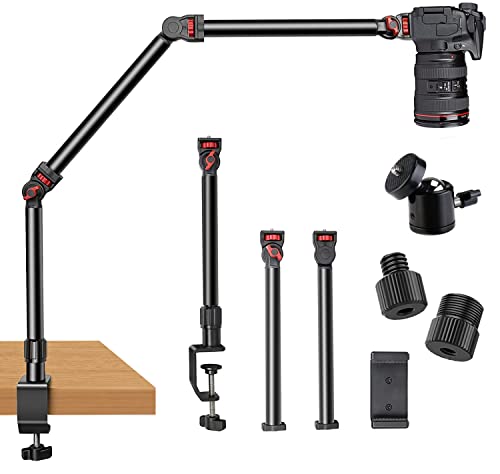
Overhead Camera Mount Desk Stand, 3-Section Detachable Articulating Arm | with 1/4“ 3/8" 5/8" Screw&360° Ball Head, C-clamp Tabletop Mount for DSLR Camera/Webcam/Microphone/Lights
One of the home product options compared in this guide.
View on AmazonThe DImotliyor overhead camera mount is a 3-section detachable articulating arm with 1/4-inch, 3/8-inch, and 5/8-inch screws and a 360-degree ball head, plus a C-clamp, per the listing. It is built for overhead desk shots such as craft demos, unboxing, or document presentations.
The three-section design lets you reach farther than a two-section magic arm, and the several thread sizes allow it to carry a webcam, a phone, or a small camera. It also folds down when you do not need the overhead view.
The catch is stability at full reach: the further the camera sits from the clamp, the more the arm can flex, so use light cameras at maximum extension. It is overkill for an ordinary head-and-shoulders call. It suits creators who film the desktop, not people who only want to hold a webcam near a monitor.
FAQ
Will any tripod work with my webcam?
Almost certainly, because webcams and tripods both standardise on the 1/4″-20 thread. The exceptions are webcams with no threaded socket at all — rare but they exist — and stands that use the 5/8″ microphone thread instead. Check that your camera has a visible threaded hole, sometimes hidden under the folding clip foot, and check the stand’s screw size in the listing.
Where should the camera actually sit?
At or slightly above eye level, centred on the display you look at most, and angled to look very slightly down at you. Avoid mounting it below your face, and avoid putting it on a secondary monitor you rarely look at, because your gaze will appear to wander off to the side for the whole call.
Is a gooseneck or an arm better?
An arm, if you can afford a small extra cost. Goosenecks are more flexible for awkward one-off positions but they wobble after a knock, they droop under weight over time, and they are hard to return to the same spot. Articulated arms lock and stay locked. For a fixed daily setup an arm is better; for occasional repositioning a gooseneck is fine.
Will a clamp mount work on my standing desk?
Check the desktop thickness against the clamp’s maximum jaw opening, which good listings publish. Thick tops and full-apron desks defeat many cheap clamps.
Do I need a mount if my webcam already clips to my monitor?
Not strictly, but the clip forces one position: the top bezel, aimed however the hinge allows. A mount lets you set the height, distance and angle independently, which is what actually makes the shot look considered rather than incidental. It also keeps the camera stable when you type, since monitor bezels transmit desk vibration directly.
Prices change frequently; check the current listing before ordering.
How much weight can a webcam mount hold?
It varies widely. Goosenecks are designed for webcams under about a pound, while magic arms and modular systems are made for several pounds. Always check the listing’s rating and keep a margin of at least one third below the limit at full reach.
Can I use a phone as a webcam on these mounts?
Yes, if the mount has a 1/4-inch thread and a phone holder or flexible grip. A phone is heavier than a webcam, so favor an articulated arm or a magic arm over a long gooseneck.
What height should a floor tripod be?
Choose one that reaches your seated eye level, typically 40 to 50 inches from the floor, so the camera is just above eye height with a slight downward tilt.
Do magnetic stands work with every webcam?
No. They are designed for specific models, so check the compatibility list before buying.