Key takeaways
- Interface and bandwidth: SATA III tops out around 550 MB/s. M.2 NVMe drives run over PCIe lanes — roughly 3,500 MB/s on Gen3, 7,000–7,450 MB/s on Gen4, and up to 14,700 MB/s on Gen5 parts like the Samsung 9100 PRO.
- Random performance: NVMe supports far deeper command queues, so it handles the thousands of small simultaneous reads that game engines and shader compilation generate. This, not sequential speed, is what you actually feel.
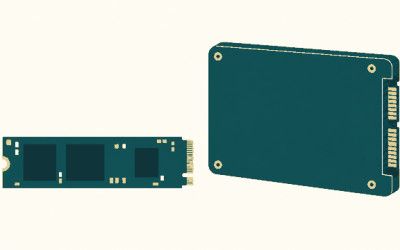
- Installation: M.2 drives screw straight into the board with no cables. SATA needs a data cable, a power lead from the PSU, and a mounting point in the case.
- Heat: SATA SSDs barely warm up. Gen4 drives run warm, and Gen5 drives genuinely need a heatsink or motherboard shroud to avoid throttling.
- System resources: Each M.2 slot consumes PCIe lanes, and on many boards populating a second or third slot disables SATA ports or drops a GPU slot to x8. SATA ports have no such trade-off.
- Cost per terabyte: SATA still edges out NVMe at high capacities, but the margin at 2TB is now small enough that value drives such as the Crucial P310 or Silicon Power Gen3x4 2TB undercut plenty of SATA options.
Storage is the one upgrade almost every PC gamer eventually confronts, and in 2026 the decision has narrowed to two practical options: an M.2 NVMe drive that slots directly onto the motherboard, or a 2.5-inch SATA SSD that connects with a data and power cable. Both are solid state, both are dramatically faster than the mechanical drives they replaced, and both will load your games without complaint. What separates them is bandwidth, heat, price per terabyte, and how much your particular build can actually take advantage of the difference.
The gap matters more now than it did a few years ago. DirectStorage is finally common in AAA releases, asset streaming has replaced long loading screens as the main storage bottleneck, and modern games routinely ship at 100–200GB. Meanwhile, PCIe 5.0 drives have pushed sequential speeds past 14,000 MB/s while SATA remains capped at the same 6Gb/s ceiling it has had since 2009. Here is how the two interfaces compare, and which one deserves your money.
Our top picks
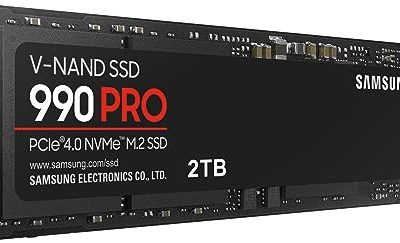
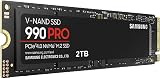
 Samsung SSD 990 PRO 2TB
Read and write speeds up to 7450/6900 MB/s suit demanding workloads
Over 55% random performance improvement is noted versus the 980 PRO
Up to 50% better performance per watt reduces power draw
PCIe 4.0 speeds depend on a compatible motherboard slot to reach full potential
2TB capacity may require a larger model for extensive game libraries
 WD_Black SN7100 2TB NVMe SSD
- This product has been replaced by our latest…
- OCTANE GAMING
- BUILT
 Samsung SSD 9100 PRO 2TB
- BREAKTHROUGH PCIe 5.0 PERFORMANCE: Supercharge your workflow and…
- EVERY TASK, TURBOCHARGED: Speed past productivity limits
- THINK FAST, CREATE FASTER: With random read/write speeds…
| Product | Key specs | |
|---|---|---|
| Samsung SSD 990 PRO 2TB | Check price | |
| WD_Black SN7100 2TB NVMe SSD | This product has been replaced by our latest… OCTANE GAMING BUILT | Check price |
| Samsung SSD 9100 PRO 2TB | BREAKTHROUGH PCIe 5.0 PERFORMANCE: Supercharge your workflow and… EVERY TASK, TURBOCHARGED: Speed past productivity limits THINK FAST, CREATE FASTER: With random read/write speeds… | Check price |
 Silicon Power 2TB NVMe M.2 PCIe Gen3x4 Silicon Power 2TB NVMe M.2 PCIe Gen3x4 | PCIe Gen 3x4 interface with read speeds up… TBW=1200 The warranty terms on all of its SSDs… | Check price |
 Crucial P310 M.2 2280 2TB PCI-Express 4.0 Crucial P310 M.2 2280 2TB PCI-Express 4.0 | M.2 2280 2TB PCI-Express 4.0 x4 NVMe | Check price |
 Samsung SSD 990 EVO Plus 2TB Samsung SSD 990 EVO Plus 2TB | The 990 EVO Plus features the latest NAND… Harness the full power of your drive with… Keep your cool as you work—or play—without worrying… | Check price |
 Acer Predator GM7 2TB SSD: M.2 2280 Acer Predator GM7 2TB SSD: M.2 2280 | PCIe 4.0 Gen4: The high-performance Predator GM7 delivers… HMB+SLC Cache: Predator GM7 supports HMB (Host Memory… Powerful controller and NAND Flash: Equipped with the… | Check price |
 Western Digital 2TB WD Green SN350 NVMe Western Digital 2TB WD Green SN350 NVMe | Fast NVMe performance for daily computing needs SSDs offer shock-resistance against accidental bumps and drops The slim M.2 2280 form factor is ideal… | Check price |
As an Amazon Associate we earn from qualifying purchases at no extra cost to you.
⚡ Save on Your Next PC — Amazon Prime
Prime members get fast free shipping on the systems above, plus early access to Prime Day & Black Friday PC deals. New members get a 30-day free trial.
Watch: M.2 vs SATA SSD: Which to Choose in 2026? — Video Review
Quick Verdict
Buy M.2 NVMe if you are building or upgrading a system from the last six or seven years — it is faster, cable-free, and the price premium over SATA has largely evaporated at the 1TB and 2TB tiers. A drive like the Samsung 990 PRO 2TB or WD_Black SN7100 2TB is the sensible default for a gaming boot drive. Choose SATA only when you have run out of M.2 slots, you are reviving an older machine, or you need cheap bulk capacity for a game library that does not need peak speed.
Key Differences
- Interface and bandwidth: SATA III tops out around 550 MB/s. M.2 NVMe drives run over PCIe lanes — roughly 3,500 MB/s on Gen3, 7,000–7,450 MB/s on Gen4, and up to 14,700 MB/s on Gen5 parts like the Samsung 9100 PRO.
- Random performance: NVMe supports far deeper command queues, so it handles the thousands of small simultaneous reads that game engines and shader compilation generate. This, not sequential speed, is what you actually feel.
- Installation: M.2 drives screw straight into the board with no cables. SATA needs a data cable, a power lead from the PSU, and a mounting point in the case.
- Heat: SATA SSDs barely warm up. Gen4 drives run warm, and Gen5 drives genuinely need a heatsink or motherboard shroud to avoid throttling.
- System resources: Each M.2 slot consumes PCIe lanes, and on many boards populating a second or third slot disables SATA ports or drops a GPU slot to x8. SATA ports have no such trade-off.
- Cost per terabyte: SATA still edges out NVMe at high capacities, but the margin at 2TB is now small enough that value drives such as the Crucial P310 or Silicon Power Gen3x4 2TB undercut plenty of SATA options.
M.2 NVMe SSDs
M.2 is a form factor; NVMe over PCIe is the protocol that makes it fast. For gaming, the practical benefit is not shaving two seconds off a loading screen — it is smoother texture streaming in open-world titles, faster shader cache builds, and near-instant fast travel in DirectStorage-enabled games. The Samsung 990 PRO 2TB remains the reference Gen4 choice thanks to strong sustained write behaviour and mature firmware, while the WD_Black SN7100 2TB is notably power-efficient, which makes it a strong fit for laptops and handhelds where thermals and battery life matter.
If you are on an AM5 or recent Intel platform with a spare Gen5 slot, the Samsung 9100 PRO 2TB is the halo option, though real-world gaming gains over a good Gen4 drive are modest and it demands proper cooling. Budget-minded builders are better served by the Crucial P310 2TB, which delivers around 7,100 MB/s reads for far less, or the Samsung 990 EVO Plus 2TB, a flexible drive that runs on Gen4 x4 or Gen5 x2 depending on the slot. On older Gen3 boards, the Silicon Power 2TB Gen3x4 is a cheap way to hit the interface ceiling.
SATA SSDs
SATA’s advantage is universality. Any desktop built in the last fifteen years has ports for it, most laptops with a 2.5-inch bay can take one, and it works in consoles, NAS boxes, and external enclosures without adapters or BIOS quirks. It also sidesteps every M.2 compatibility headache: no lane sharing, no key-type confusion, no drives that quietly disable a SATA controller when installed.
For gaming specifically, SATA is not slow — it is simply not fast. Load times on a SATA SSD versus an NVMe drive typically differ by a couple of seconds in most titles, and for older or less asset-heavy games the difference is negligible. Where SATA falls behind is DirectStorage-era streaming and any workload involving heavy random I/O. As a secondary library drive holding games you play but do not obsess over, it remains genuinely sensible.
Which Should You Buy?
- For a new gaming build: pick an M.2 Gen4 drive — the Samsung 990 PRO 2TB or Crucial P310 2TB as the value alternative.
- For a laptop or handheld: pick the WD_Black SN7100 2TB for its efficiency and low thermal output in cramped chassis.
- For a Gen5 flagship platform: pick the Samsung 9100 PRO 2TB, provided your board supplies a heatsink.
- For an older Gen3 system: pick the Silicon Power 2TB Gen3x4 or Samsung 990 EVO Plus 2TB, which stays useful after a future upgrade.
- For bulk library storage or a machine with no free M.2 slot: pick a 2.5-inch SATA SSD and spend the savings elsewhere.
Frequently Asked Questions
Will an M.2 SSD noticeably reduce game load times?
Compared with a hard drive, dramatically. Compared with a SATA SSD, expect a few seconds in most games and larger gains in DirectStorage titles and heavy open-world streaming.
Are all M.2 drives NVMe?
No. A small number of M.2 drives use the SATA protocol and are capped at 550 MB/s despite the identical form factor. Check the listing for “NVMe” and “PCIe” before buying.
Do I need a heatsink?
Gen3 and most Gen4 drives are fine with a motherboard shroud or bare. Gen5 drives such as the Samsung 9100 PRO should always be cooled to avoid thermal throttling under sustained load.
Can I use both types together?
Yes, and it is a common setup: an NVMe boot drive for the operating system and current games, plus a SATA SSD for the wider library. Just confirm your board does not disable SATA ports when M.2 slots are populated.
Final Verdict
M.2 NVMe is the correct default in 2026. It is faster in every measurable way, easier to install, and priced close enough to SATA that the old value argument no longer holds at mainstream capacities — the Samsung 990 PRO 2TB and Crucial P310 2TB cover the premium and budget ends respectively. SATA still earns a place as cheap secondary storage or a lifeline for systems without a free M.2 slot, but it should no longer be your primary gaming drive.