4K gaming used to mean choosing between resolution and refresh rate. In 2026, that trade-off has largely disappeared at the mid-range — but the shopping experience has gotten more confusing, not less. Panels marketed as “4K 160Hz” can hide dual-mode gimmicks, mediocre HDR implementations, or response times that smear in fast motion. Meanwhile, a genuinely excellent QHD monitor often delivers a better gaming experience than a compromised 4K one at the same price.
This guide cuts through the spec-sheet noise. We’ve focused on monitors that stay realistically under $500 at typical street pricing, prioritising panel quality, real-world motion clarity, and connectivity that won’t leave you buying adapters. Every pick here represents genuine value rather than a checkbox exercise — and where a model is worth stretching for, or worth skipping, we say so plainly.
Our top picks
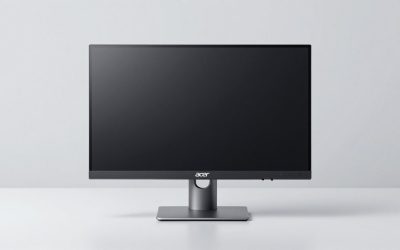
 Acer Nitro 27in 4K 3840x2160 IPS 160Hz
- Quality Visuals: The VG270K 27" IPS monitor with…
- AMD FreeSync Premium Technology: Say “goodbye” to stuttering…
- Quick Refresh Rate: Different content has different refresh…
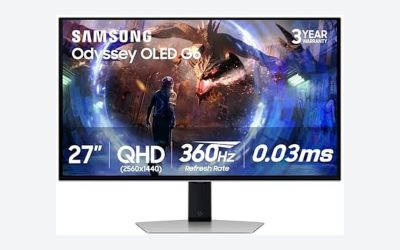
 Samsung 27" Odyssey G5
- QHD Resolution (2560 x 1440) has 1.7 times…
- HDR10 provides brighter highlights and nuanced shadow for…
- The 180Hz refresh rate minimizes lag for gameplay…
 Samsung 37” Odyssey G7
- Samsung’s 37” 4K UHD Odyssey G7 Curved Gaming…
- 37” 1000R curved display with 4K UHD resolution…
- VESA DisplayHDR 600 delivers more contrast, with deeper…
| Product | Key specs | |
|---|---|---|
| Acer Nitro 27in 4K 3840x2160 IPS 160Hz | Quality Visuals: The VG270K 27" IPS monitor with… AMD FreeSync Premium Technology: Say “goodbye” to stuttering… Quick Refresh Rate: Different content has different refresh… | Check price |
| Samsung 27" Odyssey G5 | QHD Resolution (2560 x 1440) has 1.7 times… HDR10 provides brighter highlights and nuanced shadow for… The 180Hz refresh rate minimizes lag for gameplay… | Check price |
| Samsung 37” Odyssey G7 | Samsung’s 37” 4K UHD Odyssey G7 Curved Gaming… 37” 1000R curved display with 4K UHD resolution… VESA DisplayHDR 600 delivers more contrast, with deeper… | Check price |
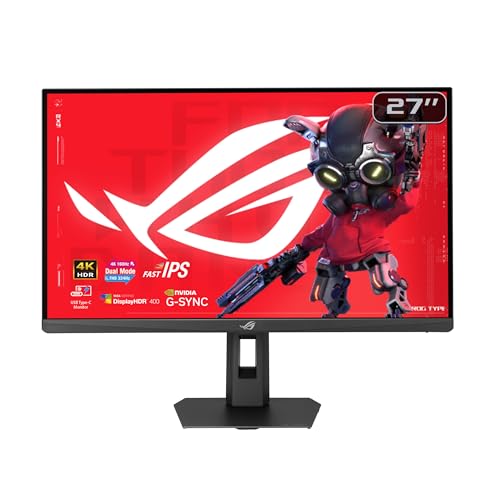 ASUS ROG XG27UCSR 27 Inch 4K 162Hz | Dual Mode Display Technology: 27-inch 4K (3840 x… Ultra-Fast Response Time: ASUS Fast IPS technology enables… Enhanced Visual Clarity: ASUS Smart Pixel technology enhances… | Check price |
 Dell 27 Monitor S2725QS | Improved ComfortView Plus: Reduces harmful blue light emissions… Refresh rate: A smooth, tear-free experience with AMD… Vivid colors: Immerse yourself in breathtaking 4K visuals… | Check price |
 ASUS TUF Gaming 27” 4K HDR Monitor | 27-inch 4K Ultra HD Display: Features 3840 x… ASUS Extreme Low Motion Blur Sync Technology: ELMB… Advanced Synchronization Technologies: NVIDIA G-SYNC Compatible, AMD FreeSync… | Check price |
 CRUA 32" 4K UHD 160Hz Curved Gaming | 4K Curved Monitor: This 32inch 4K UHD curved… Smooth High Refresh: Enjoy fluid visuals with a… Vivid Color & RGB: With 120% sRGB color… | Check price |
 CRUA 32" 4K UHD 160Hz Curved Gaming | 32inch 4K Curved Display: Enjoy breathtaking clarity and… 160Hz Refresh Rate + AMD FreeSync: Dominate every… 120% sRGB Color Accuracy & Built-in Speakers: Featuring… | Check price |
As an Amazon Associate we earn from qualifying purchases at no extra cost to you.
⚡ Save on Your Next PC — Amazon Prime
Prime members get fast free shipping on the systems above, plus early access to Prime Day & Black Friday PC deals. New members get a 30-day free trial.
Watch: Best 4K Monitor Under $500 — Video Review
How to Choose 4K Monitor Under $500
- Panel type: IPS is the default choice at this price for its colour accuracy and viewing angles. VA panels offer deeper blacks and suit curved ultrawide-style setups, but can show black smearing in dark, fast-moving scenes.
- Refresh rate vs. your GPU: A 160Hz 4K panel is wasted if your graphics card manages 60fps at native resolution. Be honest about your hardware — a 120Hz panel paired with a mid-tier GPU is often the smarter spend.
- Dual-mode and DFR features: Some monitors let you drop to 1080p for a higher refresh ceiling. It’s a genuinely useful feature for competitive titles, but check the advertised headline number isn’t only achievable in that reduced mode.
- Connectivity: DisplayPort 1.4 with DSC is the minimum for 4K at high refresh rates. USB-C with power delivery is a significant convenience win for laptop users and worth prioritising if you dock regularly.
- HDR expectations: DisplayHDR 400 is effectively a brightness label, not a transformative feature. Judge these monitors on their SDR performance and treat any HDR capability as a bonus rather than a selling point.
The Best Picks Reviewed
Acer Nitro VG270K V4
The strongest all-round value pick here, pairing a 27-inch 4K IPS panel with a native 160Hz refresh rate and a dual-frame-rate mode that pushes to 320Hz at reduced resolution. Colour accuracy out of the box is respectable, and while the stand is basic, the panel itself punches well above its price bracket.
ASUS ROG XG27UCSR
The most complete package if your budget reaches the top of the range, with 162Hz, genuine G-SYNC compatibility, and USB-C connectivity that makes it a legitimate laptop dock as well as a gaming display. Motion handling is the best on this list, though you’re paying a modest premium for the ROG name.
ASUS TUF Gaming VG27UQ1A
A more affordable route to 160Hz 4K, with 95% DCI-P3 coverage that makes it a credible option for content work alongside gaming. Extreme Low Motion Blur Sync helps in fast shooters, and the three-year warranty is reassuring at this price point.
Dell S2725QS
The sensible choice for anyone whose GPU won’t consistently exceed 120fps at 4K, offering excellent factory calibration and a genuinely good ergonomic stand — an area where cheaper gaming monitors routinely cut corners. It’s less exciting on paper, but it’s the one we’d recommend for mixed work-and-play use.
Samsung Odyssey G7 (G75F) 37″
A large curved 4K panel that transforms immersive single-player gaming, though it typically sits at or slightly above the $500 ceiling depending on promotions — worth watching for a sale rather than paying full price. The 37-inch size demands a deep desk, so measure before committing.
Frequently Asked Questions
Is 4K worth it under $500, or should I buy QHD instead?
If your GPU is mid-range or older, a high-quality QHD monitor like the Samsung Odyssey G5 (G51F) will give you a smoother, more consistent experience for less money. 4K makes most sense if you play visually rich single-player titles or use the display for productivity as well as gaming.
Do I need HDMI 2.1 or is DisplayPort enough?
For PC gaming, DisplayPort 1.4 with DSC handles 4K at 160Hz comfortably. HDMI 2.1 matters primarily if you’re also connecting a PlayStation 5 or Xbox Series X and want 4K120 from those consoles.
How much does the refresh rate actually matter at 4K?
Considerably, but only if you can drive it. Above roughly 120Hz the returns diminish for most players outside competitive shooters, so a 120Hz panel with better colour and build quality is frequently the better buy over a 160Hz one with compromises elsewhere.
Will these monitors work well with a gaming laptop?
Yes, though USB-C models like the ASUS ROG XG27UCSR simplify things considerably by carrying video, data, and power over a single cable. Check your laptop’s USB-C port supports DisplayPort Alt Mode before relying on it.
Final Thoughts
For most buyers, the Acer Nitro VG270K V4 is the clear value winner — it delivers the core 4K high-refresh experience without the premium attached to bigger brands. Those with more capable hardware and a slightly higher budget should look at the ASUS ROG XG27UCSR for its superior motion handling and USB-C convenience, while the Dell S2725QS remains the most sensible pick for anyone splitting time between gaming and desk work.